3. OPERATINGTHEHOOD
SOFTTOUCHCONTROLS
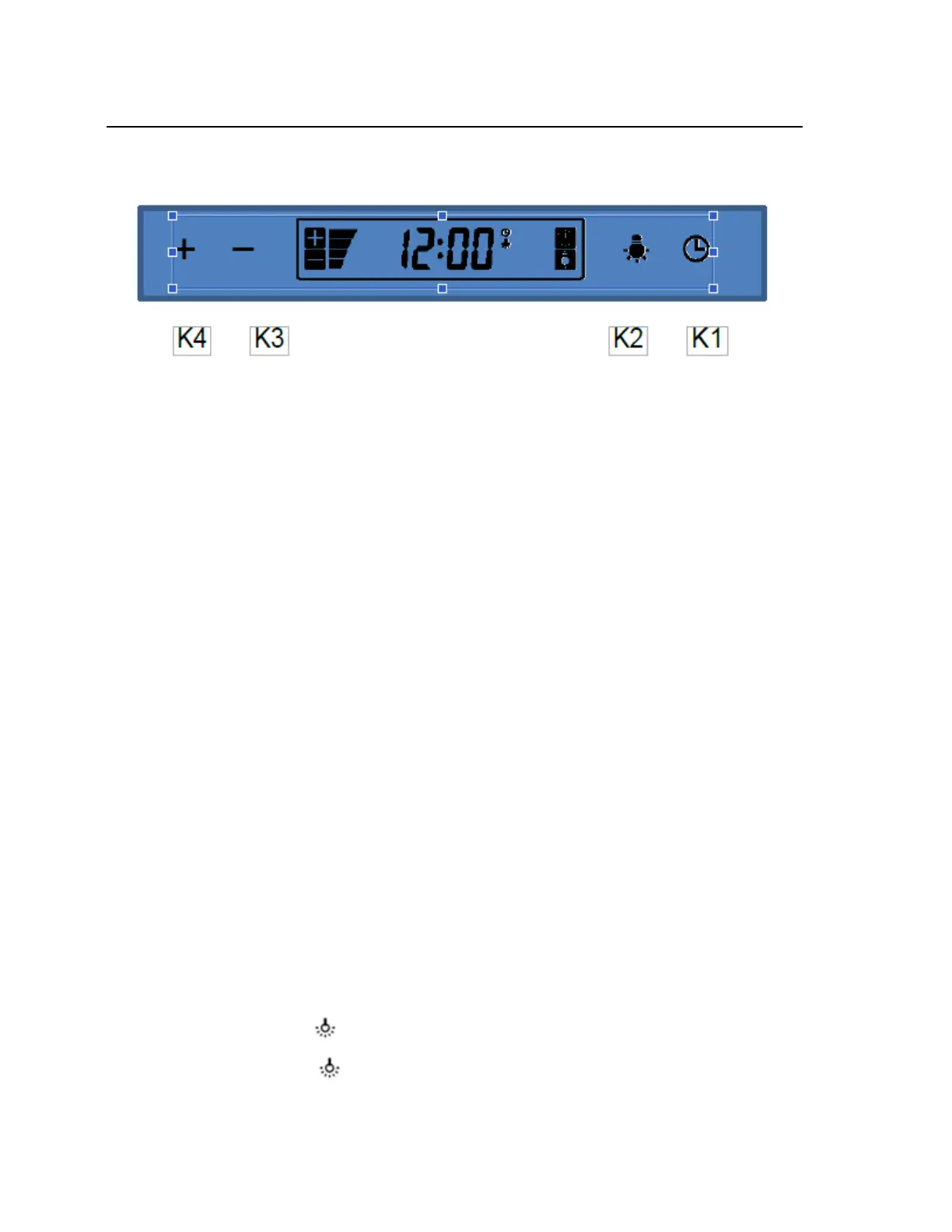
TIMER/POWERBUTTON(K1)
Presstimer/Powerbutton(K1)oncetoturnonthesystem.
Presstheplus“+”button(K4)toactivatethehood,pressthetimerbutton(K1)againandstart
power‐offdelaytimer.Usetheplus“+”button(K4)andtheminus“‐“button(K3)tosetdelay
timer
period(1to10minutes).Oncethesettimeisterminated,thehoodwill shutitselfoff.If
youneedtostopitbeforetimeelapses,simplypresstimer(K1)again.
BLOWERSPEEDINDICATOR(K3&K4)
The plus “+” button (K4) turns the blower on to three (3) speeds settings: lowest to strongest.The
minus“‐“button(K3)goesfromstrongesttothelowest.Presstheclock/timer(K1)oncetoturnthe
LCDscreenonandusetheminus“‐“button(K3)todecreaseandthe
plus“+”button(K4)toincreasethe
speeduntildesiredspeedisattained.
Lowspeed:usedforlightfrying/lowcooking.
Mediumspeed:usedforfrying/wokcooking/boiling.
Highspeed:usedforheavyboiling/grilling/intensivefrying/ wokcooking.
ADJUSTINGTHETIMERSETTING
Thisbuttonisused toset time and time is displayed in a24‐hour cycle. To settimer, pressthe timer
button (K1) for four (4) seconds.The first two digits will flash.Use the minus “–“ button (K3) to
decreaseandtheplus“+”button(K4)toincrease.Press
thetime/delaybutton(K1)again;thelasttwo
digitswillflash.Usetheminus“–“button(K3)todecreaseandtheplus“+”button(K4)toincrease.
Pressthetime/delaybutton(K1)againtoconfirmandexitthetimesettingmodeor
waitfive(5)seconds
anditwillautomaticallyexit.
ADJUSTINGTHELIGHT
Press the Light button (K2)oncetoturnthelightsonandonceagaintoturnthelightsoff.
11


 To Next Page