10
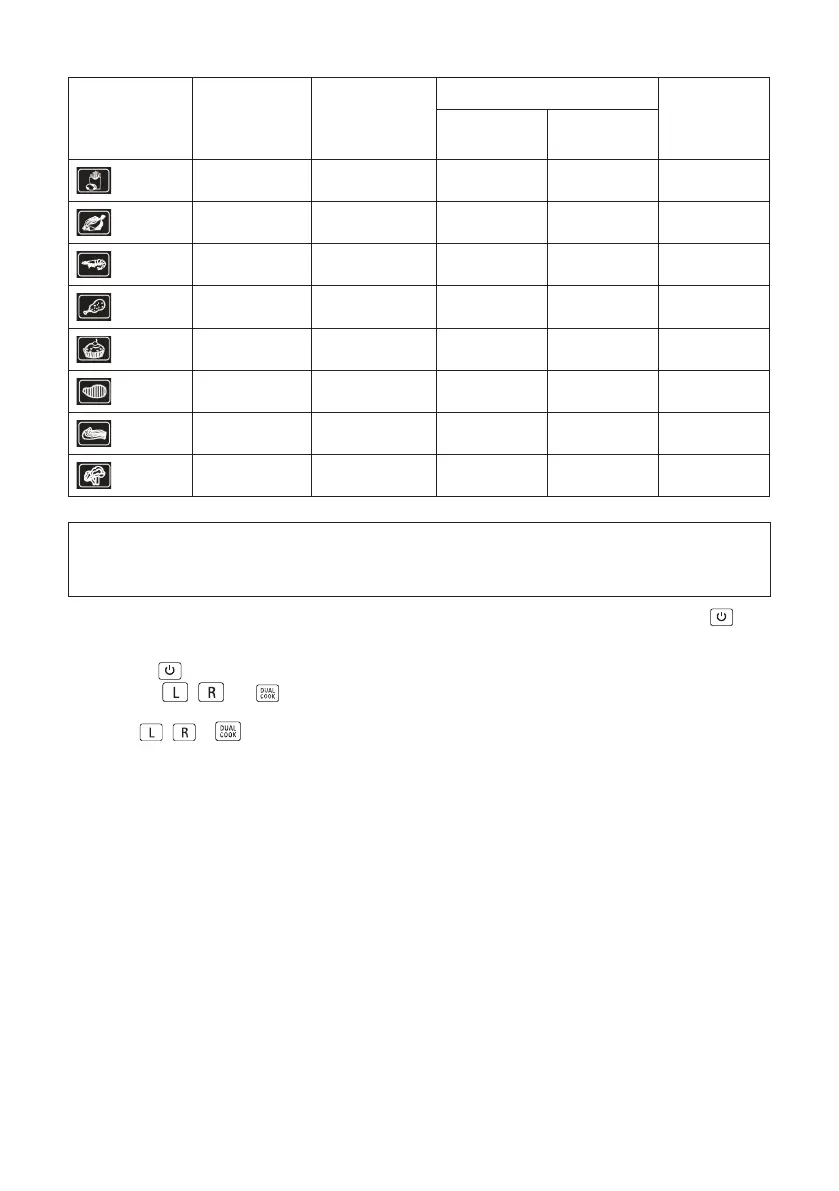
Symbol Programme Temperature°C Cooking time Shake
Single Basket
Min
Dual Basket
Min
Fries 200 25 30 yes
Fish
180 10
15 yes
Seafoods 180 10 15 yes
Poultry 200 25 30 yes
Baking 150 25 30 no
Steak 200 8 10 yes
Pork 200 15 20 yes
Vegetable 140 10 15 yes
NOTE: Cooking times and Temperatures will vary depending on the food you wish to cook
and the individual’s personal preference. Cooking times and Temperatures stated in this
Instruction Manual should only be used as a guide.
1. Plug cord in the wall outlet. An audible tone will sound, the control panel will illuminate. The
buon will light up red.
2. When the
is pressed, a tone will sound and the power buon will turn green, the control panel will
illuminate
,
and
3. Select
,
or . Press the desired MENU buon. A tone will sound.
The LEFT or RIGHT basket control and both the default TEMP and default TIME will flash on the display
and alternate between time and temperature.
Default Cooking Preset: The default cooking temperature of 180° C and a default cooking time of
15 minutes. During the cooking process, pressing the Power Buon will turn the appliance o. The
Control Panel’s lights will turn o and the fan will continue running for 20 seconds to cool down the
appliance.



 To Next Page