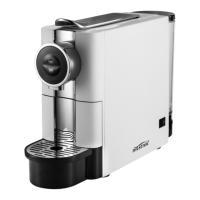
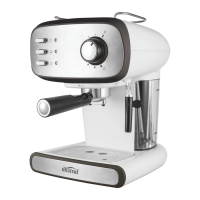
This document is an instruction manual for the Mistral Espresso Coffee Machine, Model MEM815. It covers important safeguards, features, usage instructions, troubleshooting, and maintenance.
Function Description:
The Mistral Espresso Coffee Machine is designed for domestic use to prepare espresso coffee and cappuccino. It features a pump-driven system to extract coffee and a steam wand for frothing milk. The machine allows users to make one or two cups of coffee at a time and includes a pre-heating function to ensure optimal coffee temperature and flavor. It also has an automatic power-off function for safety and energy saving, and a keep-warm function for coffee cups.
Important Technical Specifications:
- Model: MEM815
- Supply Voltage: 220-240V~ 50Hz
- Power Consumption: 850W
- Protection Class: I
- Water Tank Capacity: 1.2L
Usage Features:
The coffee machine includes a control panel with distinct buttons and indicators for ease of use:
- Steam Button (A): Activates the steam function.
- Coffee Button (B): Initiates coffee brewing.
- On/Off Button (C): Powers the machine on or off.
- Steam Indicator (D): Lights up green when the steam temperature is reached.
- Coffee Indicator (E): Lights up green when the coffee temperature is reached.
- Power Indicator (F): Lights up red when the power button is pressed.
Key components for operation include:
- Steam Control Knob (2): Regulates steam output.
- Filter (3): Holds ground coffee.
- Steam Wand (4): Used for frothing milk.
- Coffee Filter Holder (5): Secures the filter in place.
- Measuring Spoon/Tamper (6): For measuring coffee and tamping it down.
- Water Tank (7): Holds water for brewing and steaming.
- Drip Tray Plate (8) and Drip Tray (9): Collects excess liquid.
Pre-heating: Before making coffee, it is recommended to preheat the machine, coffee filter holder, and cups to ensure the best flavor and temperature. This involves filling the water tank, inserting the empty coffee filter holder, pressing the On/Off button, then the Coffee Button to allow hot water to flow through for about 20 seconds, and finally pressing the Coffee Button again to stop the flow. The Coffee Indicator Light (E) will turn green when the machine is heated.
Making Espresso Coffee:
- Remove the Coffee Filter Holder (5).
- Add ground coffee powder to the Coffee Filter (3) using the Measuring Spoon (6). Fill half-way for one small cup or full for two cups.
- Press the ground coffee powder tightly with the Tamper (6).
- Set the Coffee Filter (3) and Coffee Filter Holder (5) under the dock and turn anti-clockwise until fixed tight.
- Ensure the Steam Control Knob (2) is at '0' and the Steam Button is not pressed.
- Place hot cups on the Drip Tray Plate (8).
- Once the Coffee Indicator Light (E) illuminates green, press the Coffee Button (B) to start coffee flow.
- Press the Coffee Button (B) again to stop when the desired coffee is obtained or its color changes.
- After use, press the On/Off Button (C) to turn off the machine.
Making Cappuccino Coffee:
- Prepare espresso coffee as detailed above, using a cup large enough for both coffee and frothed milk.
- Ensure the Steam Control Knob (2) is at '0'.
- Press the Steam Button (A) until the Steam Indicator light (D) illuminates green.
- Fill a jug with about 100 ml of full cream milk (refrigerator temperature) per cappuccino.
- To improve milk foam performance, open the Steam Control Knob (2) for approximately 15 seconds without milk to clear cold water, then return it to '0'.
- Insert the Steam Wand (4) into the milk (about 2 cm deep), then slowly turn the Steam Control Knob (2) anti-clockwise. Steam will emerge, and frothed milk will be produced by moving the jug in a circular motion.
- Once frothing is complete (milk temperature around 70°C), turn the Steam Control Knob (2) back to '0'.
- Clean the steam tube by placing an empty jug under the Steam Wand (4), turning on the Steam Control Knob (2), and pressing the Coffee Button (B) to allow hot water to flow for about 30 seconds, then turning it off.
- Pour the frothed milk into the prepared espresso, sweeten if desired, and sprinkle with cocoa powder.
- Press and release the On/Off Button (C) to switch off the machine.
Automatic Power 'Off' Function: The coffee machine will automatically turn itself off 25 minutes after the On/Off button is pressed.
Keep Warm Function: The top warm plate can be used to keep coffee cups warm momentarily.
Troubleshooting:
- Water leaking from the bottom: Too much water in the drip tray. Solution: Clean out the drip tray.
- Water leaking from the outer side of the filter: Ground coffee on the edge of the filter. Solution: Clean it off.
- Tainted taste to the coffee: Water sitting too long, improper cleaning. Solution: Clean and de-scale.
- Low or no steam from the steam wand: Steam wand is clogged up. Solution: Clean and de-scale.
- Poor milk frothing: Using skimmed milk. Solution: Full cream milk is best.
Maintenance Features:
Care and Cleaning:
- Always switch off and unplug the appliance before cleaning.
- Empty any water by turning on the steam function for 2-3 minutes or until steam no longer comes from the nozzle.
- Allow the machine to cool down completely.
- Clean the housing with a damp cloth.
- Wash the drip tray and removable drip tray plate regularly.
- Never immerse the housing in water.
- Immediately remove and wash the plastic funnel over the steam nozzle in warm soapy water, then dry thoroughly.
- Clean the metal tube with a damp cloth, dry, and replace the plastic funnel.
- Wash the measuring spoon with tamper in warm soapy water and dry thoroughly.
- Clean the appliance after every use to keep it in good working order.
- Do not allow water to sit in the tank; empty it after every use.
De-scaling:
De-scaling is necessary to remove calcium and mineral deposits that can damage the machine and block the steam tube. It is recommended every 4 weeks (or 2 weeks in hard water areas), using bottled or filtered water is preferred. Do not use vinegar; use a commercially available decalcification agent and follow its instructions.
- Fill the Water Tank (7) with water and de-scaler to the 'MAX' level.
- Follow the 'Pre-heating' steps: turn on the unit, press the Coffee Button (B), allow water to flow, then shut off the pump and wait for heating.
- When the Coffee Indicator light (E) illuminates green, press the Coffee Button (B) to allow water to flow through, then shut off the pump and wait 5 seconds.
- Press the Steam Button (A) and wait until the green Steam Indicator light (D) illuminates. Make steam for 2 minutes, then turn the Steam Control Knob (2) to '0'.
- Press the On/Off Button (C) to turn off the unit immediately and leave the de-scaler in the unit for at least 15 minutes.
- Empty the tank and refill with clean water.
- Restart the unit and repeat the above steps at least 3 times with clean water.


 To Next Page
 General