21
If connect Wi-Fi failure, please try to reset WIFI module and connect it again.
Reset methods
There are three methods to reset the WIFI module:
A.
B.
C.
•
Note
•
•
•
Paring Process
•
Press the “FAN” button on the control panel 6 times within 4 seconds;
Hold the “ON/OFF” button on the control panel about 5 seconds;
Hold the “Mode” button on the control panel about 3 seconds.
Please wait about 10 seconds, until the LED screen show “CF”, and connect it again.
Every time the Wi-Fi is resetted, wait about 10 seconds.
Before the screen will display “CF” or “AP” 5 times.
There will be switch between “CF” and “AP” mode if reset the WIFI module.
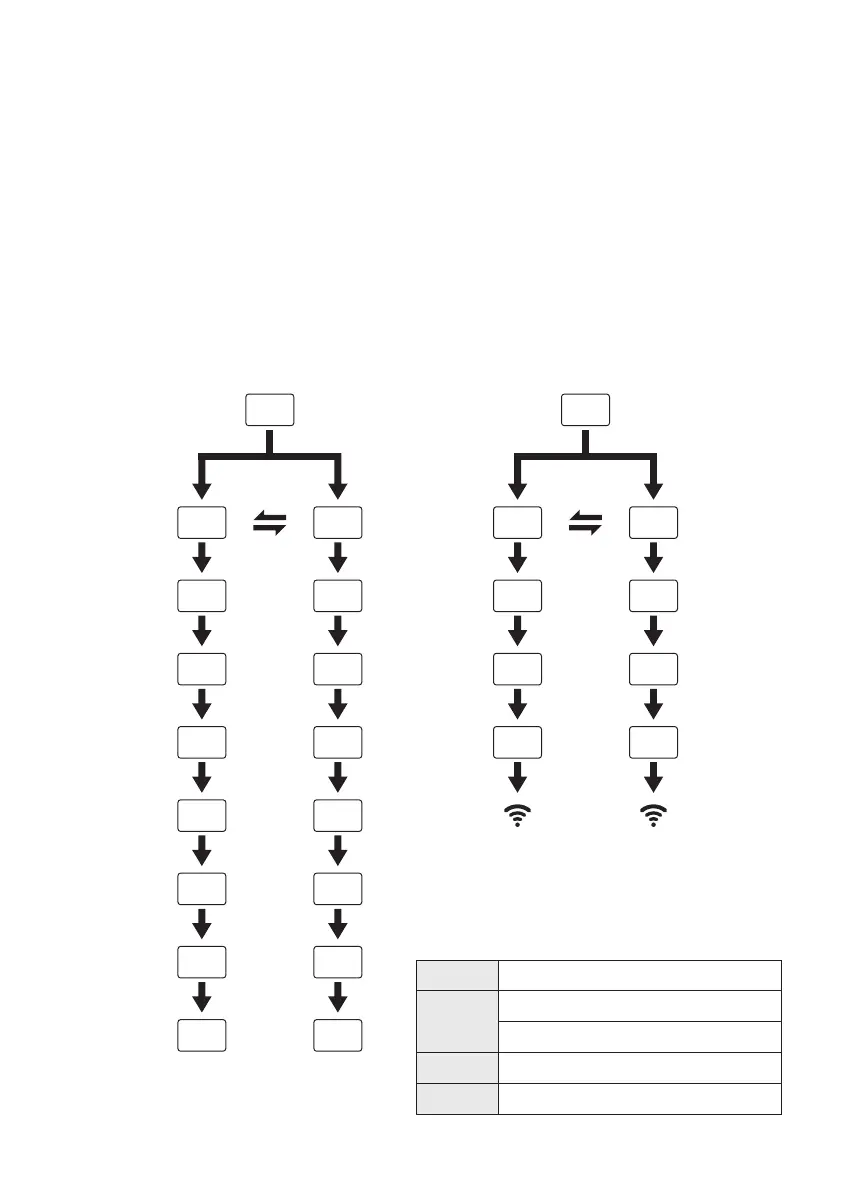
CF
AP
PP
Waiting pair after reset
Searching and try to connect
SA
Connect successful
Hot-spot connect mode
Access to the Internet
CF
--
--
PP
--
SA
--
--
AP
CF
--
PP
--
SA
--
--
AP
CF/EZ Mode
RESET
START
PAIRING
AP Mode
PAIRED
LED NEXT TO
WIFI LIGHTS UP
UNIT STANDBY
CF
pp
sa
ap
CF
pp
sa
ap
CF/EZ Mode
RESET
START
PAIRING
AP Mode
UNIT STANDBY
PAIRED
LED NEXT TO
WIFI LIGHTS UP


 To Next Page