6 7
ADVICE
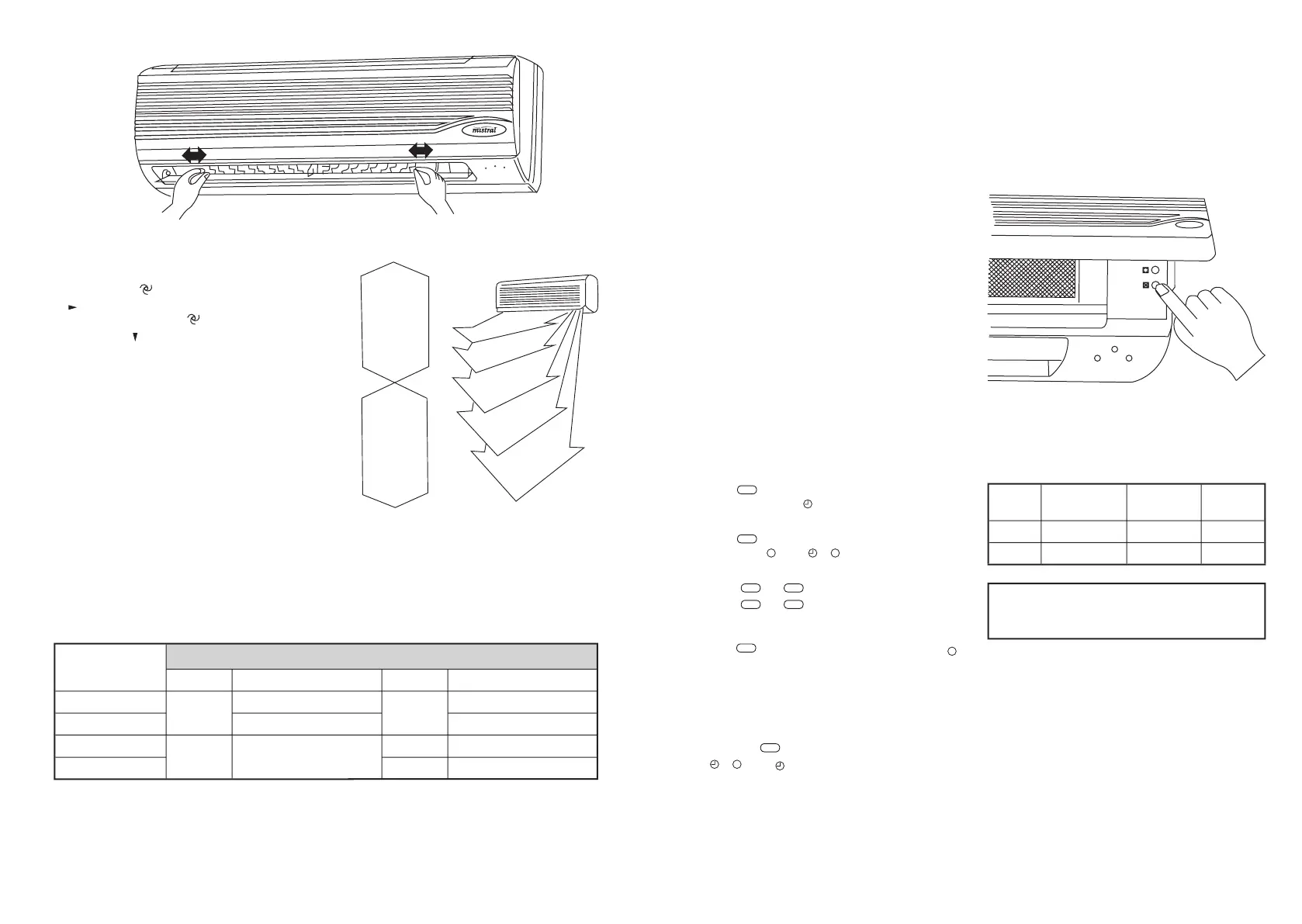
• In DRY or COOL mode, ensure the Fan
speed is set to
(auto), air blows downward
in
direction (1). In HEAT mode, ensure
the Fan speed is set to
(auto), air blows
downward in
(4).
•
Control the air direction with remote
controller to adjust up/down air ow
direction. Avoid turning deector with your
hand to avoid injury.
6. Operation mode adjustment
•
When the cool option has been selected
no HEAT will be produced.
1
AUTO mode
When started, the unit will automatcially select
COOL or DRY or HEAT mode according to the
room temperature, if operation is stopped for
two hours, the unit will restart in the same
mode set when the unit is stopped. Once
operation mode is set, it will not be inuenced
even if room temperature has changed. Press
MANUAL SWING button or SWING button to
change up/down air ow direction.
Per Room
Temperature (RT)
Cooling only type Heat pump type
Mode
Per Setting Temperature
Mode
Per Setting Temperature
above 26˚C
Cool
24˚C
Cool
24˚C
25-26˚C
RT-2
RT-2
23-25˚C
Dry
RT-2
Dry
RT-2
below 23˚C
Heat
26˚C
Fig.1
COOL
mode
DRY
mode
HEAT
mode
(1)
(2)
(3)
(4)
(5)
Fig.2
2
COOL mode
Press MANUAL SWING button or SWING
button to change up/down air ow direction.
Press FAN SPEED button to change the fan
speed of indoor unit. Press TEMPERATURE
ADJUSTMENT button to change the
temperature setting.
3
DRY mode
Press MANUAL SWING button or swing
button to change up/down air ow direction.
Press FAN SPEED button to change the fan
speed of indoor unit.
4
FAN mode
Press MANUAL SWING button or SWING
button to change up/down air ow direction.
Press FAN SPEED button to change the fan
speed of indoor unit.
5
HEAT mode
Press MANUAL SWING button or swing
button to change up/down air ow direction.
Press FAN SPEED button to change the fan
speed of indoor unit. Press TEMPERATURE
ADJUSTMENT button to change the
temperature setting.
7. Timer operation (12 Hour)
• Timer operation ON
1 Press
ON
button when air conditioner is not
operating, "I" of "
I" will icker on the
Remote Controller display.
Press
OFF
button
when air conditioner
operates,
"
" of "
" will icker on the
Remote Controller display.
2 Press
ON
or
OFF
button
to enter time setting.
Press
ON
or
OFF
button once, and the timer
will increase by 1 hour, the time will display
on the Remote Controller.
3 Press
SET
buttonto enter time setting. "I" or "
"
will stop ickering on the Remote Controller
display once the times have
been set.
• Timer operation OFF
If you want to turn the timer operation off,
press the
CANCEL
button until the set time and
"
" or
"
I"
disappears from the
Remote Controller display.
Operating procedure-control under the
Emergency operation switch
•
Should the Remote Controller be faulty you can
use the manual operation switch located under
the top cover of the indoor unit. (see diagram
below).
Each time the switch is pressed, the operation
sequence changes COOL
HEAT
STOP.
Emergency run operation procedure:
Mode
Setting
Temperature
Fan Speed
Deector
COOL
24˚C
High
Swing
HEAT
24˚C
High
Swing
Note: For the rst 30 minutes, temperature
adjustment will not work. Continuous operation
will be maintained on high fan speed.



 To Next Page
 Loading...