8 9
Service and Maintenance
WARNING
Before you clean the air conditioner, be sure to
disconnect the power supply plug.
Cleaning the indoor unit and the
remote controller
CAUTIONS
• Use a dry cloth to wipe the indoor unit and
remote controller.
• A dampened cloth with cold water may be
used on the indoor unit if it is very dirty.
• Never use a damp cloth on the remote
controller.
• Do not use chemically-treated dusters for
cleaning or leave such materials on the unit
for a long period of time, this it may damage
or fade the surface of the unit.
• Do not use benzine, thinners, polishing
powder, or similar solvents for cleaning.
These may cause the plastic surface to crack
or deform.
If you do not plan to use the unit for at
least 1 month.
1. Operate the fan only for about half a day to
dry the inside of the unit out.
2. Stop the air conditioner and disconnect power.
3. Remove the batteries from the remote
controller.
Check before operation
CAUTIONS
• Check that the wiring is not broken
and is connected.
• Check that the air lter is installed.
• Check that the outdoor unit air outlet or inlet
is not blocked.
Before you clean the air conditioner, be sure to
disconnect the power supply plug.
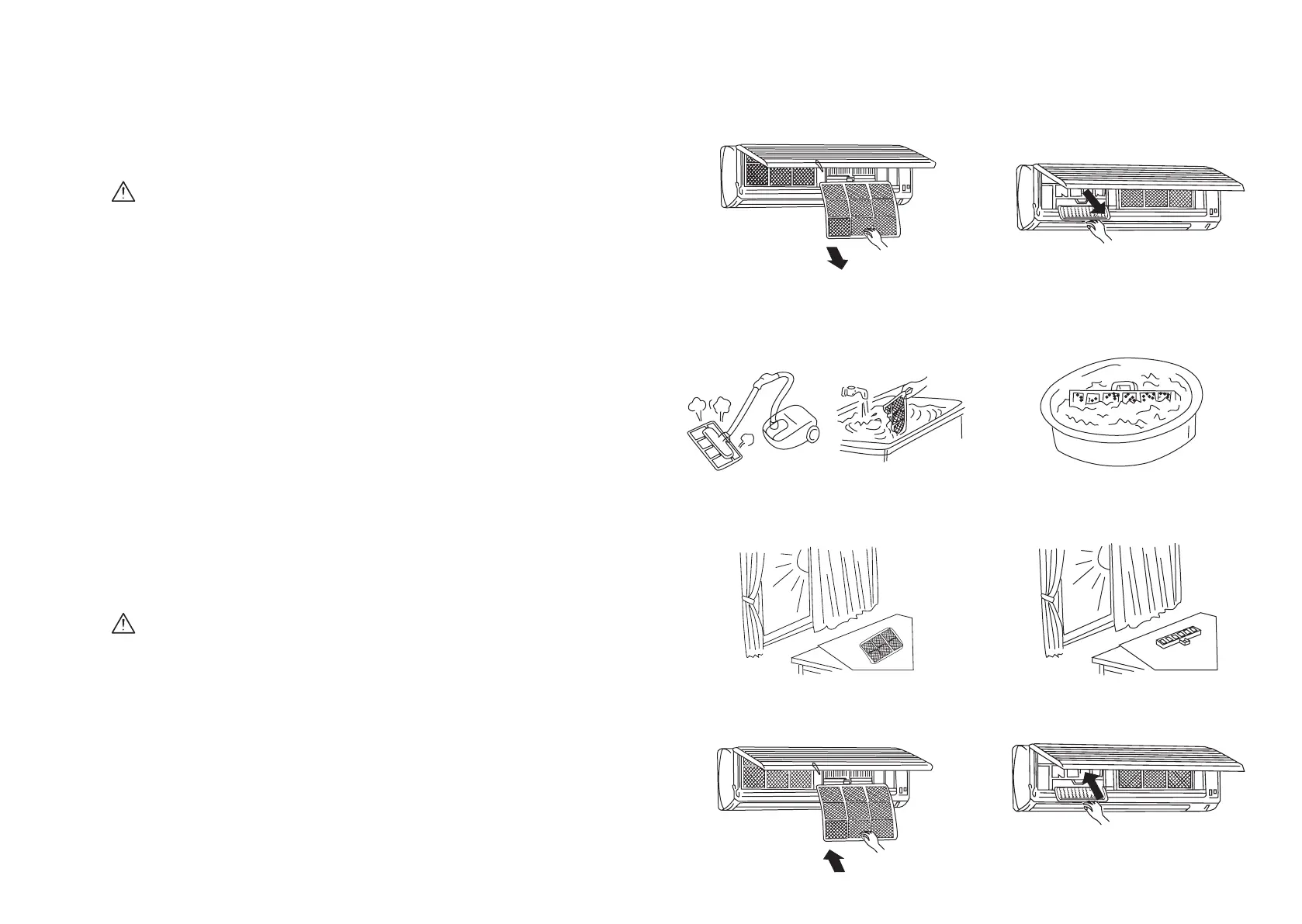
FILTERS SHOULD BE CLEANED ONCE EVERY
TWO WEEKS
1. Take out lters
2. Clean lters with a vacuum cleaner or by
tapping them gently. (If they are very dirty,
wash them in warm water below 45˚C with a
dissolved non scouring agent.)
3. Rinse lters with clean water, then dry them
in cool air.
4. Insert them in their original position, then
push down and close the front panel.
CLEAN DEODORIZATION FILTERS AND AIR
CLEANER
1. Take out lters rst, then take out
deodorization lter and air cleaner.
2. Clean deodorization lter, and air cleaner
with warm water below 45˚C with non
scouring agent.
3. Rinse lters with clean water, then dry them
in cool air.
4. Insert them in their original position, then
push down and close the front panel.
Filters must be cleaned on a regular basis



 To Next Page