110
7521
7521
N/B MAINTENANCE
N/B MAINTENANCE
7.9 USB PORT TEST ERROR
An error occurs when a USB I/O device is installed.
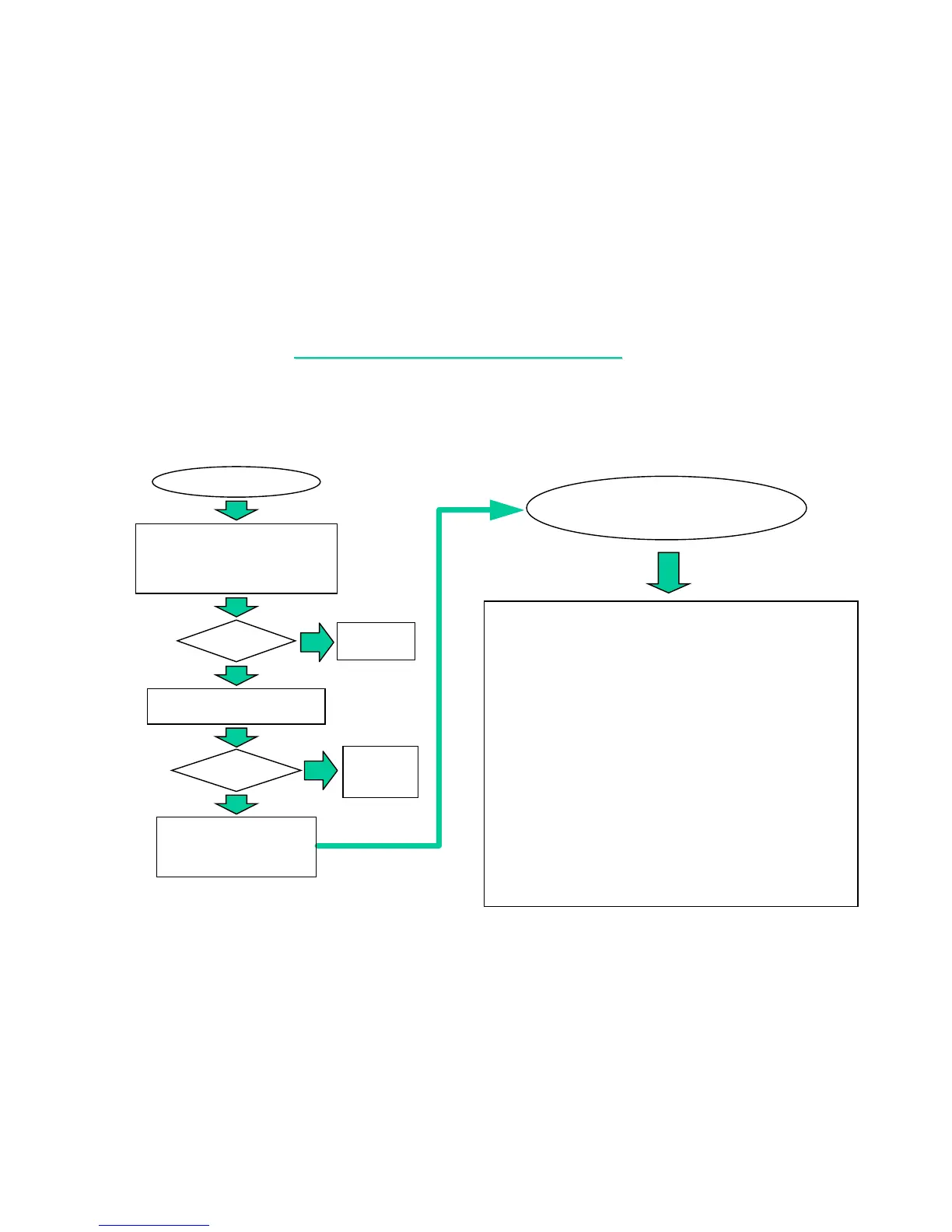
USB TEST ERROR
1. Check if the USB device is
installed properly.
2. Confirm USB driver is installed
ok.
Test
OK?
Re-test
OK?
Change M/B or go
into board-level
Troubleshooting.
YES
NO
Correct
It.
YES
NO
Change the
faulty part
then end.
Board-level
Troubleshooting for
USB test error
Check the following parts for cold solder or one of the following
parts on the mother-board may be defective, use an oscilloscope
to check the following signal or replace the parts one at a time and
test after each replacement.
Parts:
U22, RP25, CP7
F502, R26, R27
C21, L2, C11
L100, R157
R160, F503, R22
R23, C28, L13
C19, L101
R143, R147
L507, L512
Signals:
USBP1- USB_B1
USBP1+ USB_B2
USBP0- USB_B3
USBP0+ USB_B4
D/USBP1- USB_A1
D/USBP1+ USB_A2
D/USBP0- USB_A3
D/USBP0+ USB_A4
USB_OC0#
USB_OC1#
Try another known
good USB device.



 To Next Page