92
7521
7521
N/B MAINTENANCE
N/B MAINTENANCE
Symptom:
Symptom:
When the power button is pressed, nothing happens, no fan activi
When the power button is pressed, nothing happens, no fan activi
ty is heard and power indicator is not light up
ty is heard and power indicator is not light up
.
.
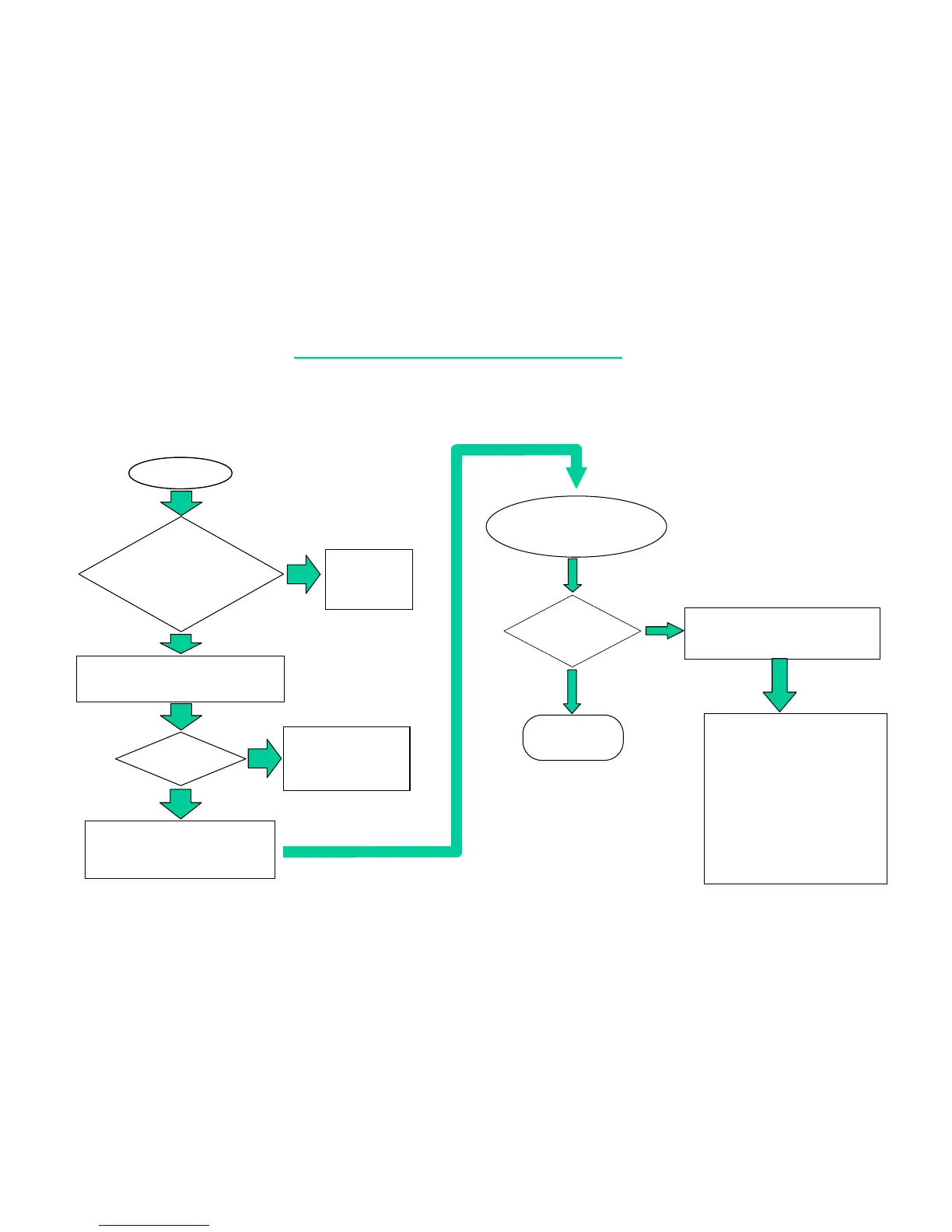
7.1 NO POWER:
No power
Is the
notebook
power source O.K?
(Either AC adapter
or battery)
No
Connect
AC adapter
or battery
Yes
Try another known good battery,
charger board or AC adapter.
Power
O.K ?
Replace motherboard
or go into board level
troubleshooting
Replace the faulty
battery, charger
board or AC adapter.
Board level
troubleshooting
for no power
Next Page
1. Check the power source
from battery circuit.
From mother board J514
check the following signal & parts.
SIGNAL: PARTS:
Yes
No
PU8
PR20
PR21
PQ12
J514
CHARGE B’D
BATT
BAT_V
WHERE
FROM POWER SOURCE
PROBLEM
?
AC-ADAPTOR
BATTERY PACK



 To Next Page