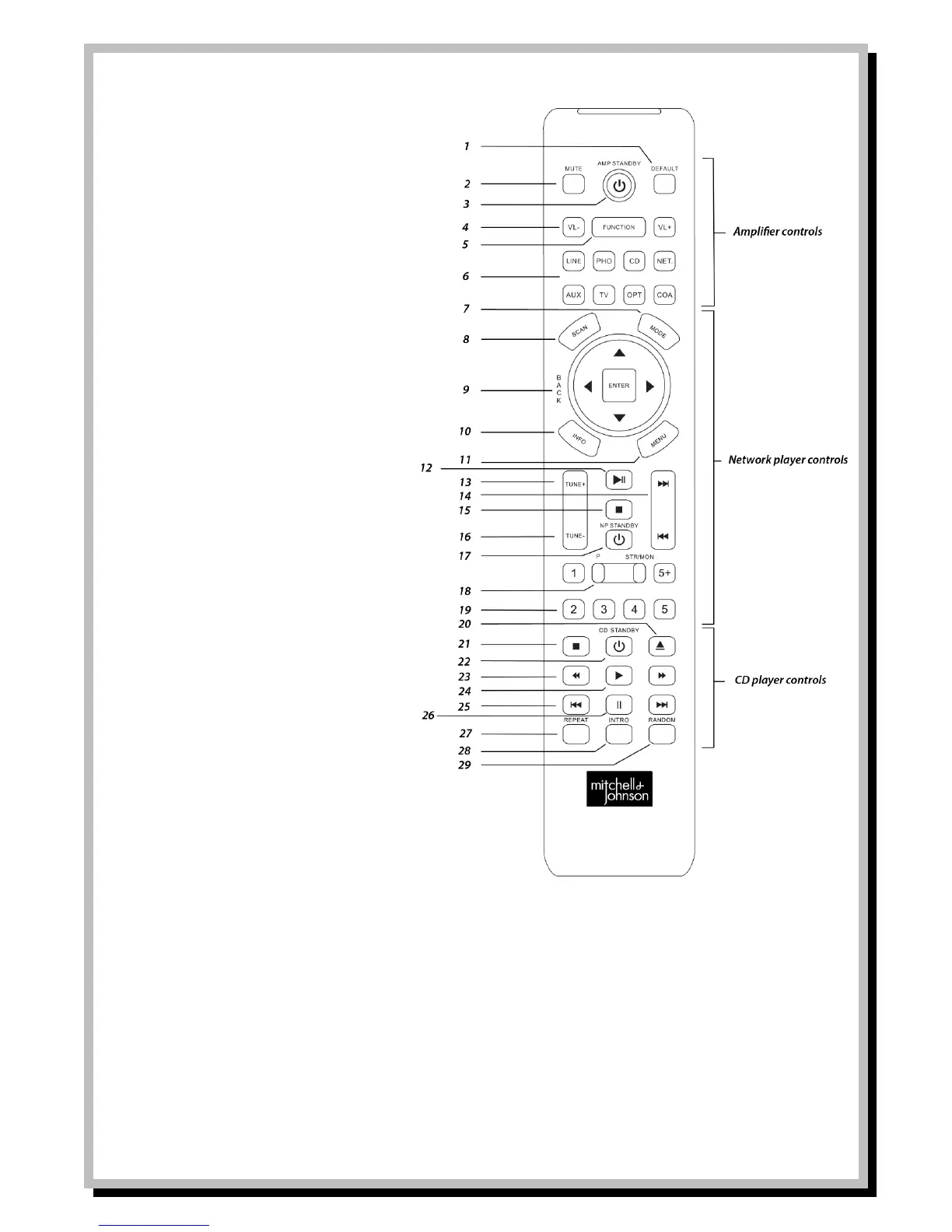
Controls 1-6 for use with Mitchell & Johnson
SAP201V amplifier.
1 Select default equalisation settings.
2 MUTE all sound.
3 Switch amp to/from standby mode.
4 Volume down/up
5 Change display to function mode.
6 Amp input mode.
Controls 7-19 for use with DR201V
7 Press to switch between play modes.
8 Auto Scan for stations in FM or DAB
mode.
9 Use arrows up/down/left and right to
navigate through menus and press
ENTER button to select.
10 Use to view information on bottom
line of display.
11 Use to select the main menu.
12 Play/pause button for Bluetooth
mode.
13 Tune to next station up in FM/DAB
mode.
14 Move to next track in Bluetooth
mode.
15 Stop playback in Bluetooth mode.
16 Tune to next station down in FM/DAB
mode.
17 Switch unit to/from standby mode.
18 STR/MON and P function not used for
DR201V.
19 Numbers 1-5 for preset stations 1-5.
Press and hold any number 1-5 to
assign current ‘listened to’ station to
preset 1-5. Press 5+ for select preset
no. over 5. E.G. press 5+ and press 1,
then select preset 6.
Press 5+ and hold 1-5 to save preset
number 6-10
Controls 20-29 for use with Mitchell & Johnson
CDD201V CD player.
20 Open CD drawer
21 Stop playback
22 Switch unit to/from standby mode.
23 Fast forward or rewind of current
track.
24 Commence playing of CD
25 Go to previous/next track on CD.
26 Pause playback
27 Repeat current track or entire CD.
28 Select to play small intro of each
track on CD.
29 Select to playback tracks on CD in
random order.


 To Next Page