MD-500 Quick Start Guide
en-US
|
10
|
Quick Start Guide|
MD-500
©Mitchell International, Inc. 394474 Rev A | APDMD500020421
Features
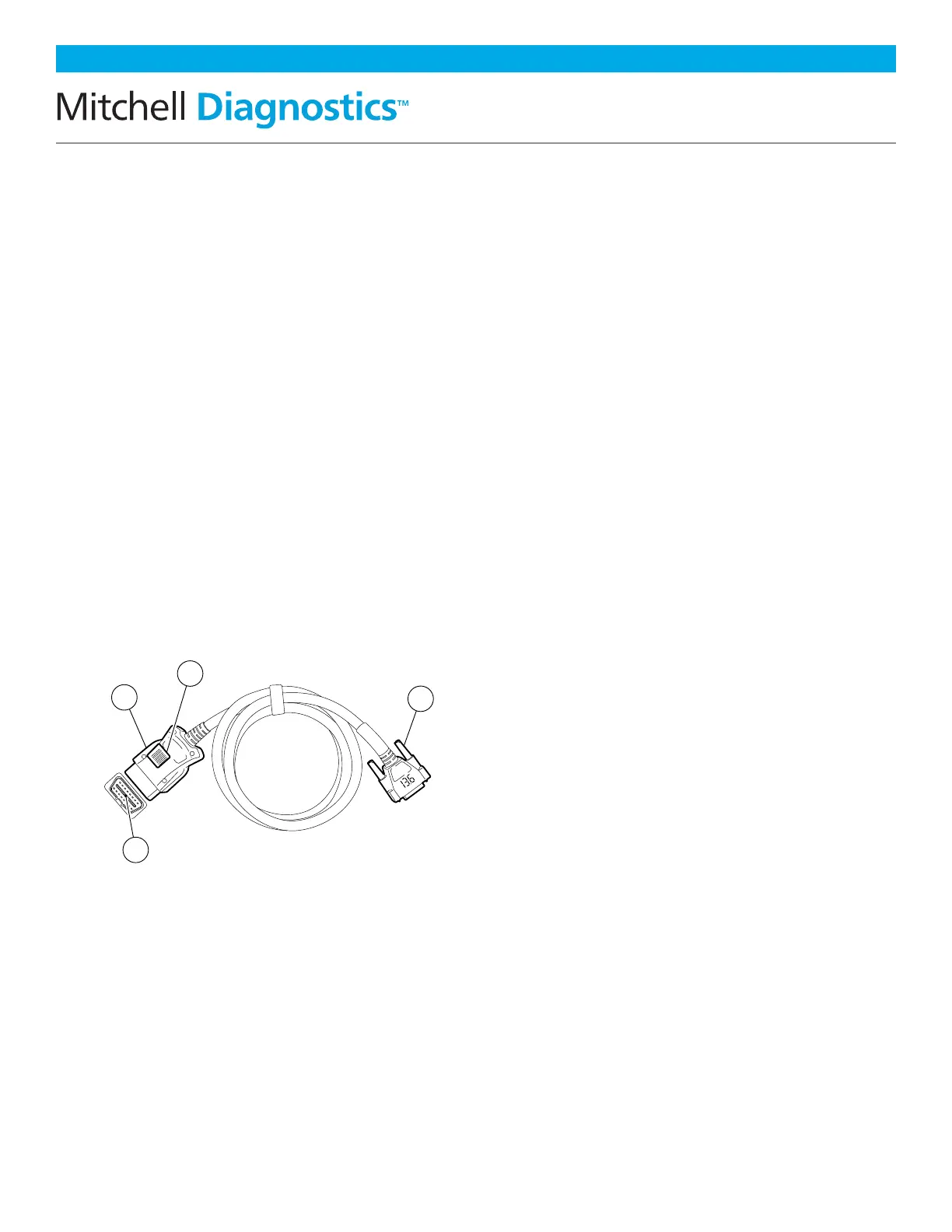
OBDII/DLC Cable
The OBDII/DLC cable has a LED lamp to
locate vehicle DLC and voltmeter that
displays battery voltage.
• The LED in the OBDII cable end is
activated by a button on the side of the
connector. This feature is provided to
assist users in finding the vehicle DLC.
• The vehicle battery indicator is
activated when the OBDII cable is
plugged into the vehicle and displays
the Pin 16 voltage available on the
vehicle DLC. A voltage reading below
11.8 Volts will activate an indication
of “LO” or if above 15.5 Volts and
indication of “HI” will activate
highlighting that the battery or
charging system needs attention.
1. LED Lamp
2. LED lamp Switch
3. Battery Cover
4. DLC Tool Connector With Voltmeter
Software Updates
Software Updates: Periodically, updates
will become available and the user will be
notified through a message on the screen.
To receive updates automatically, connect to
Wi-Fi and leave scan tool on overnight.
Note: Scan Tool will download updates
automatically when connected to the internet.
When download is complete, the user will be
informed with a pop up screen. To install an
update, the scan tool must be connected to the
AC power adapter, over 50% battery life and not
connected to a vehicles DLC.
ss02659
1
2
3
4



 To Next Page