MD-500 Quick Start Guide
en-US
|
9
|
Quick Start Guide|
MD-500
©Mitchell International, Inc. 394474 Rev A | APDMD500020421
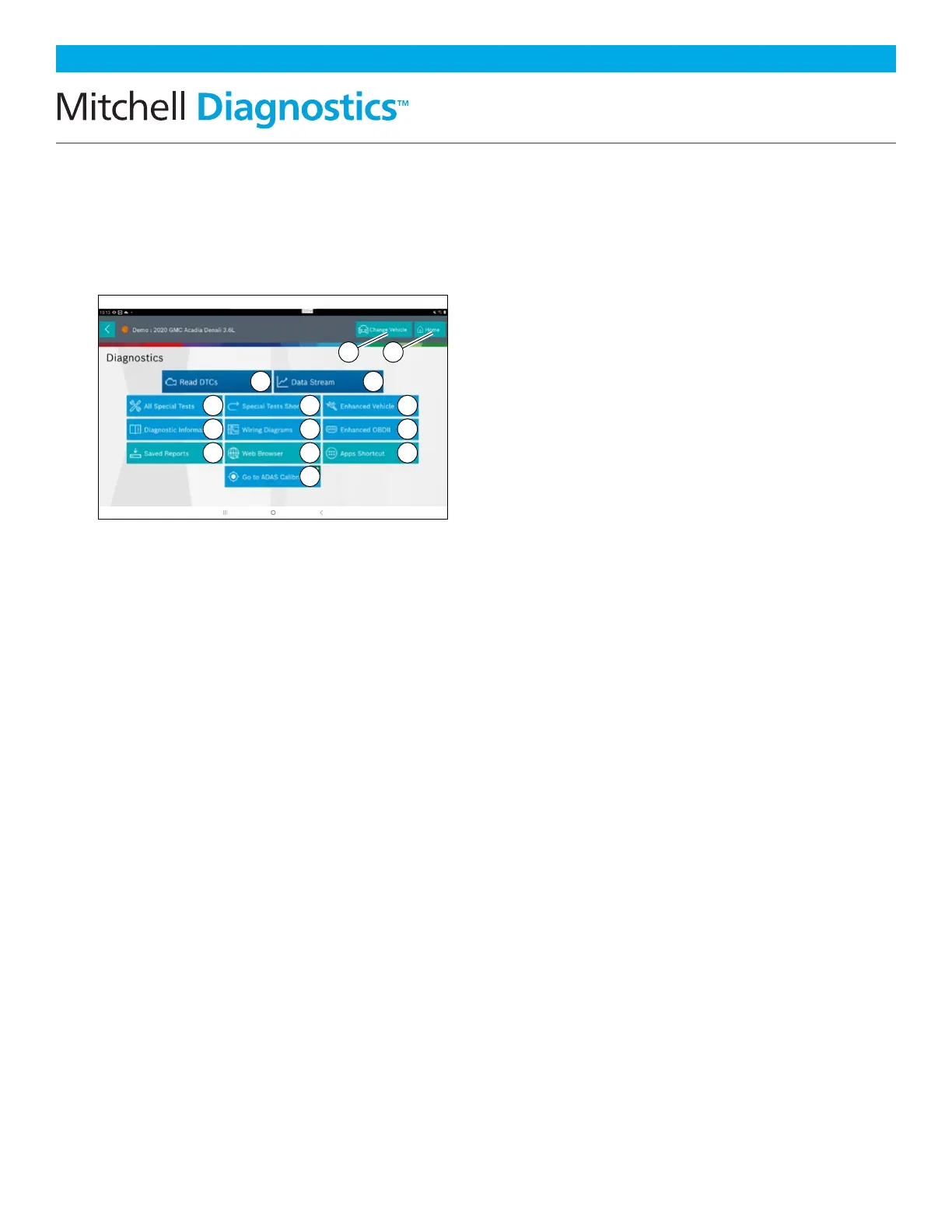
Diagnostic Functions
After selecting a vehicle the user will be
able to begin using diagnostic functions on
the vehicle.
1. Change Vehicle Button
Shortcut to the select vehicle screen.
2. Home Button
Shortcut to the Main Menu.
3. Read DTCs
Access menu to select DTC read options
(all or specific controllers).
4. Data Stream
The data stream function shows live
sensor and solenoid data streaming
from the vehicle ECU (electronic
control unit).
5. All Special Tests
Access Special Test Menu.
6. Special Tests Shortcut
Access to vehicle maintenance tests for
specific vehicle systems to provide for
recalibration or reset after service.
7. Enhanced Vehicle Scan
Access to scan all available controllers
on the selected vehicle for Modes 1—7.
8. Diagnostic Information
Provides diagnostic, repair, and reset
information for the selected vehicle.
9. Wiring Diagrams
Provides OEM and vehicle-specific
full-color, full-system wiring diagrams.
10. Enhanced OBDII
Access manufacturer specific OBDII
parameters and information.
11. Saved Reports
Access saved vehicle scan reports and
data stream recordings.
12. Web Browser
Locate saved vehicle scan reports and
data stream recordings.
13. Apps Shortcut
Access other available
Android applications.
14. Go to ADAS Calibration
Access ADAS systems to perform static
calibrations using MD-TS21.
rt0015
5
6 7
8 9 10
11 12
14
13
3 4
1 2



 To Next Page