• Consult your physician if you have any health concerns!
• Use after injury or surgery is only allowed after consultation with a physician.
• The device is not suitable for people with reduced sensitivity to heat.
• Do not expose swollen, burned, or inamed parts of the body, areas aected by rashes, wounds, or other sensitive areas.
• Do not use the product if your skin burns or is insensitive.
• If skin irritation occurs, discontinue shining and seek medical help.
IMPORTANT NOTICES
• The distance from the device depends on individual light sensitivity and the specic need. Always ensure that the minimum distance
of 15 cm between the device and the body part to be illuminated is not exceeded.
• Do not illuminate one area for more than 30 minutes per day.
• Do not illuminate one area for more than 20 minutes at a time from a distance of less than 30 cm.
• Always check for skin and eye reactions. If the light burns your skin or eyes, turn the device o immediately and do not use it.
• Medications, cosmetics, or foods can lead to hypersensitivity or allergic skin reactions under certain circumstances. In this case, the lighting
must be stopped immediately.
• Special care and attention must be taken when operating the device.
• Do not use the device if you are tired and if there is a risk of falling asleep while the light is switched on.
• Too much light exposure can lead to cell stress and is potentially dangerous.
• Children do not know the dangers associated with electrical devices. Ensure that the device is not used by unsupervised children.
CLEANING AND REPAIR
• Under no circumstances may you open or otherwise repair the device. Otherwise, its faultless operation is not guaranteed. Failure to comply
with this policy will void the warranty.
• For repairs, please contact your dealer or the listed customer service.
• Improper handling can result in injury, electric shock, re, or damage to the device.
• You must not repair the device yourself. It does not contain any parts that you can repair yourself.
• Before cleaning, switch o the device, disconnect it from the mains, and allow it to cool down.
• Do not clean the device in the dishwasher!
• Do not use cleaning agents containing solvents.
• When cleaning, disconnect the power cable and gently wipe the device with a cloth.
• Do not spray water or other liquids directly on the device. Otherwise, electric shock or damage to the device may result.
STORAGE AND TRANSPORT
• Before moving the device, switch o the device and pull the mains plug.
• Let the device cool down before touching it.
• Store the device preferably in its original packaging and in a dry place.
• Allow the device to cool down before putting it into storage.
• Do not use or store the device where it will be exposed to toxic vapors or volatile substances.
• When transporting, ensure the product is switched o, unplugged, and all cables have been disconnected.
• Prevent objects from hitting and falling on the device.
IN THE EVENT OF AN EMERGENCY
• In the event of a re of the device, do not attempt to extinguish it with water. Use a re extinguisher suitable for electrical res.
• If the device emits smoke, sparks, or a strong burning smell, disconnect it from the mains immediately and contact your dealer or the listed
customer service.
• In such cases, do not attempt to repair or disassemble the device yourself. This could lead to further damage or injury.
• If the device causes an electric shock, disconnect it from the mains immediately. Do not directly touch a person connected to the electrical source.
Use a non-conductive object to separate the person from the electrical source and seek medical help immediately.
NOTICE
• There are no known side eects for the applications listed here, provided that all safety instructions in this user manual are followed.
• For all other uses not listed in this user manual, you may use this device only after consulting a physician.
• This device is not intended for industrial or clinical use.
• Consult your physician for health problems of any kind!
How do I know if the light is working properly?
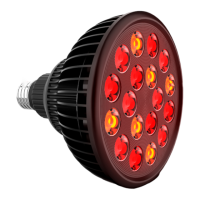
- When the red spectrum (RED) is switched on, the LEDs light up, emitting a visible red intense light. At the same time, the fans turn on.
- When the near-infrared (NIR) spectrum is turned on, the LEDs light up, emitting invisible near-infrared light. This spectrum is invisible to
human eyes. Correct operation can be veried via the camera on a mobile phone. The lens of the camera can detect this light. At the same
time, the fans turn on.
- When both the red (RED) and near-infrared (NIR) spectra are switched on, all LEDs light up simultaneously. At the same time, the fans turn on.
How do I know if the light is not working properly?
- The red (RED) or near-infrared (NIR) LEDs do not light up or ash when switched on.
- Only a portion of the red (RED) or near-infrared (NIR) LEDs are illuminated when the red or near-infrared light is turned on.
- An unusual fan sound is heard when the red or near-infrared light is switched on.


 To Next Page
 Loading...