- Follow the safety instructions.
- Fix the fully unpacked device in the stable position you will use.
- Plug the power cable into the device, plug the power cable into an electrical outlet,
and turn on the power switch (position "I").
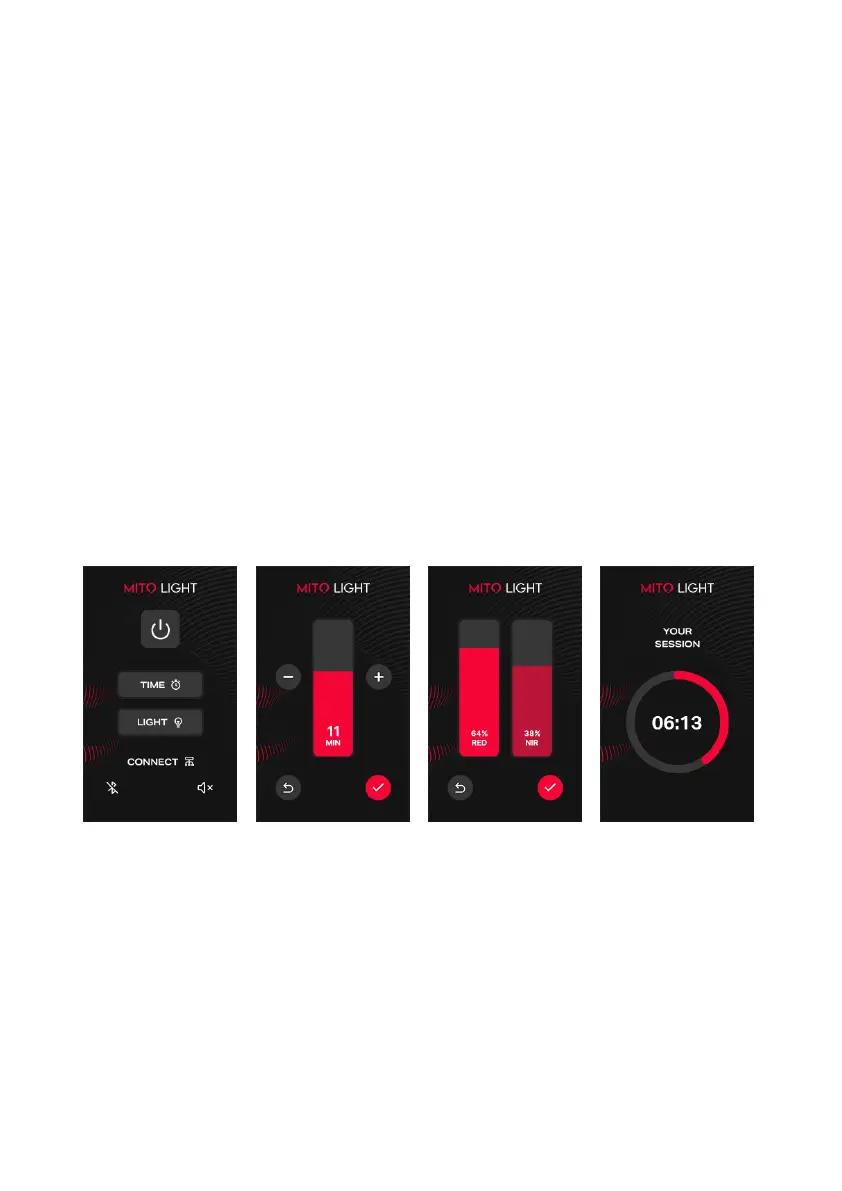
- Touch the "TIME" button on the touch screen and set the light time between
1 - 20 MIN. After adjusting, touch the "BACK" arrow button to return to the main menu.
- Touch the "LIGHT" button and adjust the RED and NIR light modes.
Use the sliders to choose the desired intensity of both spectra between 0 - 100%.
- Touch the "CHECK" button to start the light.
- Expose yourself to light without clothes at a distance of 15 - 50 cm from the light
for 10 - 20 minutes per day.
▪ According to customer feedback, most users do not use protective glasses
and only keep their eyes closed during shining. However, always wear protective
glasses unless otherwise instructed by your physician.
▪ With a shorter distance from the light, a shorter illumination time is needed,
and vice versa.
▪ This one light application applies to one illuminated area. One area can be
illuminated 1 - 2 times per day. If the same area is illuminated, we recommend
a total time of no more than 30 minutes per day.
How to use
the device



 To Next Page