- Touch the screen outside the time circle to go back to the main menu. You can
adjust the time or the intensity of RED and NIR spectra during your session.
- Touch the red power button in the main menu to return to YOUR SESSION screen.
- The light will automatically switch o after the set time has elapsed. To switch it
o manually, touch the time in the circle.
▪ If the time is set to 0 MIN, the light will stay on until you manually switch it o.
- When you have nished using the device, rst turn o the power switch
(position "O") and then pull the mains plug out of the socket. This completely
disconnects the device from the power supply.
Connection of Multiple Devices
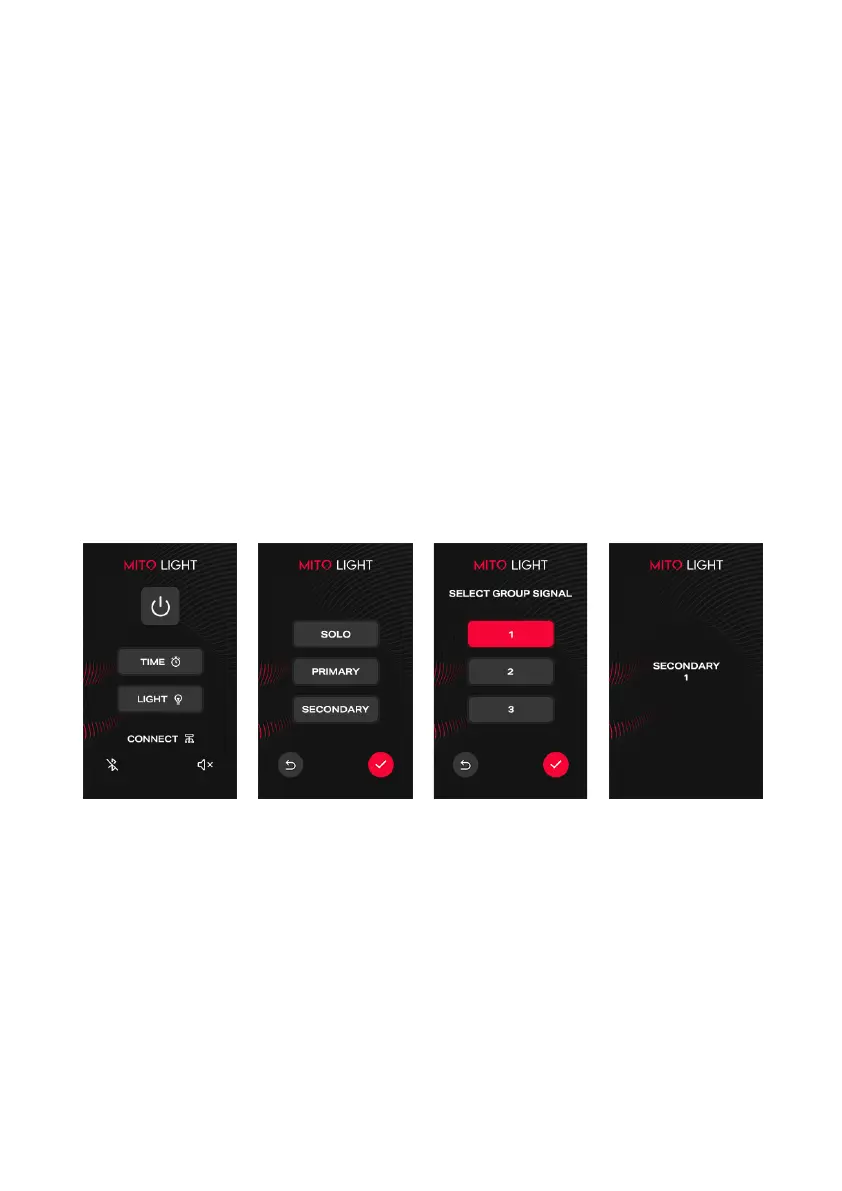
- Touch the "CONNECT" button to choose "PRIMARY" or "SECONDARY" mode on all
of the devices you want to connect. The device selected as "PRIMARY" will control
all other devices selected as "SECONDARY". The device selected as "SOLO" will
work only separately.
- Choose the same GROUP SIGNAL number by touching the 1 or 2, or 3 buttons
on all devices you want to connect.
Silent Mode
- Touch the "SOUND" button in the right bottom corner to turn ON / OFF the sound
of the touch screen.
Bluetooth Connection
- Touch the "BLUETOOTH" button in the left bottom corner to turn ON / OFF the
Bluetooth. This function only serves for the APP Connection.
APP Connection
- Download the APP called "MITO LIGHT" from the App Store or Google Play.
- Turn on the Bluetooth on your device to be visible and pair it in the APP.
- You can use the APP to control your device remotely with your smartphone.



 To Next Page