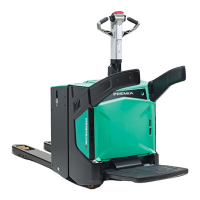
PBV20N2 PBV20N2 Service Service ManualManual
6.6. Pull the truck’s tiller to the drivingPull the truck’s tiller to the driving
position and move the lever for liftingposition and move the lever for lifting
and lowering to one end positionand lowering to one end position
and then to the other end position.and then to the other end position.
7.7. In TruckTool, check that the displayed values are acceptable and click "Stop".In TruckTool, check that the displayed values are acceptable and click "Stop".
If the process fails, If the process fails, update the firmware on the controller and try update the firmware on the controller and try again.again.
15.4.3.2 Acquiring the VACC without Truck Tool15.4.3.2 Acquiring the VACC without Truck Tool
1. 1. During key-oDuring key-on, lower the n, lower the forks and forks and turn the aturn the accelerator foccelerator forward at the rward at the same timesame time
and hold the buttons down for 15 seconds.and hold the buttons down for 15 seconds.
The truck enters the accelerator teach-in mode.The truck enters the accelerator teach-in mode.
2. 2. Release Release all all the the buttons.buttons.
3. 3. Teach the Teach the controller for controller for lifting and lifting and lowering blowering by moving y moving the lever the lever for lifting anfor lifting andd
lowering to one end position, then to the other end position.lowering to one end position, then to the other end position.
4. 4. Release Release the the lever folever for lifting r lifting and and lowering.lowering.
5. 5. Press thPress the sae safety bfety button utton to savto save the e the settings.settings.
6. 6. Restart Restart the the truck.truck.


 To Next Page
 Loading...