EN-5
6. Making and Answering a Call
6-1 Making a call
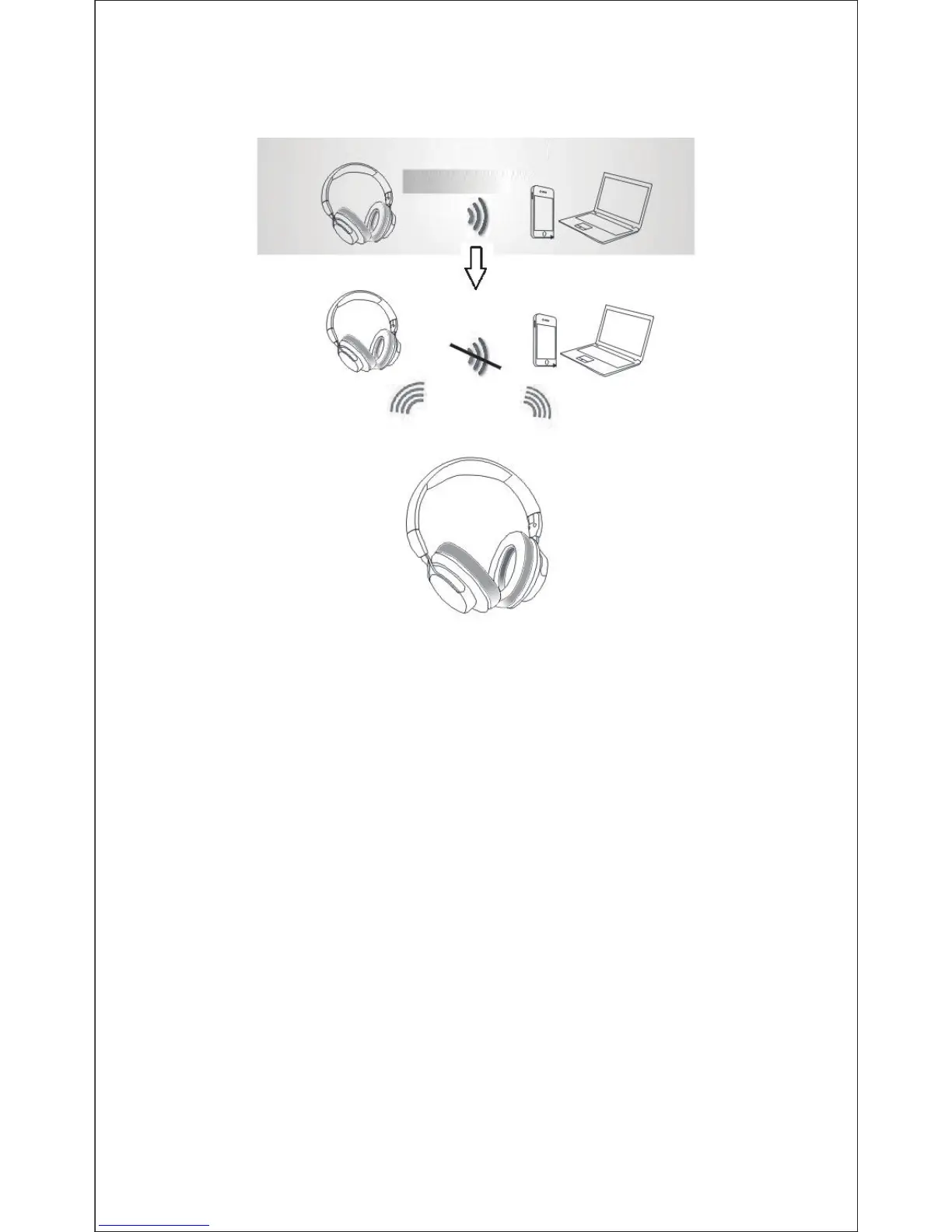
3. Conversely, if you use ShareMe function to turn the
secondary headphone on firstly, it will be connected to the
paired device automatically. Then turn the primary one on, the
secondary one will disconnect to the paired device and
Note: There will be a prompt voice when first pairing.
1. Make sure the headphone is pairing to the mobile phone. Dial
through the mobile phone and press the call button on the phone.
2. To end a call, press the power button once again or also end
the call directly by the phone.
6-2 Answering a call
Make sure the Headphone is pairing with your phone. Please
refer to chapter 5. Pairing with Bluetooth devices.
1. When a call is incoming. The LED flashes red twice every
second.
2. Press the power button on your headphone or the answer
button on your phone to answer the call. If there is the music
playback, it will pause.
The secondady headphone
Connected firstly
The primary headphone
The bluetooth-enabled
device
Connected next Connected firstly
Disconnected
transfer the connection to the primary one automatically. The
primary one will connect to the paired device directly.
3. To end a call, press the power button once again or also end
the call directly by the phone.
4. As soon as the call is ended, the music will continue to play
automatically.
Note:
- The microphone can't work when using as wired headphone.
- Only the primary headphone can answer the call when using
ShareMe function.


 To Next Page