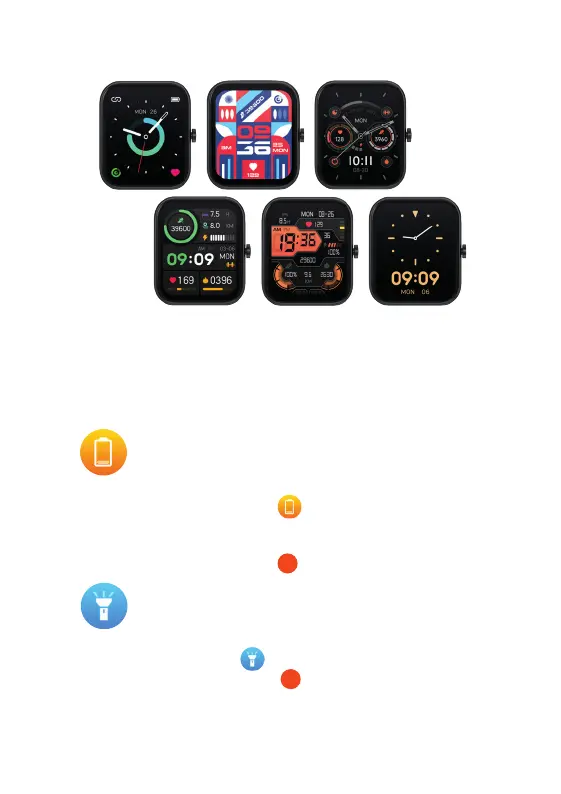
CHANGE THE WATCH FACE
Tap and hold the Multi-touch Screen or press the Home
Screen Button , scroll to the Watch Face icon and tap
to view a variety of home screens available.
14
From the Watch S home screen swipe left once to the Music
Control feature. You can now use your Watch S to play/pause,
skip tracks and adjust the volume of your music playing on
your phone or connected Bluetooth device.
9. WATCH SETTINGS
13
Swipe to the right or left to choose your home screen display
and then ‘tap’ on the screen to confirm. You can upload
additional watch face options from the App onto your
Watch S: go to Device and then tap the Watch Face Style to
show infographic or photographic watch face options.
SAVE POWER
From the Watch S home screen, press the Home Screen Button
and locate the Save Power icon . From here you can choose
to only show the time function on your Watch S. This will save
battery life but other functions will become unavailable. Long
press the Home Screen Button to exit power saving mode.
2
TORCH
From the Watch S home screen, press the Home Screen Button
and locate the Torch icon . Tap the icon to activate the torch.
Press the Home Screen Button again to exit.
2
MESSAGES
From the Watch S home screen, swipe down to view text
messages from your phone.
You will need to make sure permissions are allowed on your
phone. In the App go to Device > Notifications. From here you
can choose which Apps have permission to send notifications
to your Watch S. The Watch S will buzz to alert you of a new
message/notification.


 To Next Page