Page 7
Reference Series User’s Manual
1
2
3
4
4 user pre-sets can be stored. Holding the button down for a few seconds stores the settings for
that pre-set (stor is displayed momentarily). The individual settings can be recalled by a single
short press of the corresponding control button. The last selected setting is kept in non volatile
memory. Even if the power is disconnected all settings remain as those last used.
Memories
Connectivity
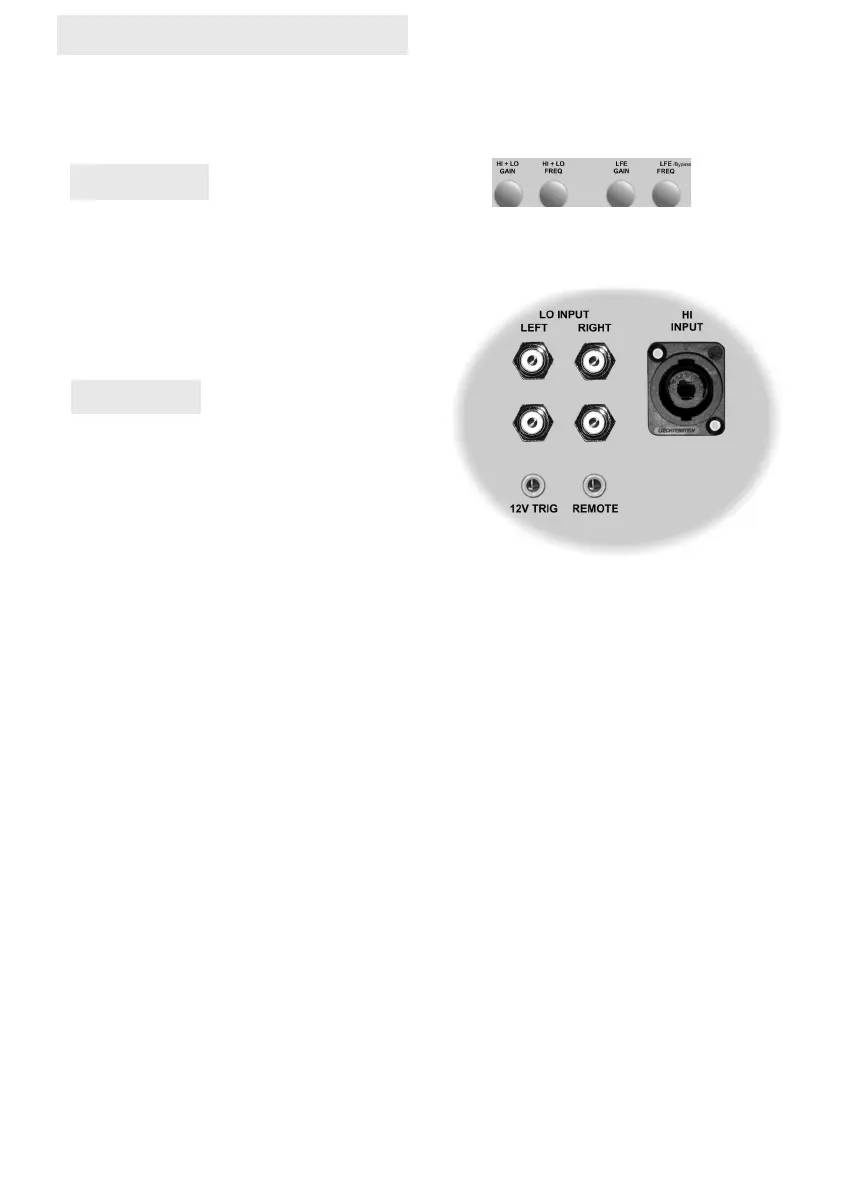
HI INPUT (Speakon)
For connection directly in parallel from the speaker outputs of the main audio system in order for
the filter circuit to extract the information required to output the required bass frequencies. The
maximum amplifier that can be connected is 750watts measured in PEC standard and only when
connected in parallel with the speakers. It is not recommended to connect direct to an amplifier
output unless in parallel with a speaker. Damage may occur if you do, to the input circuit of the
filter stage. A Special Interface is required when the power amplifier connected has floating
speaker negative terminals. (NB SEE WARNING leaflet on separate sheet)
12v TRIG (3.5mm Socket)
This jack connection is used to remotely sleep and wake the control board circuits and amplifier
stages. Please note that this only functions if the power switch is in the on position. Connect the
lead (not provided) from the device controlling the system on/off function to this socket. The unit
will wake from a sleep state upon a trigger of voltage. The menu item Etr can be used to set
whether the unit should waken or go to sleep when monitoring either a positive trigger signal
voltage or a negative trigger signal voltage. Refer to your system controller instruction manual to
determine the setting that should be applied in the menu.
REMOTE (3.5mm Socket)
This jack is used to connect the MJ Acoustics infra red eye (optional). This unique feature pro-
vides for remote control of all functions but is primarily beneficial for the selecting of user pre-set
stored data which can be selected for different program sources. The remote eye sensor hous-
ing must be located in line of sight with the ir remote transmitter. This socket should only be con-
nected to the remote RM1 Eye which provides un-modulated signal data to the processor. For
the best remote experience the use of the Smart Remote app on a smart device such as a tablet
or phone is recommended. Total out of sight control is achieved irrespective of cabinet location.
LO INPUT LEFT & RIGHT (RCA / Line
Level)
You can connect an unbalanced RCA input direct
from a mixing desk or line level pre-amplifier with or
without a sub output. Either mono or stereo input
detail may be used. When connecting from an A/V
amplifier using the sub out or LFE out, the RCA
lead used should be connected to the LFE IN on the
Reference Series. The CEN/LFE IN connector enables you to connect an additional LFE sig-
nal form the pre-amp or a Centre channel signal from the pre-amp.
Reg (Registration) This setting is for information only and will show if the sub-bass system has
been registered by means of the Smart Remote APP directly with the factory. Once confirmed as
registered the unit will display a YES.
03/2023 (REF– GEN)
CEN / LFE IN
LFE IN


 To Next Page
 Loading...