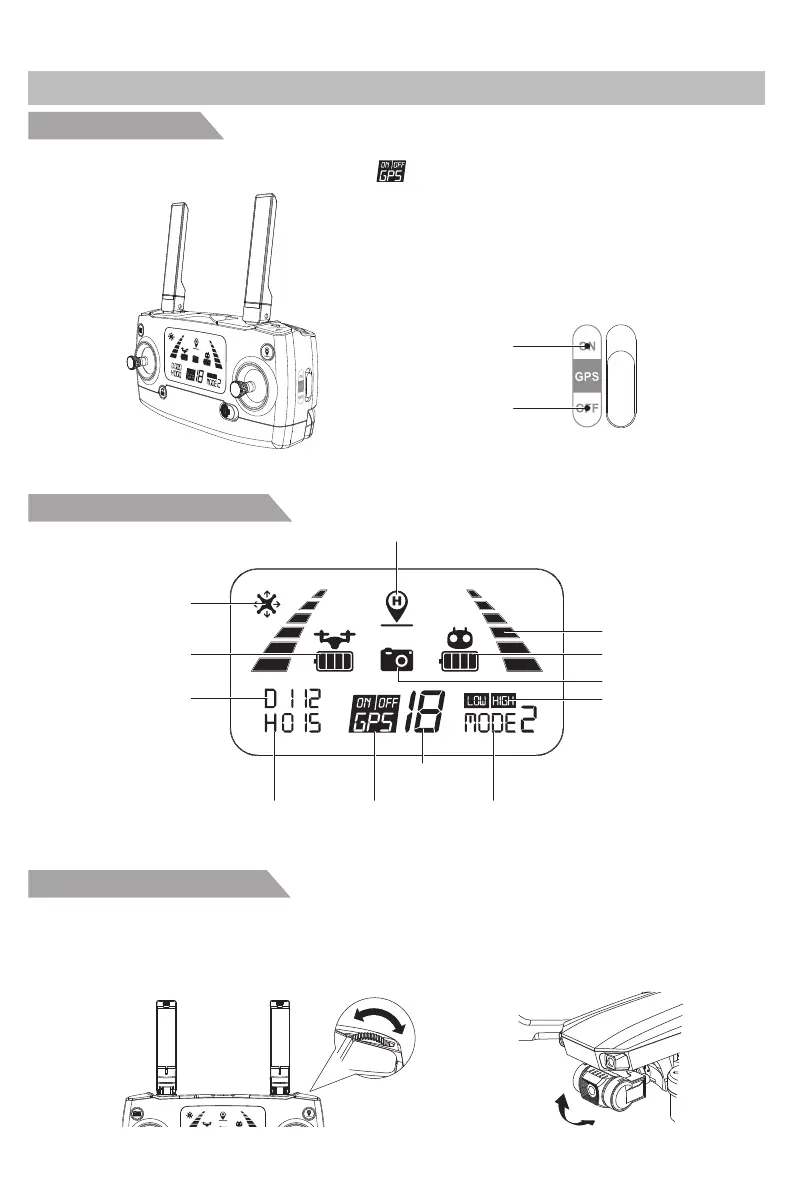
Flight mode switch
Transmitter display screen
Transmitter
Function&Situation of Transmitter
Transmitter battery
GPS mode
Satellites
number
Flight height
Photo/Video
Return home icon
Aircraft battery
Joystick mode
Flying distance
Headless mode
Transmitter signal
Fast slow speed
A
B
GPS mode
Fix altitude mode
Gimbal control handwheel
By toggling gimbal hand wheel on transmitter, the camera shooting angle can be adjusted to get a
better aerial photography experience. When the wheel rolls to the A direction, the camera angle will
be adjusted to the A direction; when the wheel rolls to the B direction, the camera angle will be
adjusted to the B direction.
Toggle the switch button on the right side of the transmitter to control the aircraft flight mode. The flight
mode switch is below, please check it. The icon “ ” on transmitter LCD screen displays the current
flight mode.
A
B
90°
-12-



 To Next Page