!
!
Reminder:
● Ensure that the flight place is open and the satellite signal is greater than 7 stars before
take-off.
● In GPS mode, if the aircraft cannot hover at a fixed point or the fixing performance is poor,
please re-calibrate the geomagnetic, it can improve the flight performance.
● Do not calibrate in areas with strong magnetic, such as magnetic mines, parking or building
areas with steel bars under ground., etc.
● Do not carry ferromagnetic materials, such as keys, phones, etc. with you during calibration.
● Do not calibrate near large pieces of metal.
Bugs 16/Bugs 16 pro User Guide
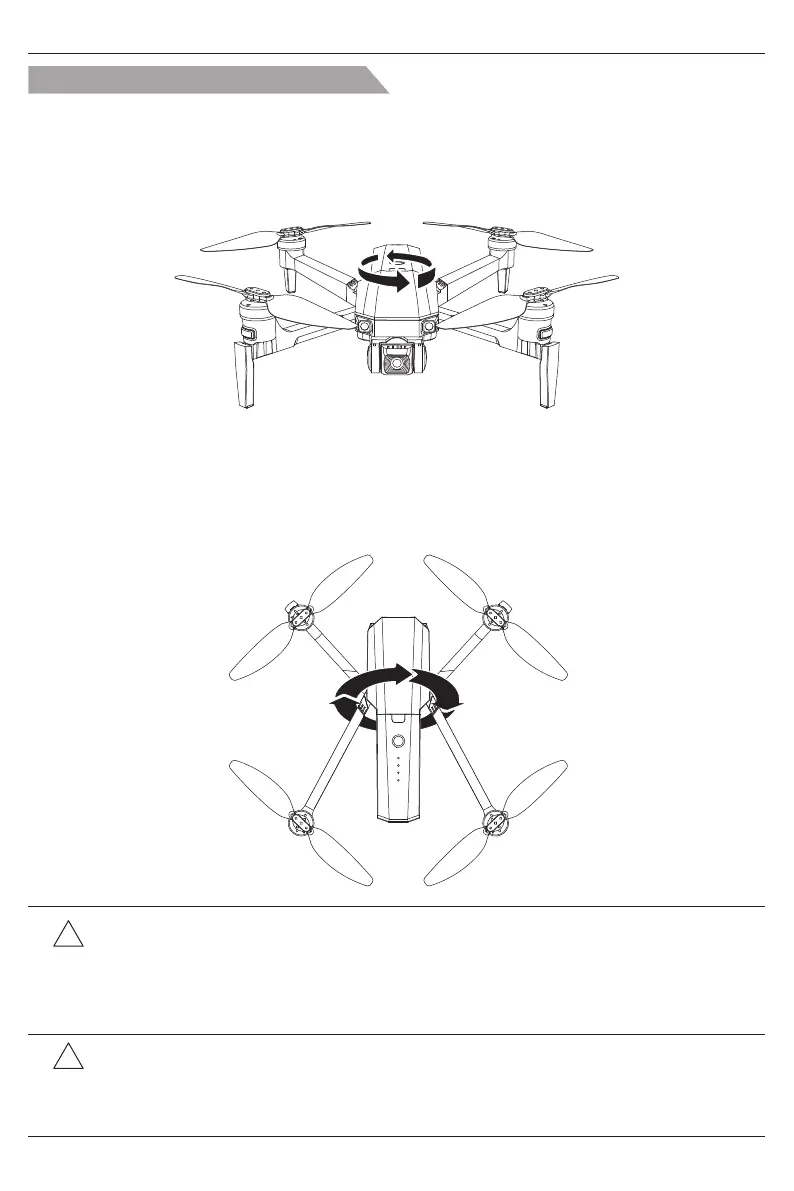
The front and rear indicator lights flash yellow alternately, means entering into the horizontal
calibration.
Place the aircraft as below picture, rotate it horizontally for about 3 circles, until the indicator
lights of the front and rear turn green alternately. In this time, the horizontal calibration is
completed.
Step 1: Horizontal Calibration
Place the aircraft’s head up, like “stand up”, as below picture, rotate the it about 3 circles until
the front and rear indicator lights stay on. In this time, the geomagnetic calibration is completed.
Step 2: Vertical Calibration
Two steps of geomagnetic calibration
-20-



 To Next Page