Product Description
!
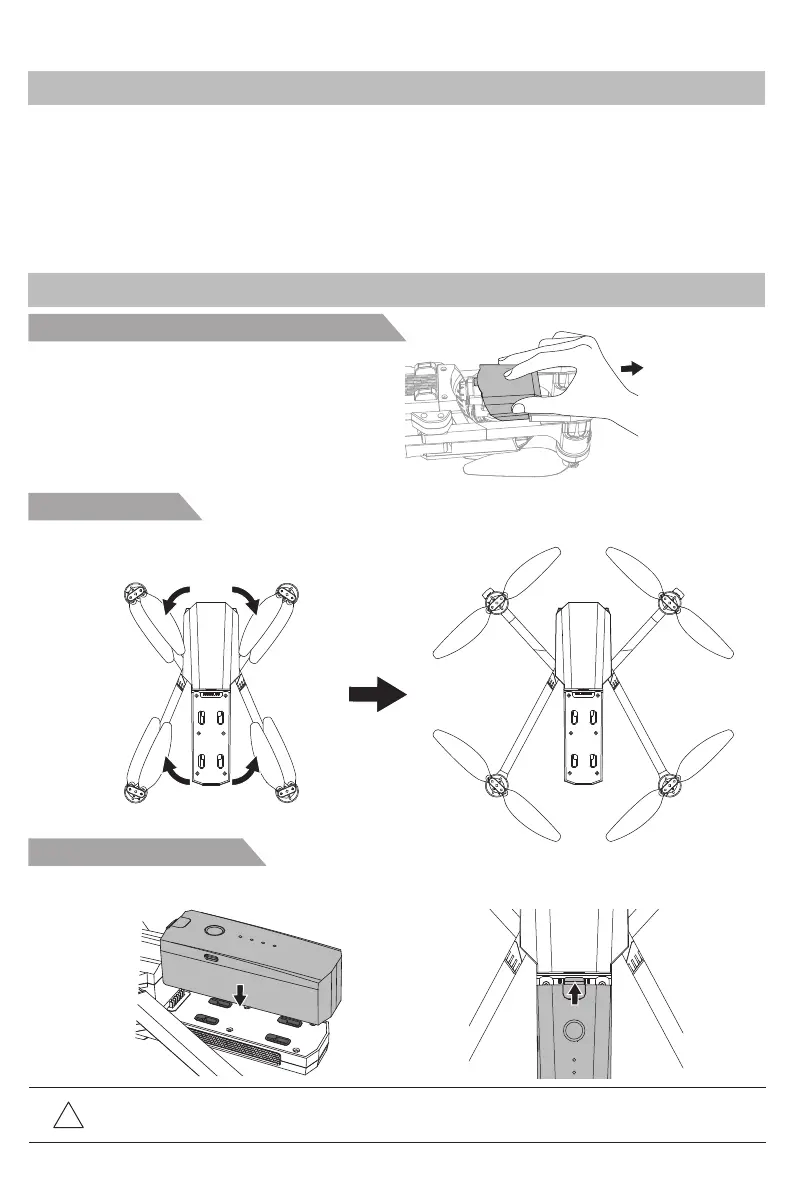
Reminder: If the battery is not installed properly, it may cause the aircraft to fall down due to
power failure.
Expand the arm
The aircraft is in folding state during shipping, please unfold it according to below instruction.
Install aircraft’s battery
Insert fully charged battery into the battery holder (as the below picture), make sure the battery install
correctly.
Disassemble the gimbal protection lock
Bugs 16/Bugs 16 pro are equipped with optical flow system and GPS, can hover and fly steadily indoor
and outdoor. They have automatic return home and easy-to-use intelligent flight, such as Orbit Flight,
Follow-Me and Waypoint Flight. It can shoot 4K HD video with highly precision 3 axis anti-shake
gimbal. The transmitter with functional buttons can complete various operation and setting of the
aircraft and camera. Through the APP, not only have real time HD image but also flight parameters
information. The folding design of transmitter improves the user operation experience. The pull-out
phone holder is easy to carry and store for the user. The gimbal can adjust the camera shooting angle
during flight. The maximum flying speed of Bugs 16/Bugs 16 pro is 40km/h.
Prepare the Aircraft
Introduction
Pull out the protective cover
of gimbal camera.
-1-



 To Next Page