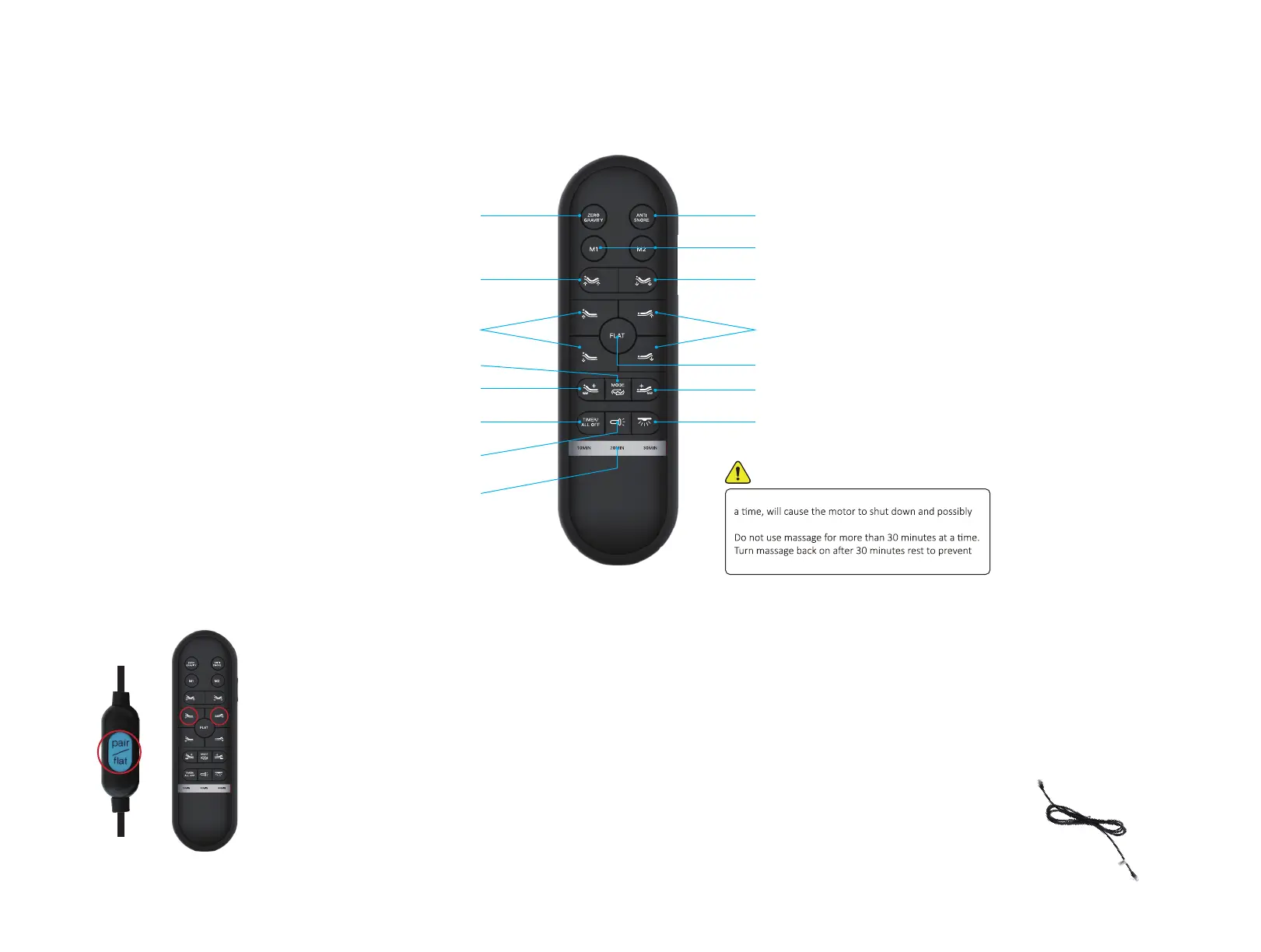
Press and hold head up ∆, foot up ∆ and pairing button on the cord
of control box simultaneously for 3 seconds.
SYNCING TWO SPLIT BASES
Option 1 (REMOTE)
Step 1: Plug bed “A” and bed “B” and make sure “A” remote was
already synced to bed “A”.
Step 2: Take the “A” remote and sync it to bed “B” as sync instruction.
Step 3: The both bases should now be controlled by “A” remote.
Option 2 (SYNC CABLE)
Step 1: Plug bed “A” and bed “B” and maker sure
bed was synced to its own remote.
Step 2: Plug Sync Cable(included with split bases only)
into the "SYNC" input on the each of control boxes.
Step 3: The both bases should now be controlled by the
one of remotes.
Each bed frame comes factory synced
to its own remote. lf not synced follow
these instructions:
HINT: To sync, hold all three
buttons at the same time.
Step 1:
Once you hear a beep that will indicate that the remote is synced.
Step 2:
SYNCING ONE REMOTE:
M300 ADJUSTABLE BED BASE
WIRELESS REMOTE
-04-
.
Excessive use of the massage motors, over 30 minutes at
overheat.
.
.
damage to the motors or the adjustable base.
WARNING
Memory Posions
One Touch ZG Preset Posions
Lis and Lowers Head
Lis and Lowers Foot
An Snore Preset Posion
Flat Buon
Foot Massage on (3 intensies)
Massage Modes Select (3 modes)
Under Bed LED ON/OFF
Back Light ON/OFF
Li Head & Foot Lower Head & Foot
10,20,30 Minute Massage Timer Light
Head Massage On (3 intensies)
Head and Foot Massage
Timer/Stop Buon


 To Next Page