MO-SYS L-40 manual and user guide
4
GYRO SETTINGS AND HEAD SENSITIVITY ADJUSTMENT
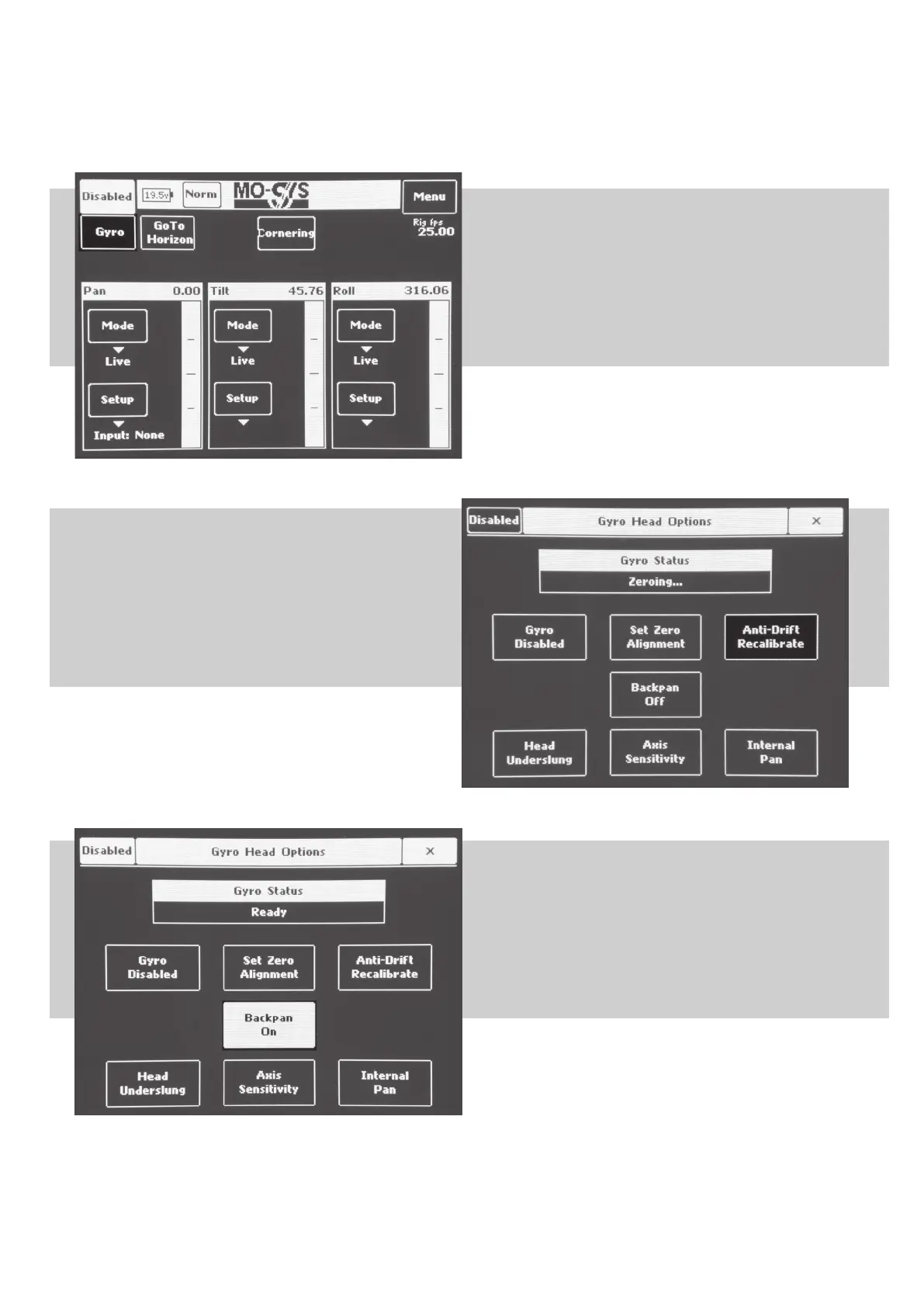
When console is turned on, this is the general window. Press
Gyro button for further gyro options.
In this window you can adjust Pan, Tilt, Roll modes and
speeds.
To calibrate Gyro, rst ensure that head is DISABLED by
checking top le corner. By default, aer turning system on,
head is always disabled. Gyro have to be disabled too. You
can disable Gyro by pressing button on le. By default, aer
turning system on, Gyro is always disabled.
When head and gyro is disabled, press “Anti-Dri Recali-
brate” button. In the Gyro Status window it will show
“Zeroing...”
Wait until it will show “Ready”.
Choose Backpan on or o. Backpan is an option for head use
with crane. Pan axis of the head tracks rotation of Pan Gyro,
so head keeps pointing in same direction (don’t use Backpan
unless necessary).
Disable Backpan when moving head in multiple rotations
(eg. When mounted on a car).



 To Next Page