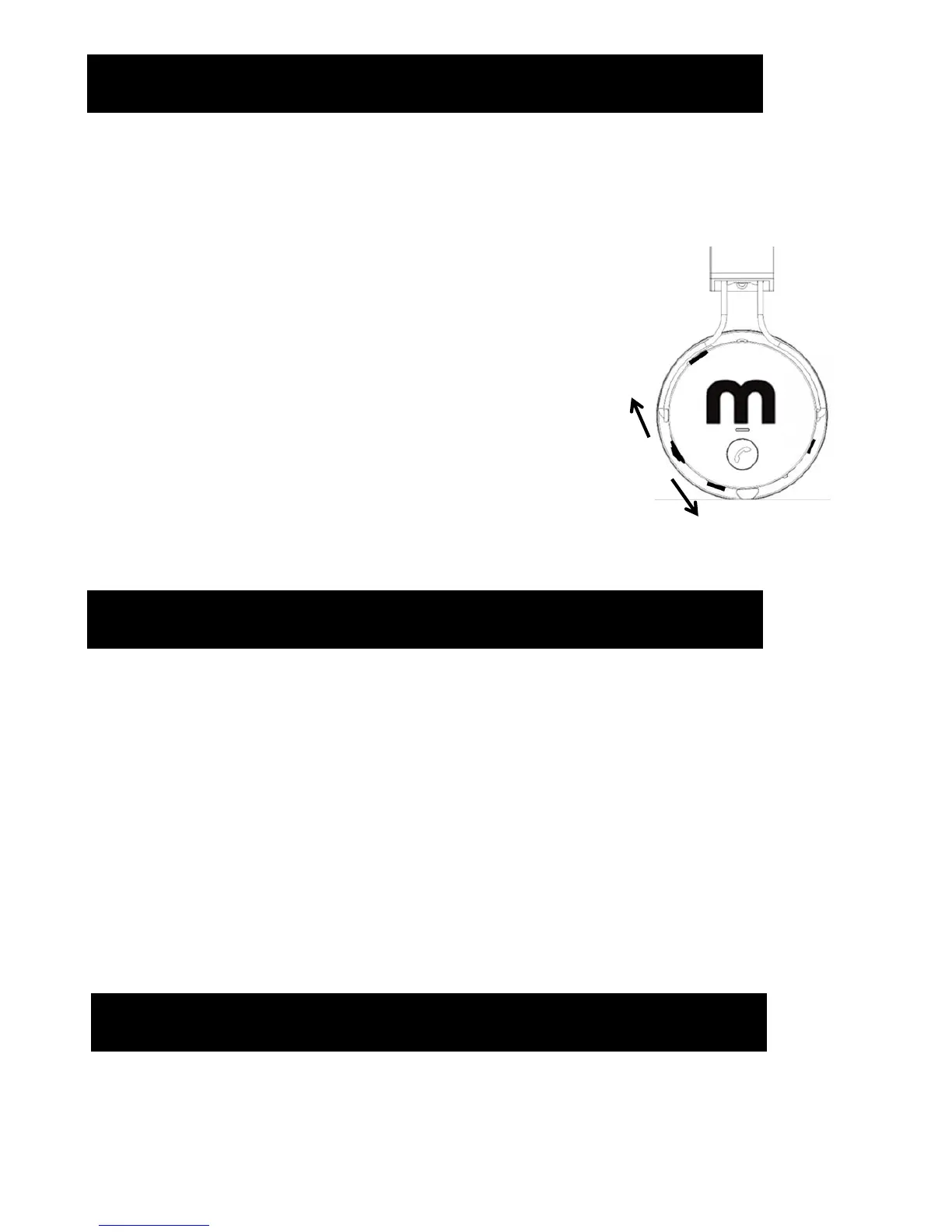
9. Volume Control
To adjust the Volume:
• Volume UP – push the Toggle Button Upwards at a constant
until desired volume level is reached, a signal will sound at
maximum volume.
• Volume Down - push the Toggle Button Downwards at a
constant until desired volume level is reached.
10. Technical Data
Standard charge time: Approx. 2 hours
Frequency response: 20 Hz-20KHz
Speaker dimensions: 40mm
Speaker impedance: 32ohm
Sensibility: 108 +/-3dB
Magnetic type: Nd
Maximum communication range: line of sight approx.10m (32.8 ft)*
Compatible Bluetooth profiles: A2DP,AVRCP,HSP,HFP
* The actual range will vary depending on factors such as obstacles between devices,
magnetic fields around a microwave oven, static electricity, reception sensitivity
,aerials performance, operating system, software application, etc.
Volume Up – Constant push Up
Volume Down – Constant push Downwards
Toggle Button
11. Warranty
Headphones are guaranteed for 12 months from date of purchase, for
registration and more information please visit www.mobimountain.com


 To Next Page