Blood Pressure Monitor
FR IT DE PT NL
SWE
PL DKENES
20
sphygmomanometers - Part 1: General requirements), EN 1060-3: 1997 + A2: 2009 (Non-
invasive sphygmomanometers - Part 3: Supplementary requirements for electromechanical
blood pressure measuring systems);ISO81060-2:2013 (Non-invasive sphygmomanometers -
Part 2: Clinical validation of automated type of measurement).
5. SPECIFICATIONS
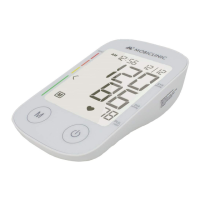
1. Product name: Upper arm blood pressure monitor.
2. Model: TX-01.
3. Classication: Internally powered, Type BF applied part, IP20, No AP or APG, continuous
operation.
4. Machine Size: Approx. 150 mm x 95 mm x 41 mm (5 29/32” x 3 3/4” x 1 5/8”).
5. Cu circumference: 22-30 cm (8-11”), 30-42 cm (11-16”) optional, 42-48 cm (16-18.2”) optional.
6. Weight Approx. 211g (7 7/16oz.) (without batteries).
7. Measuring method: Oscillometric method, ination and automatic measurement.
8. Memory volume: 4x30 times with date and time.
9. Power supply: 4x1.5V AAA size batteries.
10. Measuring range:
Cu pressure: 0-300 mmHg
Systolic: 60-260 mmHg
Diastolic: 40-199 mmHg
Pulse Rate: 40-180 beats/minute
11. Accuracy:
Pressure: ±3 mmHg
Pulse rate: ≤5%.
12. Operating temperature: 10ºC~40ºC (50ºF~104ºF)
13. Ambient humidity for operation ≤ 85% RH
14. Ambient temperature for storage and transportation: -20ºC ~50ºC (-4ºF~122ºF)
15. Ambient humidity for storage and transportation: ≤85% RH
16. Ambient pressure: 80 kPa-105 kPa (80 kPa-105 kPa).
17. Battery life: Approximately 100 times.
18. All components of the pressure measurement system, including: pump valve, LCD, cu,
sensor.
Note: These specications are subject to change without notice.
6. CONFIGURATION AND OPERATING PROCEDURES
6.1. Battery Charging
a. Open the battery cover on the back of the monitor.
b. Insert four “AAA” size batteries. Please pay attention to polarity.
c. Close the battery cover. When the battery symbol appears on the LCD screen replace
all batteries with new ones. Rechargeable batteries are not suitable for this monitor. Remove
the batteries if the monitor will not be used for a month or more to avoid major damage from
battery leakage.
Avoid getting battery uid in your eyes. If it comes into contact with your eyes,
immediately ush them with plenty of clean water and consult a physician.


 To Next Page