Blood Pressure Monitor
FR IT DE PT NL
SWE
PL DKENES
22
Notes:
1. Refer to the cu circumference fame in the “SPECIFICATIONS” section to ensure that the
proper cu is used.
2. Measure on the same arm each time.
3. Do not move the arm, body or monitor and do not move the rubber tube during measurement.
4. Remain quiet for 5 minutes before blood pressure measurement.
5. Keep the cu clean. If the cu becomes dirty, unplug it from the monitor and clean it by hand
with a mild detergent and rinse thoroughly with cold water. Never tumble dry or iron the cu. It
is recommended to clean the cu after use every 200 times.
6.5 Body posture during measurement
Measurement in a seated position
a. Remain seated with your feet on the oor and do not cross your legs.
b. Place your palm up and in front of you on a at surface, such as a table or desk.
c. The centre of the cu should be at the level of the right atrium of the heart.
Performing the measurement lying down
a. Lie on your back.
b. Place your arm straight at your side with your palm facing upwards.
c. The cu should be at the same level as your heart.
6.6 Taking a blood pressure reading
a. After the cu is in place and your body is in a comfortable position, press the “START” button.
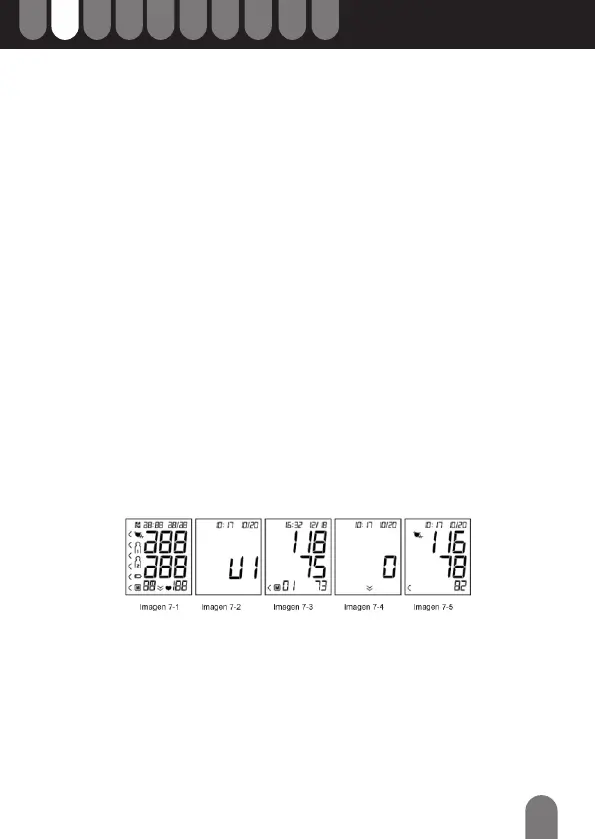
You will hear a beep and the display will show all the characters of the self-test as in picture 7-1.
Contact the service centre if a segment is missing.
b. Next, the current memory bank (U1, U2, U3 or U4) will be displayed as in picture 7-2. Press
the “MEM” button to change to another memory bank. Conrm the selection by pressing the
“START” button. The bank can also be conrmed automatically after 5 seconds without any
operation.
c. If the monitor has stored results, the LCD will momentarily display the most recent result (see
picture 7-3). If there are no stored results, the number zero will appear on the LCD.
d. The monitor then begins searching for zero pressure. See Figure 7-4.
e. The monitor will inate the cu to a pressure sucient for a measurement. The monitor
then slowly releases the air from the cu and performs the measurement. Finally, the blood
pressure and pulse rate are calculated and displayed on the LCD. The blood pressure
classication indicator and the irregular heart rate symbol (if present) will ash on the display.
If the voice function is activated, the measurement result will be announced. The result will be
automatically stored in the monitor. See picture 7-5.
f. After the measurement, the monitor turns o automatically after one minute without any
operation. Alternatively, you can press the “START” button to turn o the monitor manually.
g. During the measurement, you can press the “START” button to turn o the monitor manually.


 To Next Page