Note: This guide does not replace the user manuals.Page 14-16
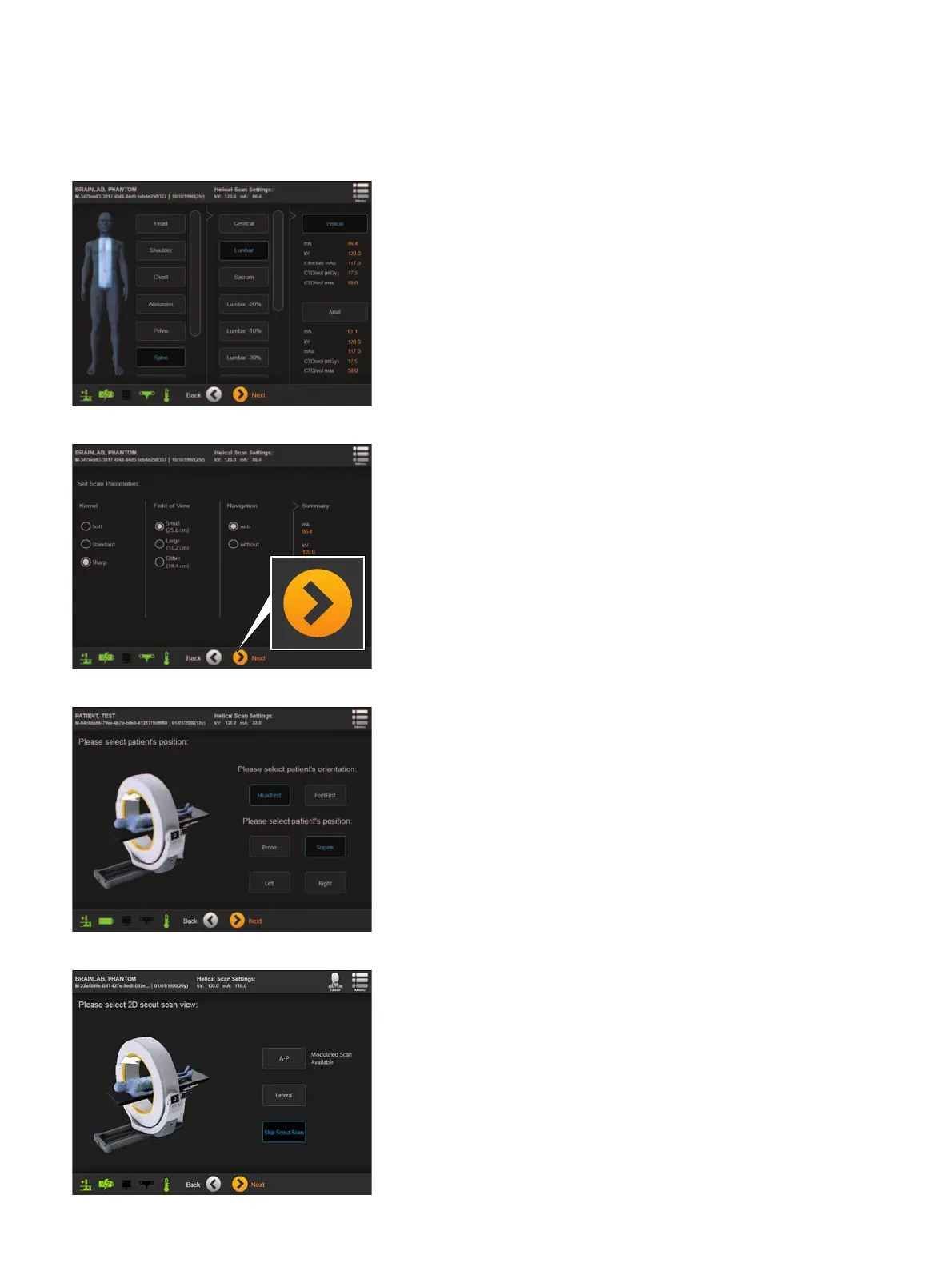
STEP 5
• Select the examination region and scanning mode
(e.g.,
Spine > Lumbar > Helical).
• Select
Next
.
NOTE: Tube current modulation is only available in
helical scan mode.
STEP 6
Select your scan parameters under:
•Kernel
•Field of View
• Navigation (to perform a scan with/without
automatic registration. If Navigation is not checked,
the data will not automatically be registered for
navigation).
• Select
Next
.
The system automatically verifies if the setup is
ready for navigation.
STEP 7
• Select the patient’s orientation a and position s.
• Select
Next
to proceed.
STEP 8
• Select either:
- A-P
- Lateral
-
Skip Scout Scan
to bypass the scout scan.
• Select
Next
.
NOTE: Tube current modulation is only available if
an A-P scout is performed.



 To Next Page