English 23
WF 652
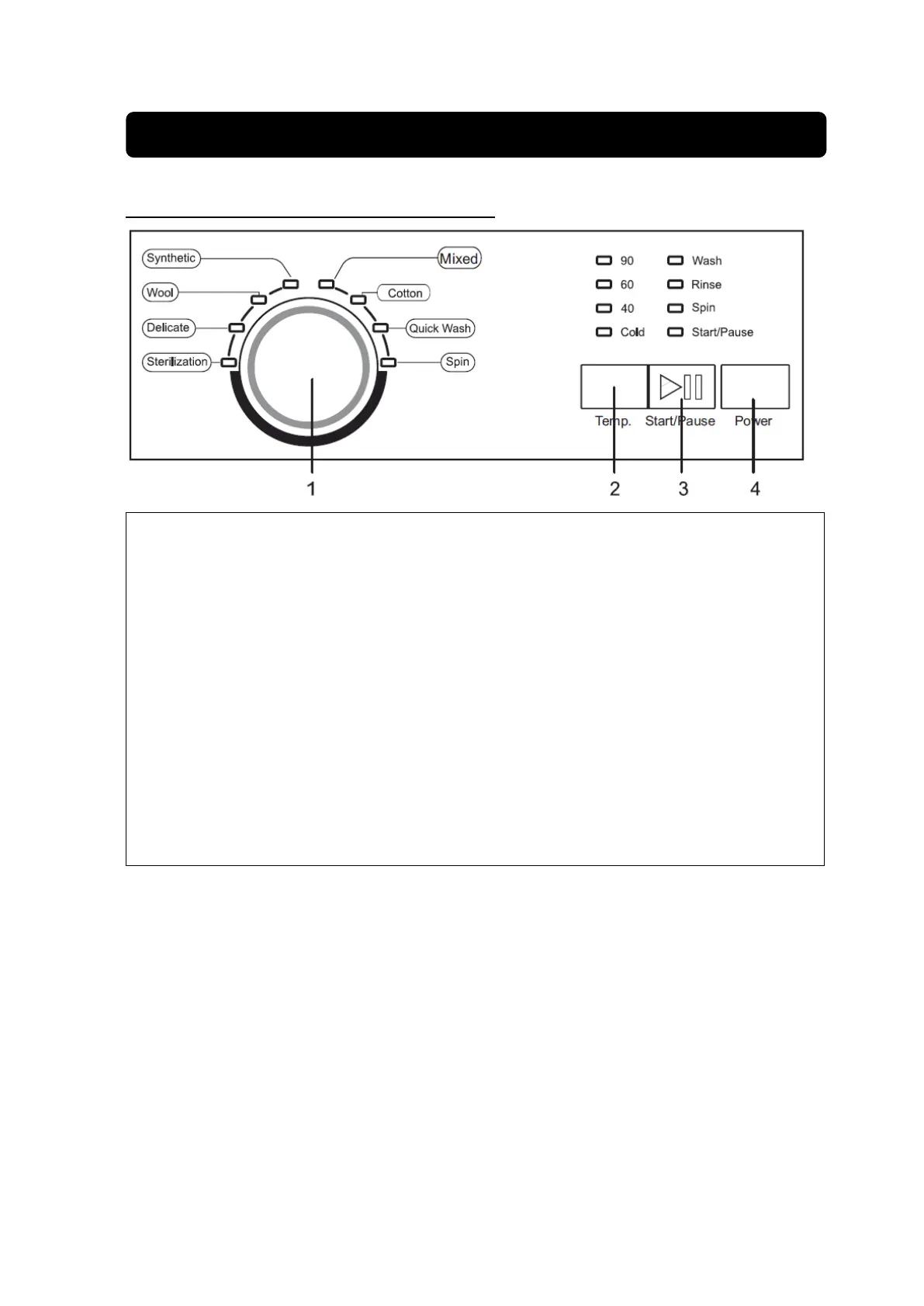
INFORMATION FOR CONTROL PANEL OF WF 652
Knob
Turn this knob clockwise or anticlokwise to select a required wash program. The available
program are Mixed, Cotton, Quick Wash, Spin, Synthetic, Wool, Delicate, Sterilization. Once
the “Start/Pause” button is pressed and the machine is running, the program can not be
changed.
Temp.
Press this button and select a required wash temperature.
Start/Pause
Press this button to start/pause this machine. The LEDof ”Start/Pause” flickers when the
machine in stanby mode or pauses, and it is lighted when running.
Power (On/Off)
Press this button to switch the machine on or off.
Important:
Be sure to switch the machine off at the end of a wash cycle.
Note:
Program cotton at 60
o
C and 40
o
C are suitable to clean normally soiled cotton laundry and they are
the most efficient program in terms of combined energy and water consumptions for washing that
type of cotton laundry , in addition, the actual water temperature may differ from the decleared
cycle temperature.


 To Next Page