17
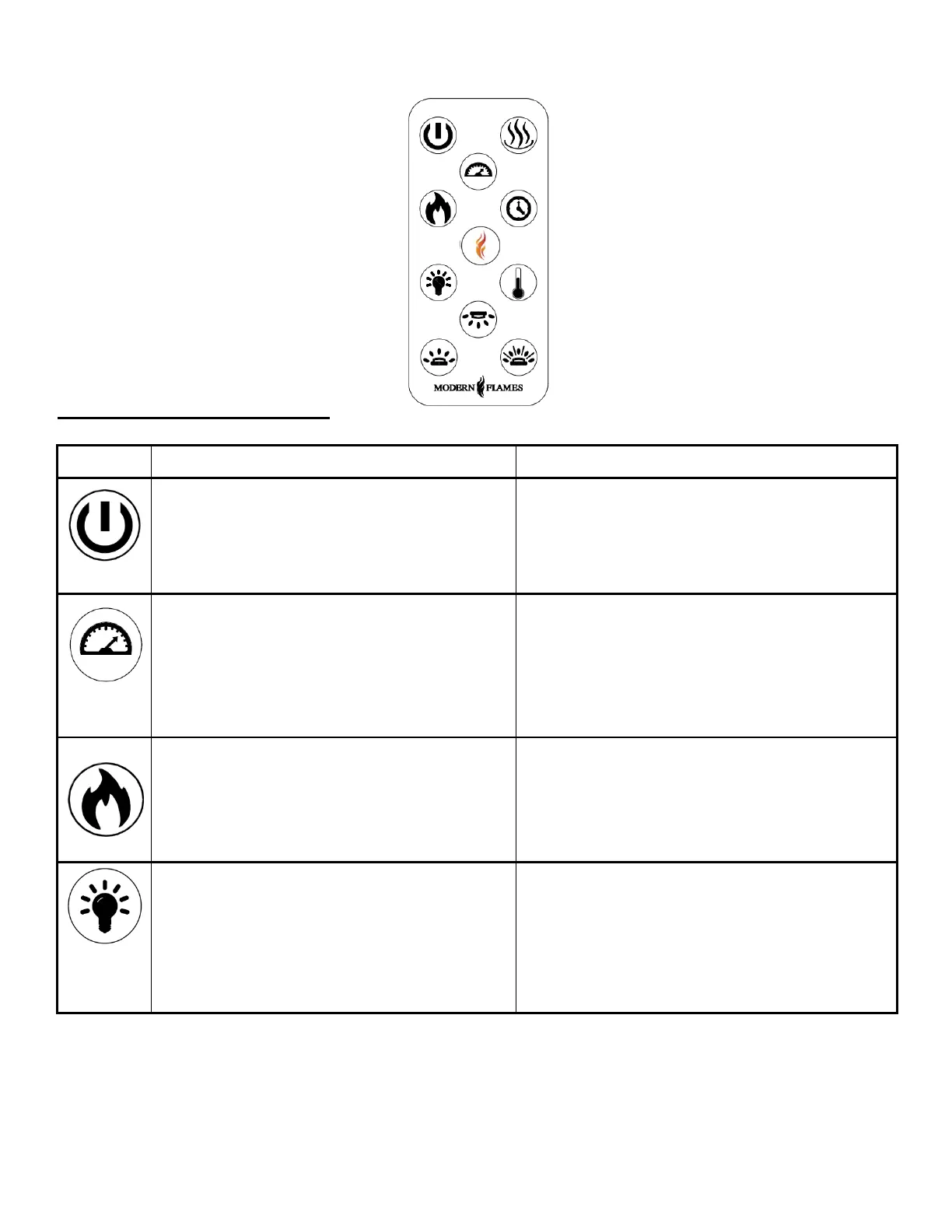
Remote Control Operation
ON: Enables control panel functions and
remote control. Turns on flame.
OFF: Disables control panel functions and
remote control. Turns off flame.
1. Press once: Indicator light turns on.
Power turns on. All functions enabled.
2. Press again. Flame turns off. Unit goes to
standby. All functions turn off.
Flame speed button: Controls the speed
of the flame. There are 4 flame speed
settings: 01 (slowest), 02 (Medium), 03
(fast), 04 (fastest)
1. Press once: Indicates current flame
speed.
2. Press again until desired setting is
reached. Display shows the setting.
The Default setting is 02 (medium speed)
FLAME button: Changes flame color.
NOTE: this fireplace has memory function
for flame.
1. Press once: Flame color illuminates.
2. Press again until desired color is
reached. In total, ten colors for flame and
one fade mode from 01-02-03-04-05-06-07-
08-09-10-11
FLAME brightness button: Makes flame
dimmer and brighter.
1. Press once: Flame brightness enabled.
2. Press again until desired setting is
reached. From F5-F4-F3-F2-F1-F0 (off)
NOTE: To turn off logs, PRESS and HOLD for
5 seconds..


 To Next Page