F
Manual MODSTER Breezy
18 www.modster.at
Altitude / Hover
360 °Flip
This is one of the default setting in the drone. When you release the Left Control Stick after the
ascending/descending action, the drone will hover at the current ight height. For a stable ight. press
the trim buttons to adjust accordingly.
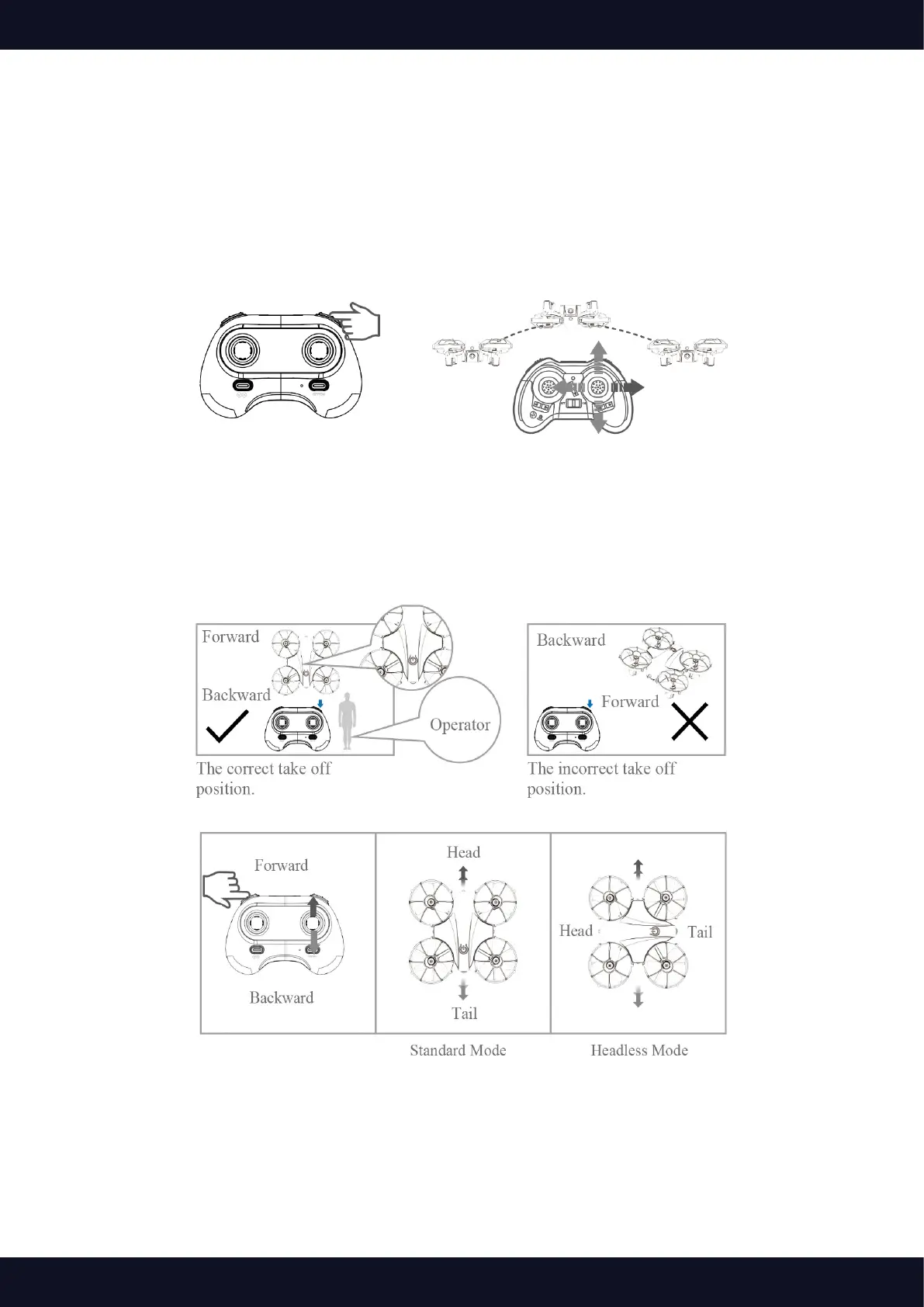
After ying the drone to a height over 2 meters, press the 360 ° ip button to activate 360 ° ip function.
Then move the Right Control Stick forward/backward/leftward/rightward to ip the drone accordingly.
Headless Mode
1. To ensure headless mode works well, please ensure corrent take o position as below picture shows
2. Long press the right upper button to active headless function. You will hear 2 beeps. In this mode,
the drone will y following the direction of the Right Control Stick regardless of the positionof your
drone‘s s head or the tail. The LED on the drone will ash during headless mode.Long press the same
button again to exit this mode.



 To Next Page