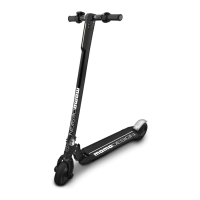
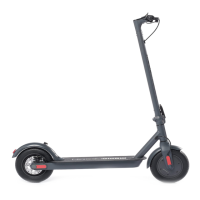
The MOMODESIGN MONACO80 MD-FS801 is an 8-inch foldable electric kickscooter designed for personal entertainment and transportation. It is not intended for public transport and can only be used by one person at a time. This kickscooter complies with the decree of electric mobility and is not suitable for children under 14 years old; adult supervision is required for riders under 18.
Function Description:
The kickscooter is a two-wheel folding electric scooter. It features a handlebar with a display, an acceleration lever on the right handle, and a brake on the left handle. The display shows the battery charge level, mileage, and speed. It also includes a front light for visibility. The kickscooter is designed for use on smooth and flat surfaces, with warnings against use on uneven, bumpy, wet, or icy grounds, or in traffic.
Important Technical Specifications:
- Model Name: MD-FS801
- Maximum Loading: 100 kg
- Minimum Loading: 30 kg
- Maximum Speed: 20 km/h
- Motor Power: 250W
- Endurance Mileage: Max 10 km (variable based on ground, inclination, speed, driving style)
- Climbing Gradient: 15 degrees
- Power Supply: AC 110-240V, 50/60Hz
- Battery: 5000mAh Lithium rechargeable battery
- Battery Power: 180Wh
- Battery Voltage: 36V
- Battery Capacity: 5Ah
- Charging Temperature: 0°C ~ 40°C
- Storage Relative Humidity: 5% ~ 95%
- Charging Time: 4-5 hours (a 24-hour charge is recommended if the battery is completely empty)
- Ground Distance: Approximately 12 cm
- Open Body Dimensions: 102 x 41.5 x 112H cm
- Folded Body Dimensions: 113 x 41.5 x 34.5H cm
- Net Weight: Approximately 11.20 kg
- Wheel Diameter: 8 inches
- Waterproof Rating: IP54
Usage Features:
- Unfolding: The kickscooter is initially folded. To unfold, press the lever on the bottom towards the deck, then pull the handlebar up 90 degrees until a "click" is heard. The handles then need to be positioned on the handlebar. An easel is provided to keep the kickscooter standing.
- Folding: To fold, pull down the lever at the bottom of the handlebar and push the handlebar down towards the deck until a "click" is heard.
- Turning On/Off: Press the power on button on the display to turn on. To turn off, press the ON/OFF button for 2 seconds. The unit automatically turns off after approximately 10 minutes of inactivity.
- Display Functions: The display shows battery level, mileage, and speed. It has three buttons: Power On/Off, Speed Up (accelerate), and Slow Down (decelerate).
- Settings Mode: Press Speed Up and Slow Down simultaneously for 3 seconds to enter "Settings" mode. In this mode, you can adjust screen brightness (P1 function, 3 levels) and select between kilometers or miles (P2 function, 0 for Km/h). Parameters P3-P4-P5 should not be modified by the user as this may cause malfunctions. Factory settings can be reset by long-pressing the Speed Up button until the display turns off.
- Acceleration and Braking: Accelerate by pressing the speed button on the right handle. Decelerate by releasing the accelerator. Brake by pressing the lever on the left handle or by using the rear wheel brake system (pressing the bumper of the rear wheel with a foot).
- Front Light: Press the dedicated button to turn the front light on or off. The light only functions when the kickscooter is powered on.
- Safety: Always wear comfortable flat shoes, suitable sport clothing, helmet, knee, and elbow protections. A helmet may be legally required. Do not drive under the influence of alcohol or drugs. Maintain a safe distance from objects and people. Avoid sudden starts or stops. Adapt speed to the ground conditions. Always check battery level before riding.
Maintenance Features:
- Cleaning: Ensure the charging cable is disconnected and the kickscooter is powered off before cleaning. Wipe the case with a soft damp cloth. Do not use high-pressure water jets.
- Battery Charging: Fully charge the battery for 4-5 hours before first use. Always check the battery level on the display. If only one LED light is on, stop using and recharge. Do not charge below 0°C. Charge in a safe, dry, and clean environment. The kickscooter must be powered off during charging and should not be used while charging.
- Battery Connection: First, open the protective cover and ensure the charging port is dry. Insert the battery charger into the kickscooter's charging port, then connect the other end to the mains. The indicator light on the charger will be red during charging and turn green when fully charged.
- Battery Storage: For long-term storage, fully charge the battery every 2 months. Do not store below 0°C. Store in its original packaging or covered, in a dry indoor place, away from dust.
- Battery Disposal: Lithium batteries are considered dangerous goods. Dispose of them according to local recycling and environmental regulations. Do not treat batteries as common domestic waste or throw them into fire. The battery must be removed from the kickscooter before scrapping.
- Troubleshooting: If the display shows error codes (E1 for accelerator, E2/E3/E4 for battery voltage, E5/E6 for motor), do not use the kickscooter and contact your Dealer or after-sale service.
- Warranty: The product has a 2-year warranty for defects in materials, workmanship, and functionality (aesthetic parts excluded) from the purchase date (1 year with invoice). The battery has a 6-month warranty. The warranty does not cover damage from misuse, negligence, accidental operation, or normal capacity fadeout. Wear and tear parts (cables, connectors, external parts, plastic supports) are excluded from the warranty unless they have manufacturing defects. Do not open the vehicle, as this voids the warranty. For technical assistance, contact the retailer.

 Need help?
 General

 To Next Page