a p p l i a n c e s - 4
82
CAMELOT 2007
REFRIGERATOR (OPTIONAL)
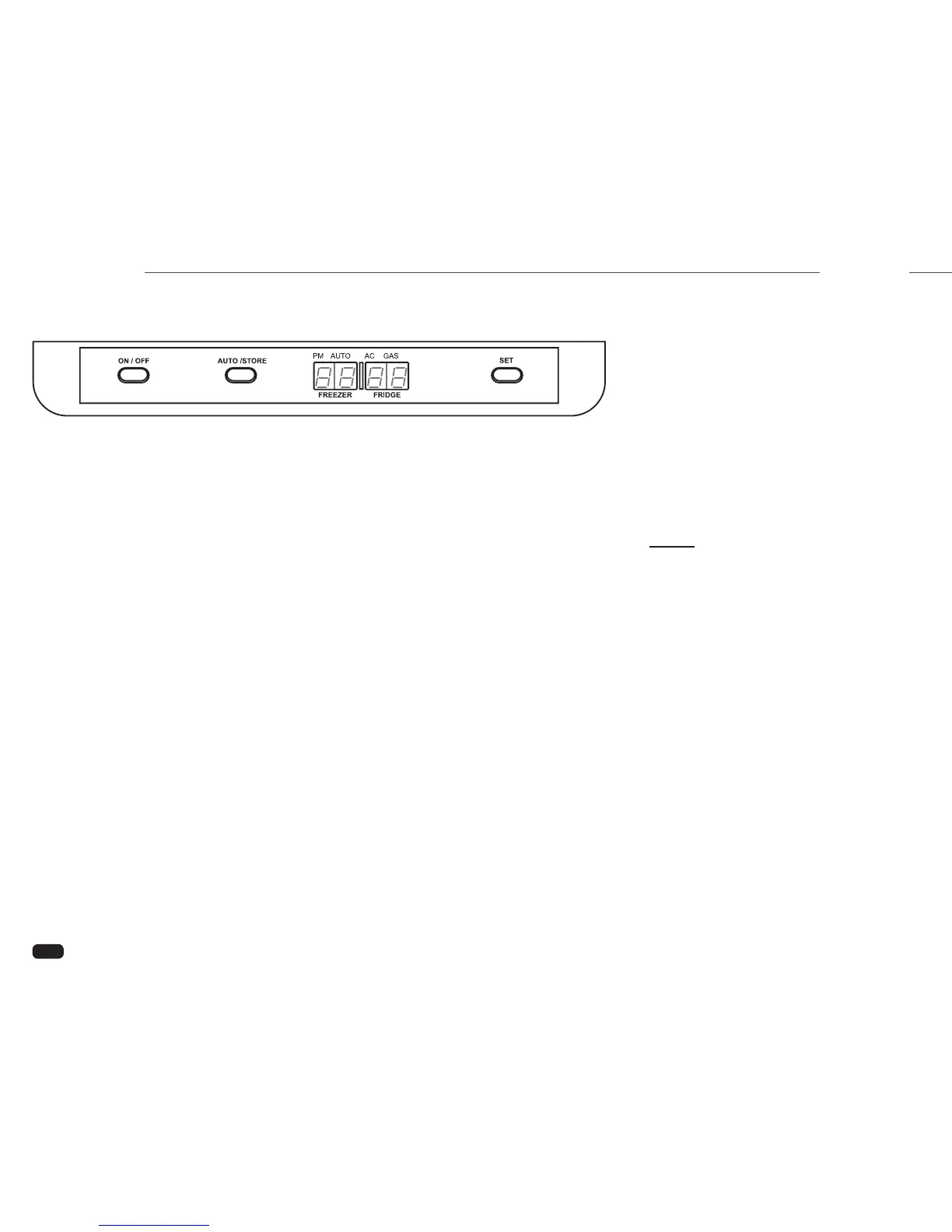
Control Panel
ON/OFF Button – Turns the refrigerator
on or off.
AUTO/STORE Button – Used to
select energy mode between
AUTO AC,
AUTO Gas, or LP-Gas. The AUTO/
STORE button is also used to save
settings.
LED Display – The screen displays
temperature, the different modes of
operation and status messages.
This includes:
- Temperature in frozen food
compartment.
- Temperature in fresh food compartment.
- AUTO AC mode.
- AUTO Gas mode.
- LP-Gas mode.
- Temperature setting.
- Clock.
- Status and error messages.
SET Button – Used to adjust the
temperature range and to set the clock.
Operation
Press the main power ON/OFF button.
If the clock has to be set the LED display
will show ashing horizontal bars “-- --“.
Setting the Clock:
1. Press the SET button until gures ash
on the LED display.
2. Press the SET button to adjust time.
PM is indicated by a dot under PM on
the LED display.
3. Save settings by either pressing the
AUTO/STORE button, or waiting 5
seconds (the settings will
automatically save).
Setting the Temperature:
1. Press the SET button to the desired
temperature setting (1 to 5, with 5 the
coldest).
2. Save settings by either pressing the
AUTO/STORE button or waiting 5
seconds (the settings will
automatically store).
Selecting Mode of Operation:
The mode of operation ranges between
AUTO AC, AUTO Gas, or LP-Gas.
1. To select automatic operation press the
AUTO/STORE button until AUTO is
displayed. In this mode the system will
automatically select the most suitable
energy source that is available, either
AC or
LP-Gas operation.
2. To select LP-Gas operation only, press
the
AUTO/STORE button until a dot
is indicated above LP.
NOTE:
Current mode of operation and the
energy source, AC or Gas, will be
indicated by a dot on the LED display.
Automatic Defrost:
The refrigerator will automatically defrost the
frozen and fresh food compartments every 24
hours.
Manual Defrost:
The refrigerator may be defrosted manually.
A defrost cycle usually takes about 1 hour
depending upon the amount of frost in the
refrigerator.
1. Press the
ON/OFF button to turn off
the refrigerator.
2. Press and hold the
AUTO/STORE
button, then press the
ON/OFF button.
“dE Fr” will show in the LED display.
031217



 To Next Page