ELECTRONICS FOR SPECIALISTS ELECTRONICS FOR SPECIALISTS ELECTRONICS FOR SPECIALISTS ELECTRONICS FOR SPECIALISTS ELECTRONICS FOR SPECIALISTS ELECTRONICS
MONACOR INTERNATIONAL GmbH & Co. KG • Zum Falsch 36 • 28307 Bremen • Germany
Copyright
©
by MONACOR INTERNATIONAL. All rights reserved.
A-1828.99.01.03.2017
6.3 Routing with the Dante Controller
To assign the input signals and output signals of the
corresponding units:
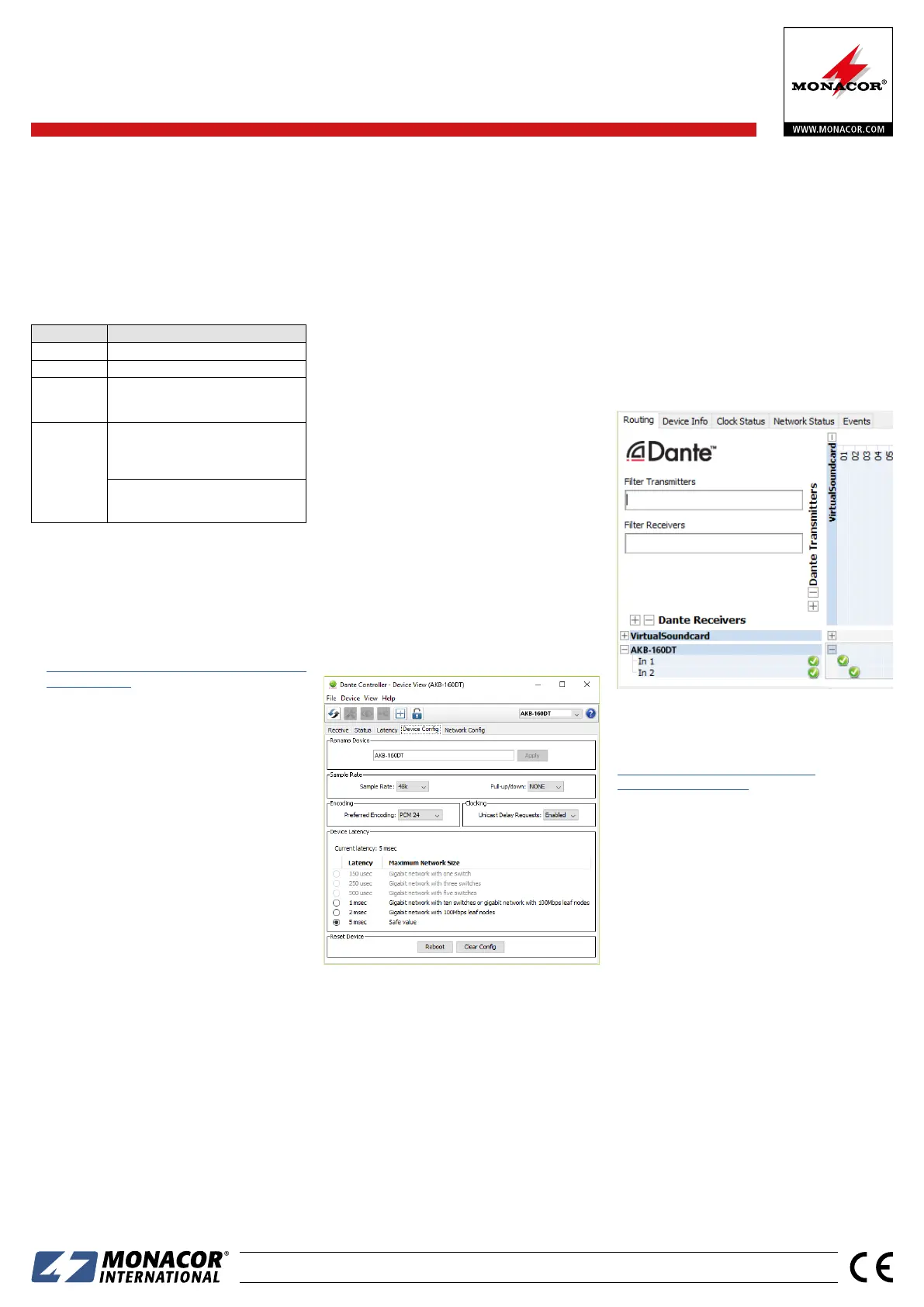
1) Under “Routing” in the window “Network View”,
click ⊞ to open the channels of the desired Dante
transmitter under “Dante Transmitters” and the
channels of AKB-160DT under “Dante Receivers”
(refer to fig. 4).
2) Navigate from the column of the Dante transmit
channel to the line of the desired Dante receive
channel of AKB-160DT and click the field at the
intersection point.
3) Wait for the field to show a green circle with a
white check mark ✔.
4) Repeat the last two steps for the second Dante
receive channel of AKB-160DT, if required.
Fig. 4 Routing from the audio source “VirtualSoundcard”
to the receiver “AKB-160DT”
An English user guide for the Dante Controller is
available for download on the Audinate website:
https://www.audinate.com/resources/
technical-documentation
7 Specifications
Speaker output: . . . . . . . 100 V
Output power
RMS power: . . . . . . . . 40 W
Music power: . . . . . . . 60 W
Frequency range: . . . . . . 17 – 20 000 Hz, −3 dB
S / N ratio: . . . . . . . . . . . . > 80 dB
THD: . . . . . . . . . . . . . . . . < 1 %
Dante input signal
Number of channels: . 2
Resolution: . . . . . . . . 16 – 32 bits
Sampling rate: . . . . . . 44.1 – 96 kHz
Data interface: . . . . . . Ethernet, RJ45 jack
Power supply: . . . . . . . . . 230 V/ 50 Hz
Power consumption: . . . . 75 VA max.
Ambient temperature: . . 0 – 40 °C
Dimensions: . . . . . . . . . . 213 × 55 × 238 mm
Weight: . . . . . . . . . . . . . 3.2 kg
Subject to technical modification.
6.2 Configuration of the unit with the
Dante Controller
1) Start the Dante Controller.
2) Wait for the desired Dante transmitter and
AKB-160DT (under “Dante Receivers”) to appear
in the matrix.
Note: If AKB-160DT or the Dante transmitter fails to
appear, the reason may be that
– the corresponding unit has not been switched on
– the unit is in a different subnet
–
the unit is not able to synchronize with the other Dante
units.
However, if one of the two last-mentioned reasons ap-
plies, the Dante unit should at least appear under the tab
“Device Info” or “Clock Status” in the network view. A
fast solution of the problem may be to switch off the unit
or to disconnect the connection to the switch. For further
information please refer to the user manual of the Dante
Controller from Audinate.
3) In the menu bar of the Dante Controller, select
“Device / Device View” or use the shortcut Ctrl+D.
The Device View window will open.
4) Select “AKB-160DT” in the bar of the drop-down
menu appearing beneath the menu bar.
5) The third bar can be used to indicate information
on the unit and to make settings. Select the tab
“Device Config” (refer to fig. 3).
6) Adjust the “Sample Rate” to the desired Dante
transmitter or set a different common sample rate
for both units, if required.
7) In the field “Rename Device”, the name used for
the unit in the Dante network can be changed
(e. g. to a specific name referring to the place of
installation). Click “Apply” to confirm the change.
Fig. 3 Device-View of AKB-160DT
8) Use the tab “Network Config” to change the
network settings for the Dante interface of AKB-
160DT, if required.
6 Configuration of the Dante Network
AKB-160DT is configured as a receiver in the Dante
network by means of the program “Dante Control-
ler”, available as a free download on the website of
the company Audinate. The settings made via the
program will be saved in the corresponding transmit-
ters and receivers of the Dante network so that the
program is only required for network configuration
but not for normal operation. The following system
requirements apply to the computer on which the
program “Dante Controller” is to be executed:
Component Minimum requirements
Processor 1 GHz
RAM 512 Mbytes
Network
Standard Ethernet interface
(100 Mbits /s or Gigabit) or
wireless LAN (WiFi) interface
Operating
system
Windows 7 (SP1 or höher), 8.1 or 10
Note: Both UTF-8 and Unicode will be supported,
except for host names and names of units; the
DNS standard will not support Unicode for them.
Mac OS X 10.9.5, 10.10.5 or 10.11
Note: Intel architecture only; PPC architecture will
not be supported
Windows is a registered trademark of Microsoft Corporation
in the USA and other countries.
Mac OS is a registered trademark of Apple Computer, Inc. in
the USA and other countries.
6.1 Installing the “Dante Controller”
To install the program from the Audinate website:
1) Call up the following Internet address:
https://www.audinate.com/products/software/
dante-controller
2) Select the operating system.
3) Click the button with the version of the Dante
controller.
4) Log in or create an account.
5) Download the software.
6) Install the software.
AKB -160 DT Order Number 17.6070


 To Next Page
 Loading...