
 Need help?
Do you have a question about the Monitor TrueCap MK-2 and is the answer not in the manual?
Expresses gratitude for purchasing the TrueCap® RF Capacitance Level Sensor and appreciates customer business.
Emphasizes reading the manual and complying with safety sections for proper operation and personnel safety.
Provides contact information for technical support and instructions for returning units for service or warranty.
Details critical factors for selecting an optimal mounting location, including flow, contact, shield penetration, and proximity.
Describes the process for safely removing the sensor cover using spanner slots.
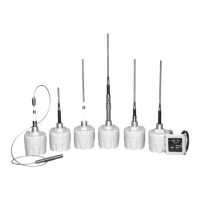
Details the mounting process for various probe types including hole cutting, welding, and probe insertion.
Describes the mounting process specifically for the lagged housing version of the sensor.
Covers mounting, probe insertion, and mechanical reinforcement for pipe extension probes.
Explains how to attach optional probe extensions to augment sensing probe length.
Provides guidance on selecting a location and mounting the remote electronics enclosure.
Details safety regulations and precautions for installing the sensor in hazardous locations.
Covers factory wiring connections and requirements for permanently connected equipment.
Explains how to maintain separation of circuits and proper protective earthing for safety.
Describes power supply compatibility and the function of the output relay contacts.
Details the distance limitations and requirements for connecting the remote probe and electronics.
Guides users through the process of calibrating the sensor to ignore vessel or material build-up.
Explains how to adjust sensitivity for different material dielectric values.
Details how to use the push-button test feature to verify sensor operation.
Describes the time delay adjustment and the selectable fail-safe modes.
Explains the meaning of the various status LEDs on the sensor.
Describes the power-up initialization sequence and the self-verification error mode.
Provides a step-by-step summary for performing the sensor calibration.
Addresses problems like sensor not detecting, remaining in 'DET' mode, output contact issues, and no switch response.
States that the fuse is not operator-replaceable and advises contacting the factory.
Discusses the low maintenance nature of the sensor and periodic checks for enclosure integrity.
Explains the importance of enclosure protection and cleaning threads for proper operation.
Provides dimensional drawings for the standard and food grade probe configurations.
Shows dimensional data for the cable extension probe assembly.
Presents dimensional information for the stub probe variant.
Displays dimensional drawings for both ordinary and hazardous location remote electronics enclosures.
Provides dimensional details for the pipe extension probe assembly.
Shows dimensional data for the lagged housing version probe.
Highlights crucial safety information and the use of the safety symbol.
Details precautions regarding high voltage, enclosure integrity, and electrical integrity in hazardous locations.
Lists EMC standards compliance and test setup requirements.
Provides detailed technical specifications for power, environment, output, indicators, and probe types.
Outlines the terms and conditions of the manufacturer's warranty for the sensor.
 General
| Brand | Monitor |
|---|---|
| Model | TrueCap MK-2 |
| Category | Accessories |
| Language | English |

 To Next Page