49-2000868 Rev. 0 7
USING YOUR COOKTOP
TURN BURNER(S) OFF
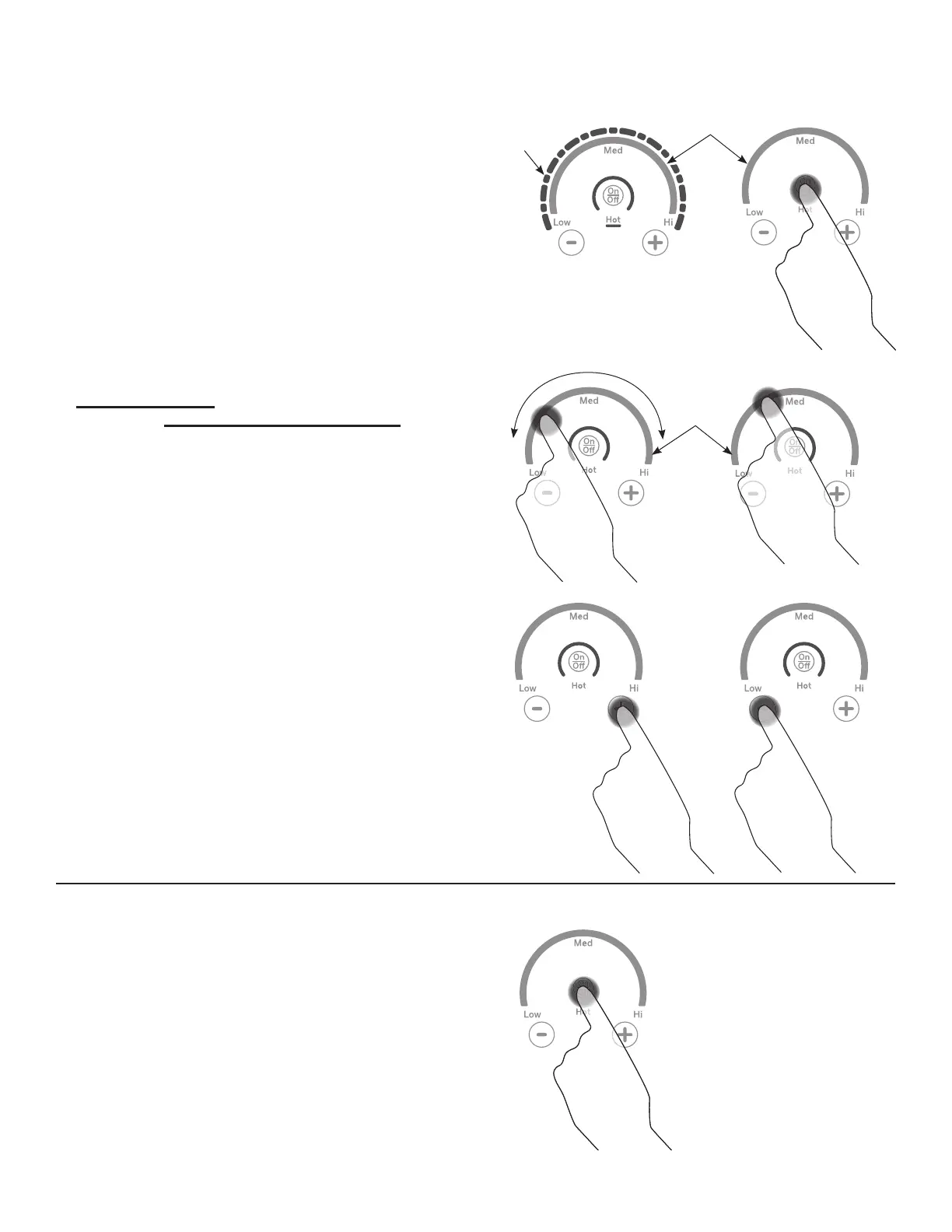
Touch On/Off pad for an individual burner.
OPERATING THE COOKING ELEMENTS
Turn Burner(s) On: Touch and hold On/Off pad about half
a second. A chime can be heard with each touch to any
pad.
Power level can be selected in any of the following ways:
1. Swipe the gray arc (on the graphics) to the desired
power level. There is no sensor on the LEDs, or;
2. Touch Anywhere along the gray arc, or;
3. Touch + or - pads to adjust power level, or;
4. Shortcut to Hi: Immediately after turning unit on, touch
the + pad, or;
5. Shortcut to Low: Immediately after turning unit on, touch
the - pad.
Gray Arc
Swipe Area
LED
Lights
Gray Arc Swipe Area


 To Next Page