10 49-1000709 Rev. 0
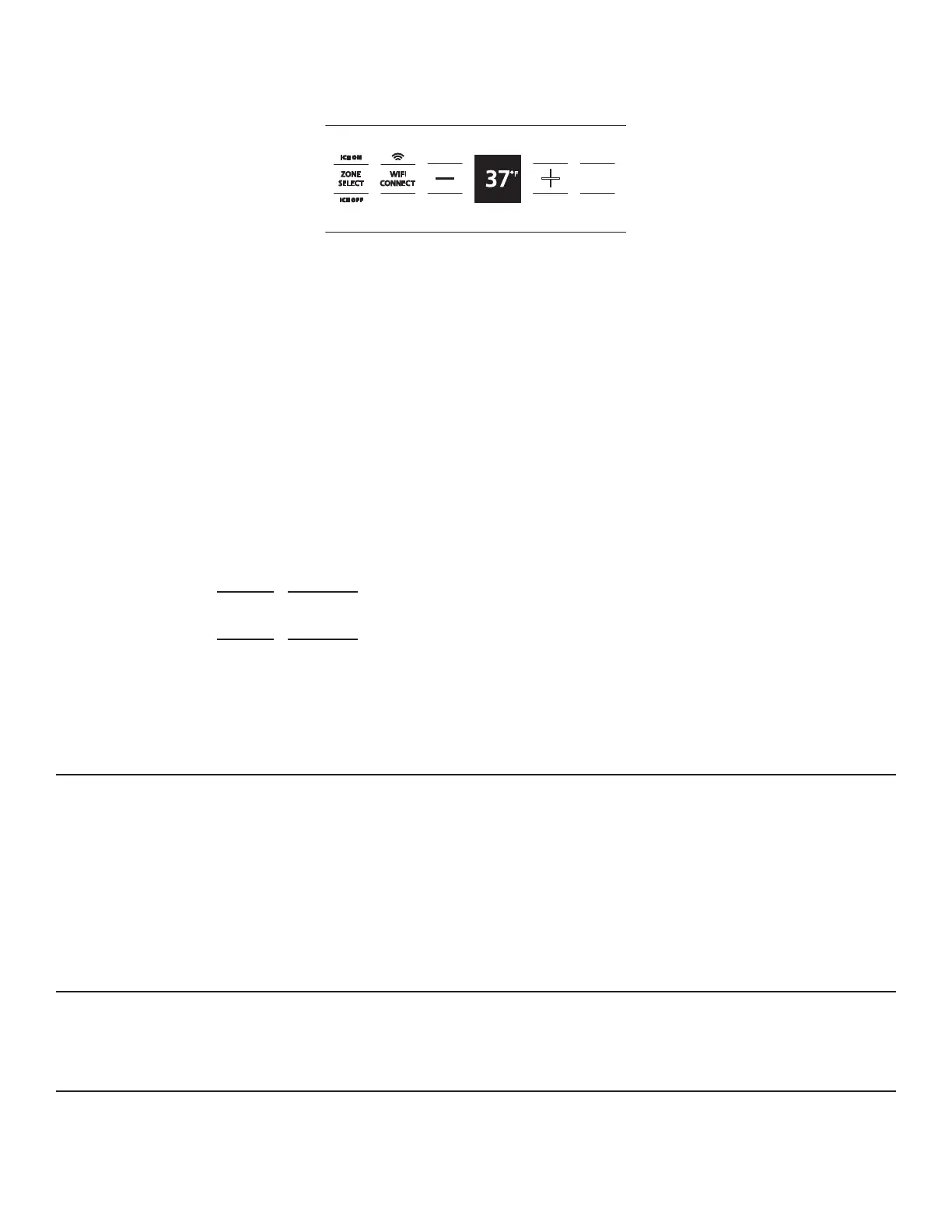
CONTROL PANEL
The control panel shows the set temperature of the
fresh food, convertible and freezer compartments.
The actual temperature will vary from the set temperature
based on factors such as door opening, amount of food,
defrost cycling and room temperature.
NOTE: Frequent door openings or a door left open for
periods of time may increase the internal temperature of
thefreezerorrefrigeratorcompartmenttemporarily.
Before changing the temperature, press the Zone Select
paduntilyoureachthezoneyouwishtoadjust.
To change the temperature settings, press the (+) or
(-) pads to desired
temperature set point.
Allow 24 hours for the
refrigerator to reach the
temperature you have
set.
For the Convertible Drawer, “+”or“-”mustbetapped
oncetochangethetemperaturepreset.“Pressagainfor
change”isdisplayedonUIwithfirsttouch.Afterthefirst
touch, only a single tap is necessary to switch between
eachpresetzone.
Convertible Drawer Preset Zones:
Freezer(syncwithfreezer)
Ice Cream 10°F (-12°C)
Meats 29°F (-2°C)
Drinks 33°F (1°C)
Snacks 37°F (3°C)
Produce 41°F (5°C)
To turn off the cooling system press and hold both (+)
and (-) pads for 3 seconds. Once complete, the display will
show COOOLING OFF.
To turn the cooling system on, press either (+) or (-) pad
and the display will show COOLING ON.
NOTE: Setting the controls to COOLING OFF stops
cooling, but does not shut off electrical power to the
refrigerator.
CHANGING DISPLAY TEMPERATURES FROM °F TO °C
To change between Fahrenheit and Celsius, press and hold the Zone Select and (-) pads on the control panel for 3 seconds.
CONTROLS
FRIDGE
ON
OFF
DOOR
ALARM
TOP
Preset Settings: Allow 24 hours to reach these preset temperatures.
Temperature Ranges
Low High
34°F 42°F Refrigerator
1°C 6°C
-6°F +4°F Freezer
-21°C -16°C
TurboCool™
TurboCool™ rapidly cools the refrigerator to cool foods
faster. Use TurboCool™ when adding a large amount of
food to the refrigerator, when putting away foods after they
have been sitting out at room temperature, or when putting
away warm leftovers. It can also be used if the refrigerator
has been without power for an extended period.
Access TurboCool™ in the SmartHQ™ App to activate
the feature. The display will show tc. After 8 hours, or if
TurboCool™ is deactivated through the app, the refrigerator
will return to the original setting.
NOTE: The refrigerator temperature cannot be changed
duringTurboCool™.Thefreezertemperatureisnot
aectedwhileTurboCool™isactivated.Whenopeningthe
refrigerator door during TurboCool™, the fans will continue
to run if they have cycled on.
TurboFreeze™
UseTurboFreeze™toquicklyrestorefreezertemperaturesafterfrequentdooropenings.AccessTurboFreeze™inthe
SmartHQ™ App to activate the feature.
NIGHTTIME SNACK MODE
Use Nighttime Snack Mode to lower the level of the interior lights. Access Nighttime Snack mode in the SmartHQ™ App
to activate the feature.








 To Next Page