Temperature Controls
Built-In Refrigerators
@
_c0 Q_
f
FREEZER
X
R£FRIGERATOR
@
H{}LO 3 _EC
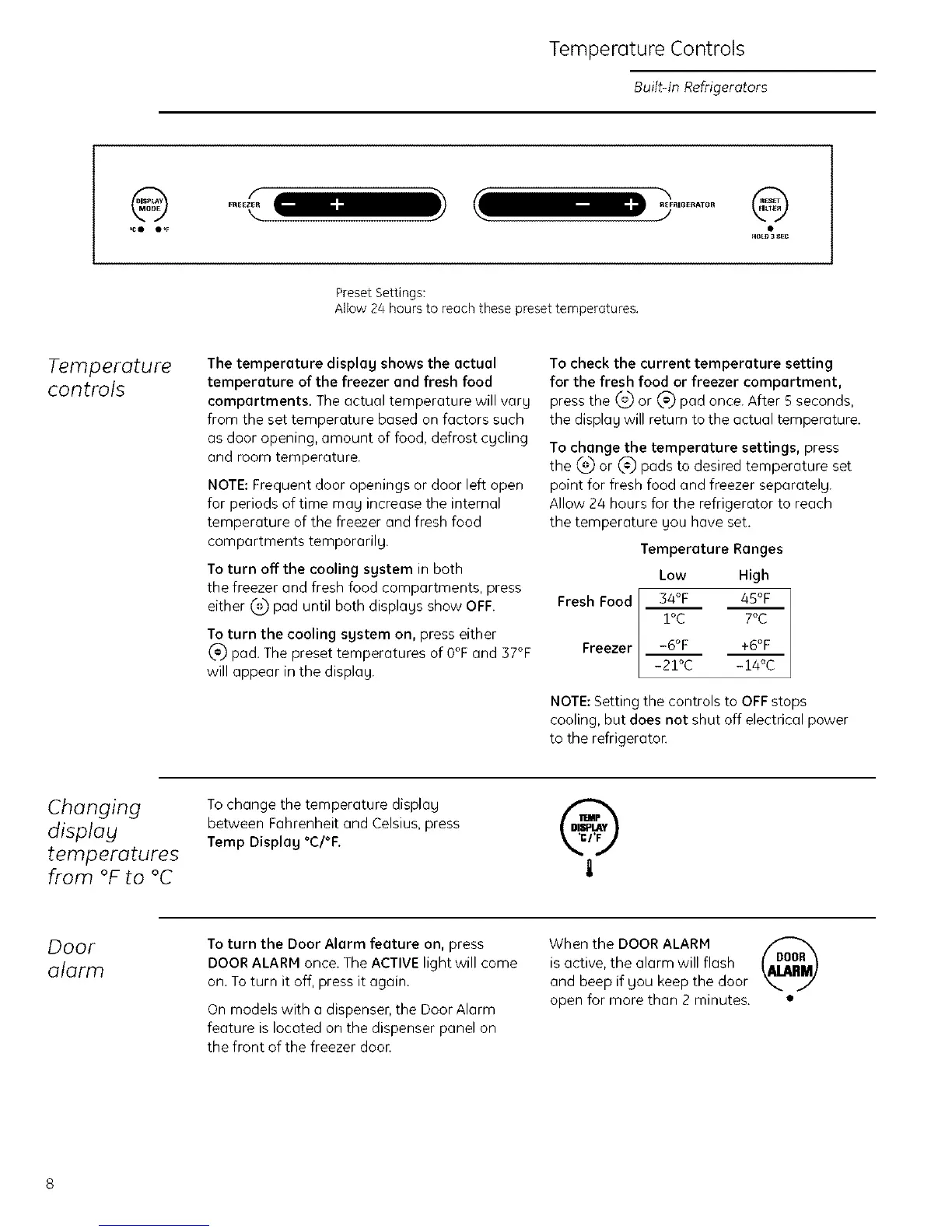
Preset Settings:
Allow 24 hours to reach these preset temperatures,
Temperature
controls
The temperature display shows the actual
temperature of the freezer and fresh food
compartments. The actual temperature will vary
frorn the set temperature based on factors such
as door opening, amount of food, defrost cgcling
and room temperature.
NOTE:Frequent door openings or door left open
for periods of time mag increase the internal
temperature of the freezer and fresh food
compartments temporarilg.
To turn offthe cooling system in both
the freezer and fresh food compartments, press
either 0.2)pad until both displays show OFF.
To turn the cooling system on, press either
_'_ pad. The preset temperatures of 0°F and 37°F
will appear in the display.
To check the current temperature setting
for the fresh food or freezer compartment,
press the (_ or _-_ pad once. After 5 seconds,
the display will return to the actual temperature.
To change the temperature settings, press
the _ or _ pads to desired temperature set
point for fresh food and freezer separatelg.
Allow 24 hours for the refrigerator to reach
the temperature you have set.
Fresh Food
Freezer
Temperature Ranges
Low High
34°F 45%
1oc 7oc
-6OF +6OF
-21°C -14°C
NOTE: Setting the controls to OFF stops
cooling, but does not shut off electrical power
to the refrigeraton
Changing
display
temperatures
from °F to °C
Tochange the temperature display
between Fahrenheit and Celsius, press
Temp Display °C/°F.
Door
alarm
To turn the Door Alarm feature on, press
DOOR ALARM once. The ACTIVE light will come
on. To turn it off, press it again.
On models with a dispenser, the Door Alarm
feature is located on the dispenser panel on
the front of the freezer door.
When the DOOR ALARM
is active, the alarm will flash
and beep if you keep the door
open for more than 2 minutes.








 To Next Page