10-2007
Page 6 of 7
Step 3
Connect the Infrared (IR) Blaster
Cable
!
The IR blaster cable allows HAVA to send commands to your video device, just like a remote. Make
sure you properly connect the IR blaster cable before you install the HAVA software so that the Setup
Wizard and Player can control your device.
CONNECTING TO YOUR HAVA
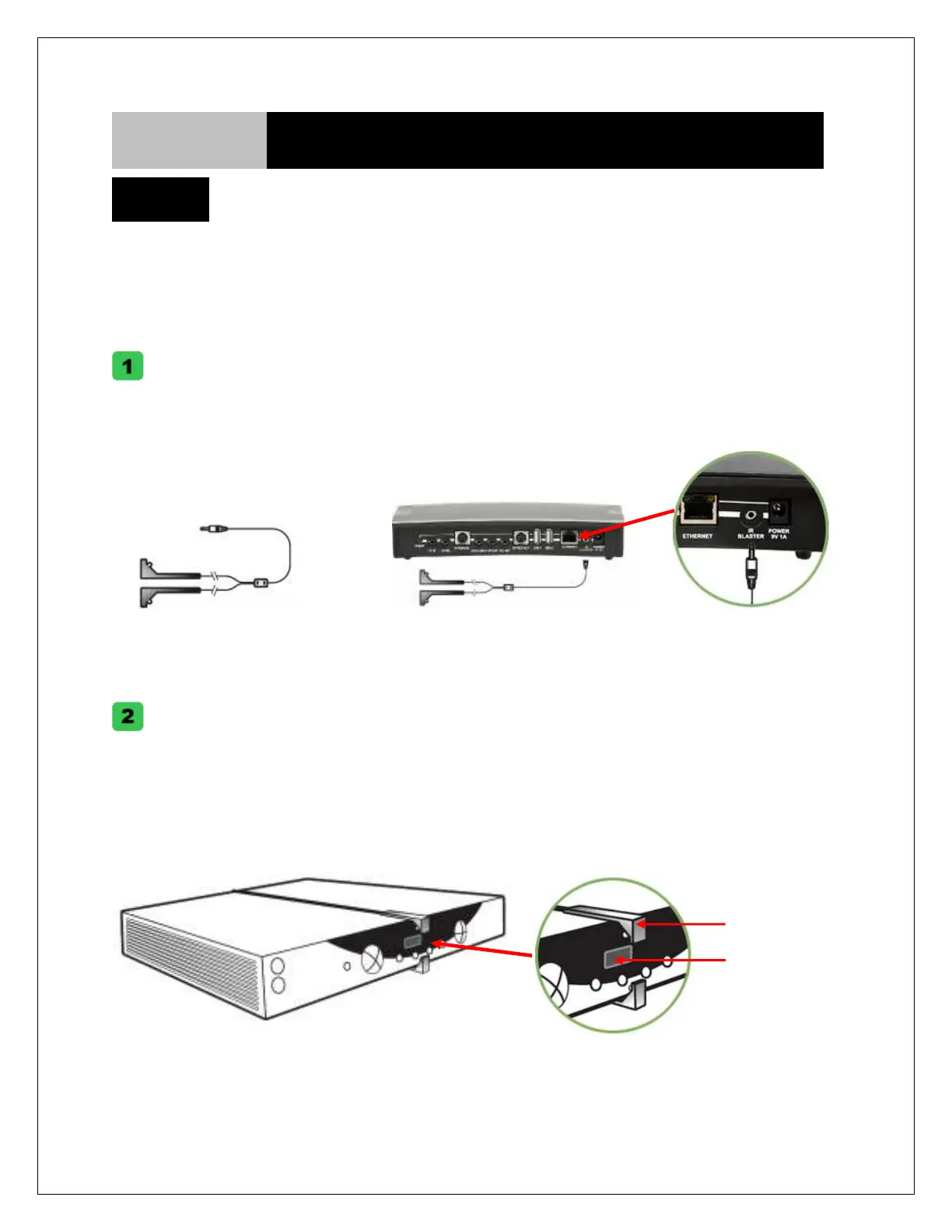
Connect the IR blaster cable to the IR blaster port on the back of your HAVA.
IR Blaster Cable
IR Blaster
IR Blaster Cable Connection:
Locate the IR receiver on the video device you wish to operate. Place the IR emitter so that it faces the IR
sensor on the device (see diagram). Run the Setup Wizard to test Remote Control commands. IR Emitter
position may need to be adjusted prior to affixing it to the device. Two emitters are provided and each
emitter controls one single device.
Finding the infrared sensor
The IR sensor is on the front of your cable / satellite / DVR box. Often you can locate it by using your
remote and seeing the flashing sensor light it activates.
IR emitter
IR sensor



 To Next Page