!
©Copyright+2016+Monster+GPS™+|+JLM+Enterprises +LLC +
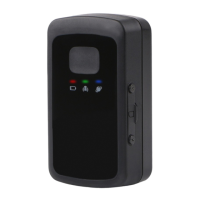
PORTS AND BUTTONS
1. SIM Card Port - Your device came with a SIM card pre-installed, so you do not need
to do anything with this. You will also notice a small screwdriver in the package. This
tool is for removing the cover of the SIM Card Port should you ever need to do so.
2. Charging Port - One end of the included charger plugs into this port, the other end
into a wall outlet.
3. Function Key (a.k.a. Panic Button) - You can set up alerts for use with this button.
For example, your child carrying a GL300 in her backpack can press this button to
immediately send a panic notification to you via text message and/or email.
4. Power Button - Used to turn the device on and off. Hold the key in for 2-3 seconds
to turn the GL300 on/off.
LED STATUS INDICATORS
• The Power LED Status Indicator flashes RED when charging and lights solid
RED when charging is completed. The light will be OFF when not connected to power.
• The GSM (Cellular) LED Status Indicator flashes fast GREEN (about once every 1
second) when searching for an adequate cellular signal and flashes
slow GREEN (about once every 3 seconds) when cellular lock has been
achieved. NOTE: Cellular networks are used to transmit the location data to our servers
for display for you.
• The GPS Satellites LED Status Indicator flashes BLUE intermittently when
communicating with one or more GPS satellites. Most of the time, this indicator will


 To Next Page