5
4
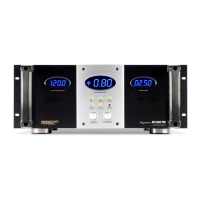
MONSTER AVS 2000 FEATURES
1. Digital “Output/Input Voltage” Meter: Indicates Output or Input voltage.
2. Digital “Voltage Correction” Meter: Indicates the amount of voltage being increased or decreased in an effort
to maintain a consistent 120 volts.
3. Digital “Current Usage” Meter: Indicates amperage draw.
4. “Ground OK” Indicator: Indicates the wall outlet that Monster AVS 2000 is plugged into is properly grounded.
5. “Surge Protected” Indicator: Indicates Monster AVS 2000’s internal surge protection circuit is active.
6. “Line and Neutral OK” Indicator: Indicates the wall outlet that Monster AVS 2000 plugged into is properly wired.
7. “Sequential Power ON/OFF” Switch: Once the Automatic Voltage Stabilizer is plugged into a properly grounded
120 volts (nominal) outlet, pressing this button will provide AC power to the components plugged into the Automatic
Voltage Stabilizer’s Switched and Switched (Timed) outlets. Pressing this button again will turn off the Switched
and Switched (Timed) outlets. (Unswitched outlets remain on at all times.)
8. “Switched Outlets On” Indicator: Indicates components plugged into the “switched” outlets will receive power
when the ON button is pressed.
9. “Input Voltage and Display Dimmer” Button: Indicates output voltage meter (press and release).
Adjusts the brightness of the digital meters (press and hold).
10. “Abnormal Voltage Condition” Indicator: Indicates the incoming voltage is below approximately 80 volts AC
or above approximately 140 volts AC.


 To Next Page