EasyManua.ls Logo

Monster AVS 2000 - User Manual

Monster AVS 2000
32 pages
Print Icon
To Next Page IconTo Next Page
Loading...
Owner’s Manual
®
Home Theatre Reference
Automatic Voltage Stabilizer
AVS 2000

Questions and Answers

  • H
    Heather HornJul 31, 2025
    What to do if my Monster Surge Protector AVS 2000 is not receiving power?
    • L
      leonardkingJul 31, 2025
      If your Monster AVS 2000 is not receiving power, there could be a couple of reasons. First, ensure the AC power plug is properly plugged into a grounded 120V wall outlet and that the unit is turned on using the power button. In some cases, the wall outlet may be controlled by a wall switch, so try turning on nearby light switches. Another potential cause is an overload due to too many connected devices, which can trip the thermal circuit breaker. If this happens, disconnect some devices and press the thermal circuit breaker button (labeled Breaker 15A on the back panel) to reset it. Allow 10 minutes before attempting to reset the breaker; otherwise, it may prematurely sense a power overload.
  • A
    Andrew DayAug 9, 2025
    Why is my Monster Surge Protector AVS 2000 not providing power to the components?
    • S
      Sarah GomezAug 9, 2025
      If your Monster AVS 2000 is not providing power to the connected components, it might be because the component is plugged into a 'switched outlet' and the Monster AVS 2000 hasn't been turned on. To resolve this, press the ON button on the Monster AVS 2000 and wait a few seconds for the 'switched outlets' to activate. Alternatively, you can plug the component into an 'unswitched' outlet.
  • J
    John ChambersAug 20, 2025
    How to reset Monster Surge Protector AVS 2000 after overload?
    • K
      Kristi JonesAug 20, 2025
      If your Monster AVS 2000 has overloaded, disconnect some of the connected components to reduce the load. Then, press the thermal circuit breaker button located on the back panel (labeled Breaker 15A) to reset it. It's important to wait at least 10 minutes after the breaker trips before attempting to reset it. Resetting it too soon might cause it to sense a power overload prematurely, preventing the unit from operating correctly.

Summary

Important Safety Information

Power Sources and Grounding

Guidance on connecting to correct power outlets, avoiding plug forcing, and consulting electricians for grounding.

Liquid and Environmental Hazards

Warnings against operating the unit if liquid is spilled on it or near water sources.

Power Cord Safety and Storm Precautions

Advice on cord placement, immediate disconnection if damaged, and unplugging during storms.

User Serviceability and Grounding

Instruction not to open the unit for repair and emphasis on proper grounding for safety.

Proper Grounding and Installation

Heat Exposure and Cleaning Precautions

Advises against heat exposure and recommends light dusting without liquid cleaners.

A Note from The Head Monster

The Minds Behind the Monster AVS 2000 Design

Richard Marsh Profile

Overview of Richard Marsh's expertise in AC power and home theater system design.

Demian Martin Profile

Details Demian Martin's contributions to AC power solutions and audio design.

Noel Lee Profile

Highlights Noel Lee's role in popularizing audio cable and founding Monster Group.

Monster AVS 2000 Features

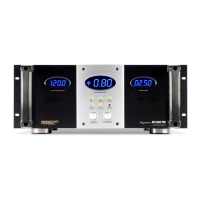
Voltage and Current Meters

Digital meters for output/input voltage, voltage correction, and current usage.

Indicator Lights

Indicators for ground status, surge protection, line/neutral status, and abnormal voltage.

Control Buttons

Button to adjust display brightness and input voltage.

Power Control Switch

Sequential power ON/OFF switch for switched and timed outlets.

Outlet Indicators and Wiring Status

Indicates switched/unswitched outlets, line/neutral OK status.

Outlet Programming and Circuit Breaker

Features for programming outlet delays and a resettable 15 Amp circuit breaker.

Remote Controls and Grounding

Includes remote trigger inputs/outputs and a ground screw for components.

Outlet Programming

Outlet Programming Method

Explanation of how to use slide switches to program delay times for switched outlets.

Troubleshooting

Power and Overload Issues

Addresses unit not powering on, overload, and circuit breaker tripping with remedies.

Component Power Delivery Problems

Provides solutions for components not receiving power from switched outlets.

Specifications

Monster AVS 2000 Specifications

General IconGeneral
Outlets8
Voltage120V
Cord Length8 feet
Response Time<1 nanosecond
WarrantyLifetime

Related product manuals