1: Long press 3 seconds EQ button to query and display the software version
2: long press 5 seconds Reset key to restore the factory default setting, including: Volume is 10,
treble and bass 0, the first time it is default by Bluetooth MODE, EQ is default by music,
MODE is default by indoor, and RGB light is default by mode 2 Breath.
3: USB only for update, no MP3 paly back function
4: The display and RGB light will be turned off with no operation for 20 seconds, but in GAME mode,
only display is tuned off, RGB light is still on. The display and RGB light will wake up again with
pressing any button on bar or remote control.
5:The first time soundbar is turned on by default Bluetooth mode, the next time turned on,
remember the current mode state set by the remote control or soundbar button.
6: The default volume is 10, and the iPhone simultaneously dominates the volume synchronization.
7
REMOTE CONTROL
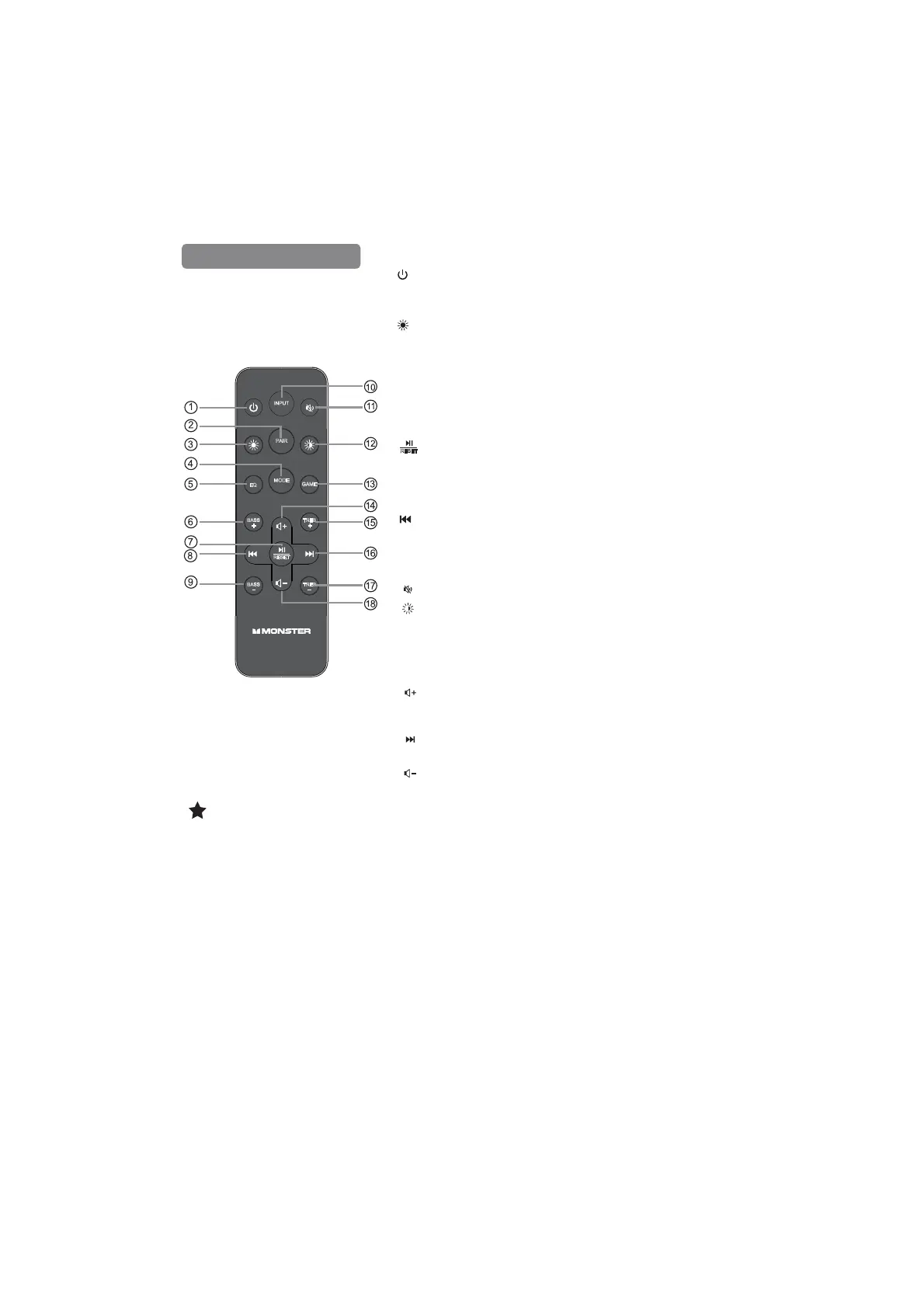
1. : Press the power button to turn on and turn off the unit.
2. PAIR: Press the "PAIR" button more than 2 seconds to connect or
disconnect to the pairing device.
3. : Lingt Mode L1-L2-L3-…L10, default in Breath mode L2,
long press 2S to enter into monochromatic mode L11, L12….L18.
4.MODE: Short press “MODE” button to switch MODE,
scrolling display: INDOOR/OUTDOOR, default in INDOOR mode.
5. EQ: Short press “EQ” button to switch EQ MODE, scrolling
GLVSOD\086,&ĺ029,(ĺ1(:6GHIDXOWLQ0XVLFPRGH
6. BASS+: Bass up, -5,-4,-3,-2,-1,0,1,2,3,4,5,default 0
7. : Short press Play/Pause key once to pause current music
playback (under BT mode).
Short press Play/Pause key once to resume music playback.
(Under BT mode)
Long press 5 seconds Reset key to restore the factory default setting.
8. : Short press PREV button skip to backward music (under BT mode).
9. BASS-: Bass down, -5,-4,-3,-2,-1,0,1,2,3,4,5,default 0
10.INPUT: Short press “Input” button to switch between
BT/AUX /HDMI eARC/Optical.
11. : Mute the music,the display will flash.
12. : BRIGHTNESS LEVEL 100%-75%-50%-25%,OFF
13.GAME: When pressing the “GAME “ button, the soundbar scrolling
display show "GAMING", default in Dance mode L9; Whenever user
change the different light mode, the soundbar will remember the light
mode from last set.
14. : Press the volume+ button to increase the volume,volume
level :0-32 , 0=Mute ,default 10.
15.TREB+: Treble up, -5,-4,-3,-2,-1,0,1,2,3,4,5,default 0
16. : Short press NEXT button skip to forward music (under BT mode).
17.TREB-: Treble down, -5,-4,-3,-2,-1,0,1,2,3,4,5,default 0
18. : Press the volume- button to discrease the volume,volume
level :0-32 , 0=Mute ,default 10.
INPUT
PAIR
MODE
GAME
EQ
BASS TREB
BASS
TREB
RESET
RESET
Note:


 To Next Page