EasyManua.ls Logo

mooas MO-MC-ELSD - Buttons and Indicators; Alarm Button Function; Smart Auto-Change Indicator; PM Icon Display

mooas MO-MC-ELSD
6 pages
Print Icon
To Next Page IconTo Next Page
To Previous Page IconTo Previous Page
Loading...
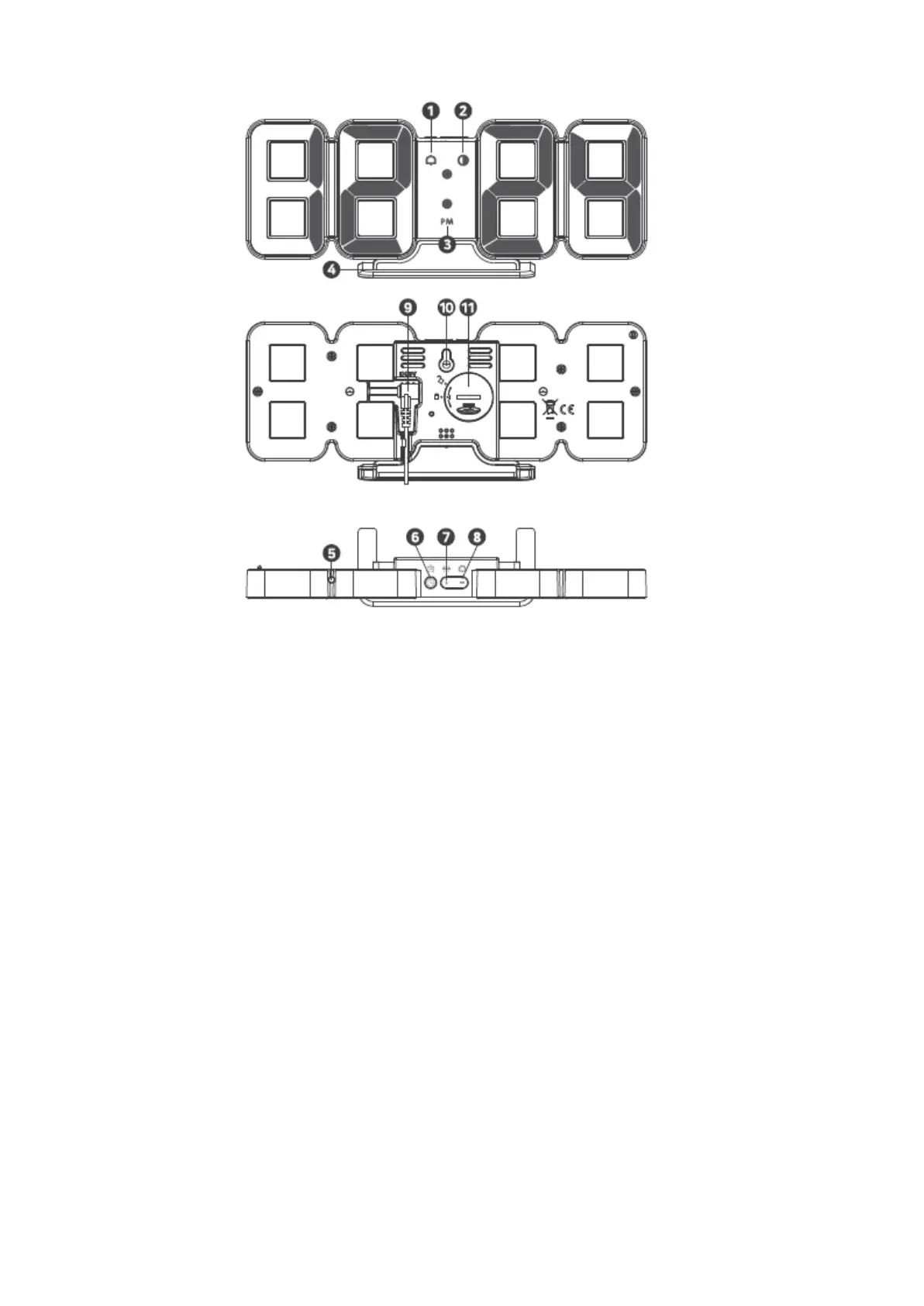
[Buttons]
1. Alarm
2. Smart auto-change mode indicator
3. PM icon with 12H mode
4. Cradle
5. Light sensor
6. Setting button (Time, Date, Alarm)
7. Press short to adjust the luminance,
press for while to turn ON/OFF the
smart auto-change mode
8. Press short to turn ON/OFF the
alarm, press for while to set the
display mode
9. Power socket
10. Wall mounting hole
11. Battery cover
*Smart auto-change mode is a mode that
automatically changes LED brightness and
color according to light sensor and time.

[按鈕]
1. 鬧鐘
2. 智能動切換模
3. 12小時式的時的下午圖標
4. 底座
5. 光源應器
6. 設定鈕(時、日期、鬧鐘)
7. 短按調節亮度,長按/ 智能動切
換模
8. 短按/關鬧鐘,長按設定顯示模式
9. 電源
10. 掛牆
11. 池蓋
*智能動切換模式是根據源感應器
和時自動變化LED亮度和顏色的
式。
[How to USE]
After connecting the included USB cable and power adapter, connect the cable to the power socket at the back
of the main unit and the power will be turned on.
[使用]
在連所附USB線和電源適配後,將線連接到主機背面的電插座,即可開電源

Related product manuals