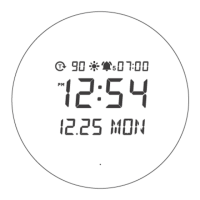
8. If no operation occurred when the alarm goes off, an alarm rings for 2 minutes.
0-10” : Beep sounds once per second.
11-20”: Beep sounds twice per second.
21-30”: Beep sounds 3 times per second.
If 30“ pass, the beep sounds four times per second.
鬧鐘設定
1. 如果在時間顯示器上按下 按鈕, 圖示會閃爍,以設定鬧鐘。
2. 如果長按 ,相應部分會閃爍。設定順序為鬧鐘時間 -> 鬧鐘分鐘。
3. 按下+和-按鈕來增加和減少數字。長按+和-按鈕可以連續增加和減少數字。
4. 若要確認設定,按下 按鈕或者如約15秒內沒有操作,系統將自動確認設定並返回時間顯示。
5. 按下-按鈕來開/關鬧鐘。
6. 當鬧鐘開啟時, 圖示會顯示,當鬧鐘關閉時, 圖示會消失。
7. 在鬧鐘響起時,按下任意按鈕來取消鬧鐘。將會顯示,並且鬧鐘將在第二天的同一時間響起。
8. 如果在鬧鐘響起時沒有進行任何操作,鬧鐘將響2分鐘。
0-10秒:每秒嗶一聲。
11-20秒:每秒嗶兩聲。
21-30秒:每秒嗶三聲。
如果超過30秒,每秒嗶四聲。
Easy Luminance adjustment
1. Press + button short to adjust the LED luminance. High -> Medium -> Low -> Off in order.Default
setting is the High.
2. Even if LED mode is OFF, the LED automatically turns on and the brightness keeps the previously set
level when the alarm rings.
簡單的亮度調整
1. 按短時間+按鈕以調整LED亮度。按順序為:高 -> 中 -> 低 -> 關。預設是高。
2. 即使LED模式關閉,當鬧鐘響起時,LED也會自動開啟且亮度保持先前設定的水平。
Color change
Press + button twice shortly to change the color of LED as white or white gold.Default setting is White.
更改顏色
輕按「+」兩次即可將LED燈顏色更改為白色或白金色。預設設定為白色。
Smart auto-change mode setting
Smart auto-change mode is a mode that automatically changes LED brightness and color according to light
sensor and time.


 To Next Page