2 ProFusion iS for iHeartRadio Quick Start Guide
Welcome
Thank you for choosing Mood Media to provide your iHeartRadio® internet
radio listening experience for your business!
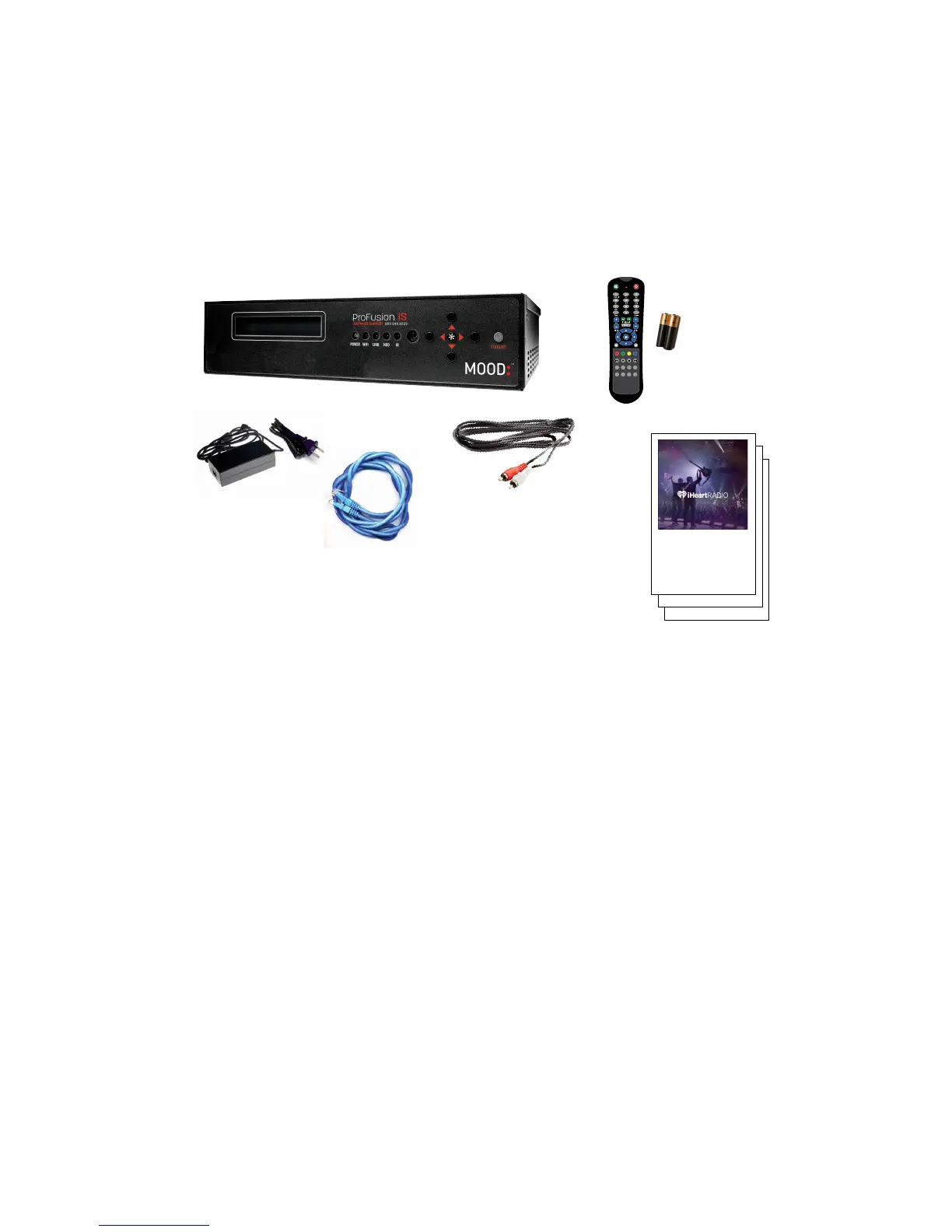
WHAT’S IN THE BOX?
1 ProFusion® iS player for iHeartRadio
2 Remote control and batteries
3 External power adaptor for the ProFusion iS
4 Ethernet cable
5 RCA audio cable
6 This Quick Start Guide, Feature Guide and
other important information about your
ProFusion iS
WHAT YOU WILL NEED
• A working amplifier/speaker system
• An open/active wired broadband internet connection (LAN, DSL, cable)
• A computer with Internet access
• An iHeartRadio internet radio account—don’t worry if you do not have
one yet. You will be prompted to create one during the setup process.
MOOD:
1
3
4
5
6
2
1 Connect
2 Activate
3 Listen
Quick Start Guide
USING YOUR MOOD MEDIA PROFUSION iS FOR
MOOD:
1 Connect
2 Activate
3 Listen
Quick Start Guide
USING YOUR MOOD MEDIA PROFUSION iS FOR
MOOD:
1 Connect
2 Activate
3 Listen
Quick Start Guide
USING YOUR MOOD MEDIA PROFUSION iS FOR
MOOD:



 To Next Page