Patches selection
01
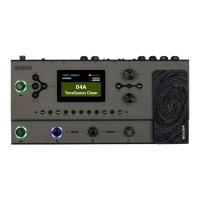
Connect the included power supply to the GE200. The GE200 will then boot into the
main interface.
PLAY/CHAIN mode: switch the preset tone by , , or rotate the VALUE knob, press
or to pin and hold for 1 second to achieve fast switching.
In CHAIN mode, the order of effects chain can be adjusted by using the VALUE button.
Three types of preset packs!
P001-P050 with AMP and CAB activated. It is recommended to use when connecting
to full-range devices (headphones, sound card, mixer, full-range speakers, etc.)
P051-P100 with AMP enabled. It is recommended to connect to the guitar speaker's
RETURN interface or later.
P101-P150 with AMP and CAB off. It is recommended to directly connect the INPUT
of the speaker.
P151-P200 Blank patches.
Editing
Saving
ON/OFF
Press the effect blocks to turn on/off respective effect modules.
1.Press the module button to enter the editing interface.
2.Select the item to be adjusted by rotating the VALUE knob
3.Press VALUE knob to enter the tone type selection or edit parameters.
4.Rotate VALUE to change the effect type or parameter, and press VALUE again to
return to the item to being adjusted.
Editing
1. Press the SAVE button.
2. Press the , or rotating the VALUE knob to select the storage position.
3. Press VALUE to confirm the storage slot.
4. Press VALUE to select the character at the current position, press again to
complete the editing
5. After editing the name, press the SAVE button. Press any button other than SAVE
or VALUE before the last step to discard the save operation.



 To Next Page