AUDIO PLAYBACK
SD amps have the ability to playback audio from your favourite external media device.
There are different ways to connect external devices with SD amps for music playback.
- A UX I N -
‒ BLUETOOTH CONNECTION ‒
Open the SY STEM menu and select the b utton to turn on Bluetooth
Open your external device and ensure Bluetooth is active
Search for Bluetooth devices on your external device, your amp will appear
as “MOOE R S DAMP”
Select “MOOER S DAMP” to connect to your SD amplifier
Control the playback volume from your external device
AUX I N
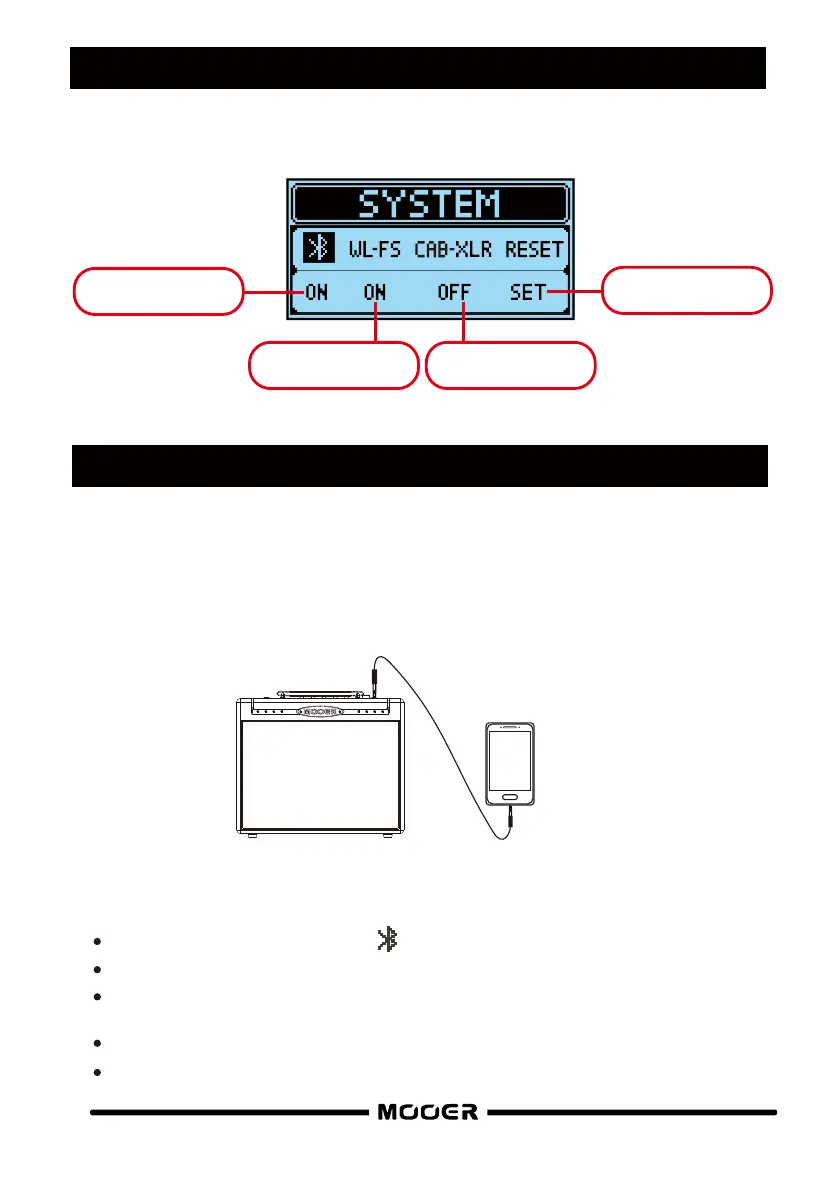
SYSTEM SETTINGS
Press the SYSTEM button to enter the system settings menu screen
Wireless footswitch
on/off
XLR O UT c ab
sim on/off
Res et to factory
default settings
Bluetooth playback
connection on/off
Connect your external device to the AUX IN input using a 1/8” TR S s tereo jack.
Control the playback volume from your external device.
14



 To Next Page