1.5 The Keypad Panic Alarms
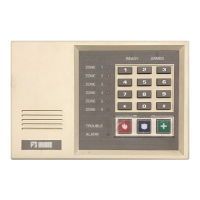
Your system may have been purchased with up to three keypad panic alarms. These
may be used to activate an alarm in the event of a Fire, Hold-up, or other condition,
as programmed by your installer. Each alarm is activated by pressing the
appropriate panic key (located below the numeric keys). Each alarm may be
programmed to report the condition to a central monitoring station. Check with your
security company representative to determine the characteristics of your system.
Alarm Activation
Each of the three panic keys (See FIGURE 1-1) can initiate a specific type of alarm
as programmed and labeled by your installer.
To activate an alarm, press the appropriate panic key and hold for three seconds.
The alarm will activate.
Your installer may have programmed the panic zones to ignore momentary key
presses and to activate only by pressing and holding pressed for three seconds (or
pressing at least twice within three seconds). Check with your security company
representative for the specific characteristics of your system.
Resetting The Alarm
When an Alarm is activated, the ALARM indicator will be lit (unless your installer has
programmed the alarm for silent or no keypad indication).
To reset the alarm, enter your user code. Pressing the Reset (*) key will extinguish
the ALARM indicator, if lit.
A history of the last alarm will be stored in the control's memory and may be recalled
if desired. (See Alarm Memory on page 1-12.)


 To Next Page