6
5. SETTING AND OPERATION
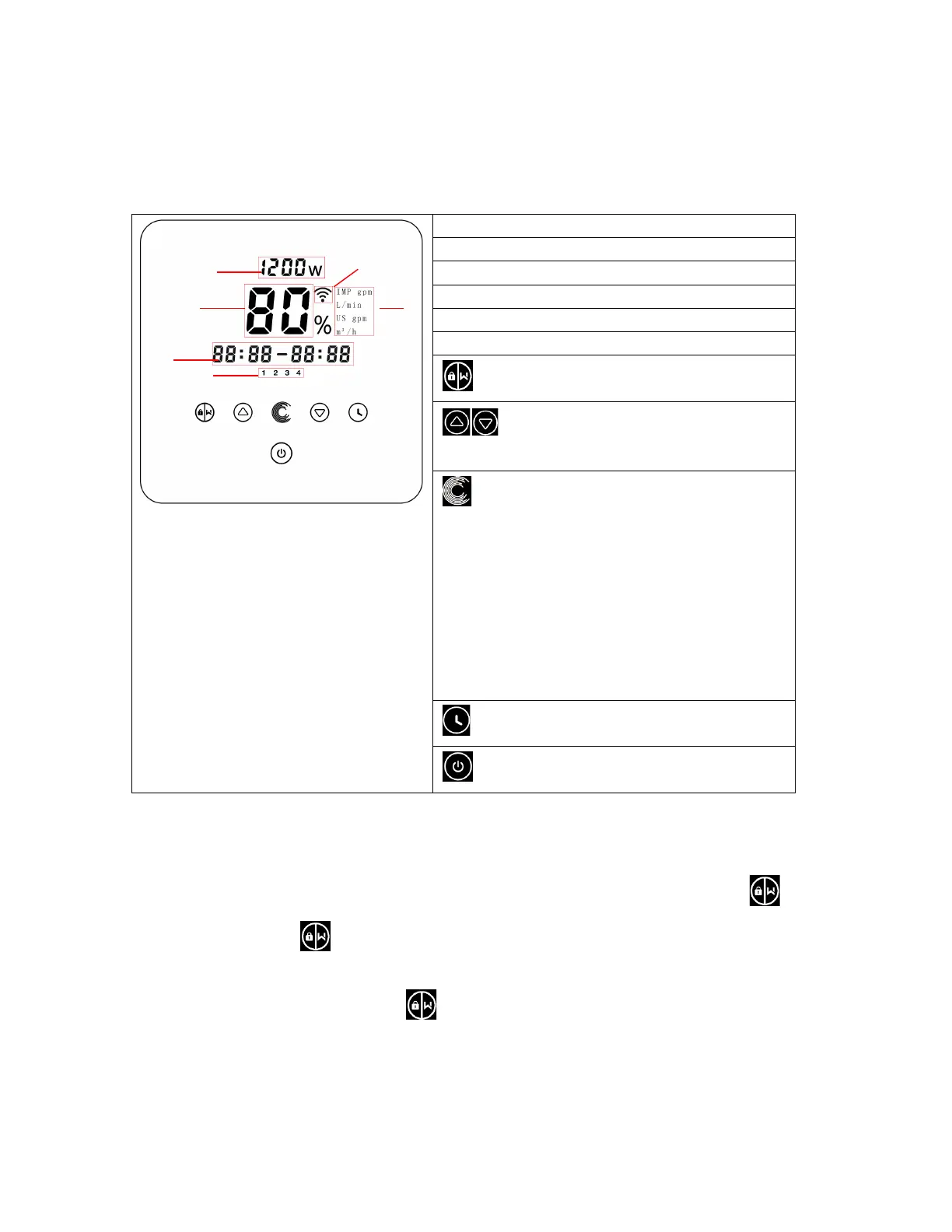
5.1 Display on control panel:
① Power consumption
② Running capacity / Flow rate
③ WIFI indicator
④ Unit of flow
⑤ Timer period
⑥ Timer 1/2/3/4
Backwash/unlock
Up/down: to change the value
(capacity/flow/time)
Switch between Manual-Inverter Mode and Auto-
Inverter Mode
Manual-Inverter Mode: The running capacity will be
set manually between 30%-120%. Will be shown in
percentage.
Auto-Inverter Mode: The running capacity will be
automatically adjusted between 30%-120% according
to the preset flow rate. Will be shown in M
3
/h.
The default mode is Manual-Inverter mode.
Timer setting
On/off
5.2 Startup:
When the power is switched on, the screen will fully light up for 3 seconds, the device code will be displayed,
and then it will enter the normal working state. When the screen is locked, only the button will
light up; Press and hold for more than 3 seconds to unlock the screen. The screen will automatically
lock up when there is no operation for more than 1 minute and the brightness of the screen will be reduced
to 1/3 of the normal display. Short press to wake up the screen and observe the relevant operating
parameters.



 To Next Page