Description of functioning
technical
28
Second digit from “YY” External probe (SE)
0 Without probe
A Curve A
b Curve B
C Curve C
d Curve D
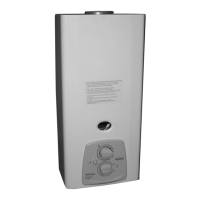
- Step 2. Latest Faults. Shows an historical with fi fty last faults of the boiler. At fi rst
its shown “FAI” (historical fault) and the number of faults occurred since last time
fault clean. Later using increase/decrease CH set point buttons is selected different
faults. It shows from “F1” to “F50” and the number of occurred fault (“XX”). If it shows
“- -”means that somebody has entered in the fault menu from ASS Control.
- Step 3. Type of boiler. Using increase/decrease CH set point buttons is selected
different type of boiler. From 00 to 03 means that the boiler has water pressure switch
and if its from 04 to 13 the boiler has water pressure sensor. To store the selected
value use the comfort button.
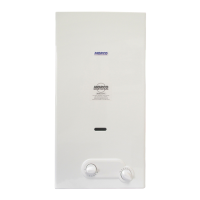
- Step 4. Type of heating circuit (radiators or fl oor heating). The display will show CA
as it’s shown in the picture and the selected option, RA (radiator) or SU (fl oor hea-
ting). Using increase/decrease CH set point buttons is selected and pressing comfort
the value is stored. In case fl oor heating (SU) is selected, the set point must be also
stored. Select the fl oor heating set point value using increase/decrease CH set point
buttons (between 40 and 60) and pressing comfort the value is stored. When this
option (SU) is chosen, CH set point won’t be able to select the CH set point in normal
operation; it will be always the stored value in the confi guration menu.


 To Next Page